
You turned off Advanced Protection on your Android phone days ago, yet it still refuses to install an app you trust. That is frustrating, and before you reset the phone, I would check every Google account signed in to it.
A second account can hold the block, according to the answer in a Google Android community thread from early October 2026. Seventeen people marked that question as theirs too.
What the phone kept doing
The asker was helping a friend install an app they had built themselves. The phone kept "blocking APK installations" with the message "App blocked by Advanced Protection".
They had "unenrolled all Google accounts from Advanced Protection more than 3 days ago". Device Protection showed as off, and Account Protection offered to sign them up again. Restarting and force-stopping the Play Store changed nothing.
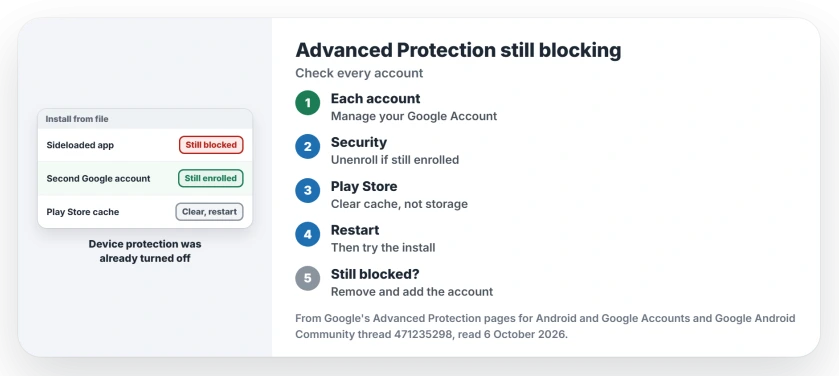
Status: checked 6 October 2026. A phone kept blocking a sideloaded app after Advanced Protection was off. The answer that helped: check every account, clear the Play Store cache, restart.
Two switches, not one
Google's Advanced Protection page splits the feature in two. Device protection lives in Settings, under Security & Privacy. Account protection belongs to your Google account.
On apps, Google is blunt: it "will block the installation of apps from unknown sources and will block updates for apps originally installed from unknown sources".
Turning off one half is not enough. Google says "some protections may continue to be turned on even after you turn off Device protection" if your account is still enrolled. It also warns that switching off "might require a device reboot".
1. Check every Google account on the phone
The answer that worked starts here. In the words of the Product Expert who wrote it: "A single secondary email that is still enrolled in Advanced Protection will enforce the block across the entire phone".
On the phone, open Settings, then Google, then Manage your Google Account, and look at Security. Switch to each account in turn. Ours: include old work or school accounts you forgot were there.
For any account still enrolled, Google's account help page has the way out. There, choose Unenroll under Advanced Protection Program.
2. Clear the Play Store cache, then restart
A force stop was not enough. The answer explains why: "Simply force-stopping the app isn't always enough to clear out the cached security policies".
Open Settings, then Apps, then See all apps, and pick Google Play Store. Under Storage & cache, choose Clear cache, then restart the phone and try the install again.
Leave Clear storage alone at first. The same answer warns that it "resets the app completely" and can remove shortcuts and parental controls.
3. Remove the Google account and add it back
Still blocked? The last step in that answer is to remove the Google account from the phone and add it again, so the phone fetches its settings fresh.
The asker came back with good news. In their words: "Thank you it helped". Their friend's app installed at last. I would do the steps in this order, because the first two cost you nothing.
If an app you trust still closes right after installing, clearing that app's cache is the next thing to try.
Should you turn Advanced Protection back on?
If you turned it on for a reason, I would say yes, once the app is in. Keep in mind that Google blocks updates for sideloaded apps while it is on, so that app will stay at its current version.
Account protection also changes how you sign in. Google says you are required to sign in with a passkey or a security key, and our page on what a passkey is explains the first of those.
The Short Version
- Advanced Protection has a device half and an account half.
- An enrolled account, even a second one, can keep the block on.
- Check Security in every Google account on the phone, and unenroll there.
- Clear the Play Store cache and restart, before trying Clear storage.
- Remove and add the account back if it still blocks.
- With it back on, sideloaded apps will not update.
Where to Next
Open Settings, then Google, and check Advanced Protection on each account signed in to the phone.
Which phone and which app were you trying, and what cleared the block? Tell me in a comment.

Isaac Smith is the founder and editor of PC Glance, a website that covers computers, laptops, and technology. He is a tech enthusiast and a computer geek who loves to share his insights and help his readers make smart choices when buying tech gadgets or laptops. He is always curious and updated about the latest tech trends.