
The quickest Samsung IMEI check is Settings > About phone, where your phone lists its identifying numbers. Or open the Phone app and enter *#06# on its keypad to display the IMEI without searching through Settings.
Check the label beside the number before sending it to support. The IMEI, serial number, model number and phone number identify different things, and a service form may ask for more than one.
Find the IMEI in About phone
Unlock your Galaxy and open Settings. Scroll to About phone, then look for IMEI. Depending on the model and software, you may find related details under Status or another information section there.
Samsung lists the Settings, dialer and Members options in its phone identifier instructions. Start with Settings when you need to compare several labels on one screen.
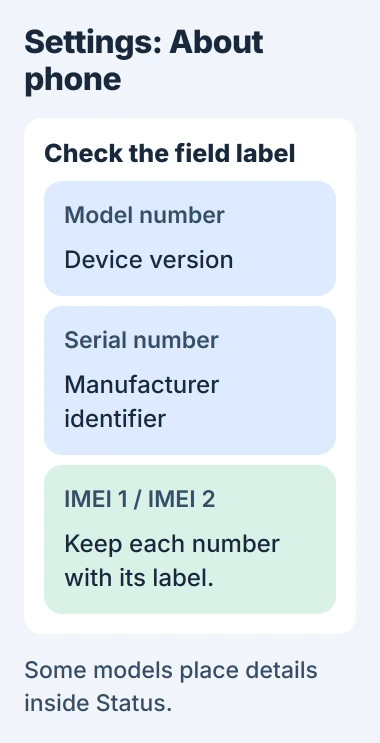
Read the label IMEI before you copy a number. The model number tells you the device version, and the serial number is another number the manufacturer uses to identify it. Neither belongs in an IMEI field.
If more than one IMEI appears, keep each label with its number. Save IMEI 1 and IMEI 2 separately, without joining the numbers together. Ask your carrier which entry it needs.
If you write the number by hand, check it against the screen before sending it. One mistyped digit can make a compatibility or repair form reject a perfectly valid phone.
Send the number through your carrier's or support team's intended channel. In a public troubleshooting post, give the error and model; crop out the identifiers if you attach an About phone screenshot.
Display it with the Phone keypad
Open the Phone app on your phone and select Keypad. Enter these characters in order:
*#06#On supported Galaxy software, the information screen appears after the last character. The code tells the phone to show its details; it isn't a phone number to call. Read the IMEI labels on the screen that opens.
Use the Phone app's dialing keypad for the code. Typing it in Messages, Contacts search or a browser won't open that screen.
If the code doesn't open an information screen, return to About phone. A dialer limitation doesn't tell you whether the phone has an IMEI or whether it's genuine.
The keypad option helps when you don't know the Settings menu. Still check the label: if the screen shows several numbers or barcodes, copy the entry the service asked for.
Keep dual-SIM identifiers separate
Dual-SIM Galaxy models can show two IMEIs, one for each cellular identity. Your carrier may need the number for the line or SIM setup you're activating.
An EID, which you may see on a phone that supports eSIM, is a different identifier. Keep it out of an IMEI field even if the entries sit together. Ask your carrier which labeled number its form needs.
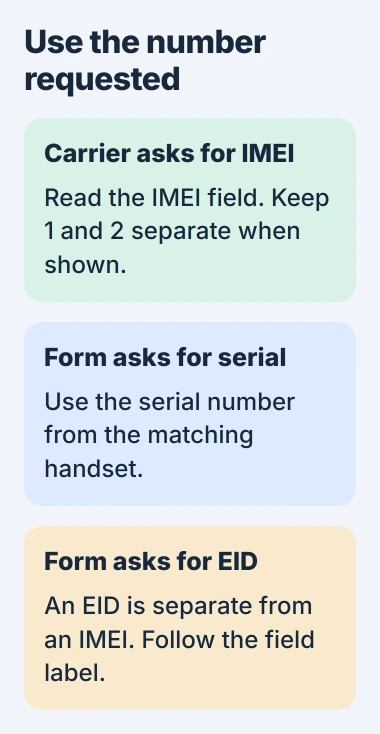
If activation rejects the number, note the IMEI you sent and the exact response. Give your carrier those details and your SIM setup so it can check what happened, rather than repeatedly swapping the numbers.
Finding the IMEI doesn't turn on mobile service. If your phone recognizes the SIM but data won't connect, the Samsung cellular-data checks cover the connection and APN settings, which control cellular data access.
I'd use the phone's own screen while it works and save each label with its number. That helps you avoid mixing it up with another Galaxy in the household or a number on an old box.
Use Samsung Members when that route is available
Open Samsung Members on your phone. Follow the US app instructions: tap Support, then select the phone name shown at the top to see its identifying numbers.
Some regional layouts use Get Help > Device Information instead. If neither option appears, use About phone rather than changing accounts or installing an unfamiliar app to check the number.
Check that the model shown matches the phone you're holding. If several Galaxy devices are registered to your account, it's easy to open another phone's details by mistake.
If Members stops at an account error, the Samsung account sign-in guide covers that problem. While the phone works, its Settings screen gives you another way to get the number.
Check the original packaging when the phone is unavailable
Find IMEI on the barcode label of your phone's original box. Match the box to the device and purchase record. Two boxes for the same Galaxy model can still belong to different phones.
Some older models also print details on the phone or SIM tray. Check your model's instructions before looking for an engraving, since its location varies between Galaxy generations.
Don't open a sealed phone or remove a built-in battery to look for the number. If your phone won't start and you don't have its original box, ask the carrier, seller or Samsung which purchase details they can use instead.
For a lost phone, the Android lost-device guidance explains that your service provider can use the IMEI to disable it. The carrier blocks the device; the digits don't show its location.
Use the Samsung phone-finding guide to locate and protect a missing phone. Tell your carrier whether you need help with the mobile line, the device identifier or a lost-device block.
Before buying a used phone, ask the carrier you plan to use about compatibility and blocking. An IMEI on screen won't answer every question about ownership, finance or whether the phone can get service.
If the number is missing, unreadable or rejected, tell Samsung or your carrier what happened. Give your model, how you looked up the number and the label the form asked for, rather than guessing another number.
The Short Version
Use About phone or the Phone keypad code. Keep IMEIs separate from the serial number and EID, with their labels. If you can't use the phone, check its original box. Ask your carrier about a number it rejects.
Checked November 5, 2026.

Isaac Smith is the founder and editor of PC Glance, a website that covers computers, laptops, and technology. He is a tech enthusiast and a computer geek who loves to share his insights and help his readers make smart choices when buying tech gadgets or laptops. He is always curious and updated about the latest tech trends.