
Cellular internet can fail on a Samsung phone because of the plan, selected SIM or connection settings. Turn off Wi-Fi, enable the cellular-data switch in Settings > Connections > Data usage, then try a webpage.
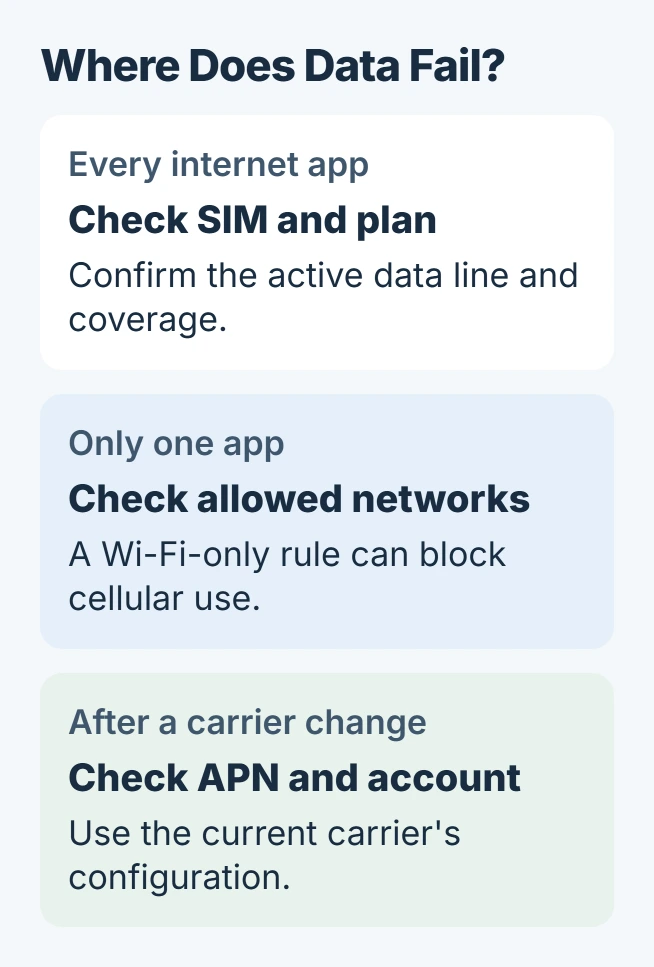
If only one app fails, check its allowed network before resetting the phone. If every app fails, start with the SIM, coverage and carrier account, then work through the connection checks.
Confirm the data connection and the selected SIM
With Wi-Fi off and the data switch enabled, try the browser and another internet app. Google documents this Wi-Fi versus mobile-data comparison to check which connection fails.
Look for the cellular-data indicator beside the signal bars. If it is missing, move to a location with better coverage and try again. Signal bars alone do not establish that the plan's internet service is working.
Status: Samsung and Google connection guidance checked November 1, 2026. Carrier menus vary. Owner reports include unsuccessful resets; no Galaxy connection was tested here.
With two SIMs, open Settings > Connections > SIM manager. Use its data-line selection to choose the SIM with the active internet plan. Older layouts call this page SIM card manager.
Samsung's mobile-data troubleshooting page documents that SIM selection. If the phone presents a different preferred-line control, confirm its data assignment with the carrier.
Check that the account is active and has data remaining. When traveling, confirm roaming availability and charges with the carrier before enabling Data roaming. Changing a phone setting cannot renew an exhausted allowance.
Reconnect after a restart or loss of coverage
Restart the Galaxy from its power menu, then repeat the webpage check. If it still fails, Google says to turn Airplane mode on, wait 10 seconds, and turn it off again before checking the connection.
This temporarily disconnects the phone, so do it after finishing any call. A connection that returns only briefly is useful information for the carrier; it is not evidence that the underlying problem has gone.
If the phone reports a data-limit cutoff, check the Samsung usage-limit settings. Raise or remove that cutoff only after checking the actual allowance and possible charges.
One app fails: inspect its network permission
Open Settings > Connections > Data usage > Allowed networks for apps, when that option is present. Check whether the failing app is restricted to Wi-Fi only, and allow cellular data if that is the intended behavior.
Samsung says this control chooses which connection an app may use in its data-management guide. Reopen the app with Wi-Fi off to check the change.
For an app that works while open but updates late in the background, inspect Data usage > Data saver. Samsung states that Data saver restricts background traffic. Its allowed-app list can exempt a selected app.
Keep the exemption limited to the app that needs it. If its internet access still fails while other apps work, contact that app's support with the error rather than resetting every network connection.
For recordings available by dial-in but missing from a Galaxy app, follow the voicemail download checks once cellular internet works.
After changing carriers, check the APN configuration
An APN supplies the mobile network's access settings. If a new SIM or carrier change left calls working but data unavailable, ask the current carrier to confirm that the line is provisioned for data and supplies the correct APN.
Samsung documents Settings > Connections > Mobile networks > Access Point Names, then More options > Reset to default > Reset, in its network troubleshooting instructions.
Before resetting, preserve any custom APN values supplied by the carrier and confirm how to restore them. Use the carrier's exact instructions when manual values are required; an unrelated carrier's settings will not help.
Try mobile internet again after the correct configuration is in place. If the APN controls are locked or missing, have the carrier check the line instead of using a third-party unlocking tool.
Persistent failures need the carrier or Samsung
For broader connection-setting trouble, the Samsung network-reset guide distinguishes the current mobile reset from the older combined reset. Read its scope before proceeding.
One owner reported that even a factory reset left cellular internet broken after an update. Another recovered service using a carrier-dependent voice setting; that single outcome does not establish a universal repair.
Give the carrier the model, software version, approximate location, SIM in use and whether calls still work. For a failure that began after an update, send those details to Samsung as well, including any resets already tried.
Keep using Wi-Fi where available while they check the account or software fault. Do not erase the phone repeatedly or disable voice-network features without the carrier confirming the effect on calls.
The Short Version
Check cellular internet with Wi-Fi off, then verify the active SIM and plan. App-specific failures need their network controls checked. Carrier changes need the correct APN; persistent failures belong with the carrier or Samsung.

Isaac Smith is the founder and editor of PC Glance, a website that covers computers, laptops, and technology. He is a tech enthusiast and a computer geek who loves to share his insights and help his readers make smart choices when buying tech gadgets or laptops. He is always curious and updated about the latest tech trends.