
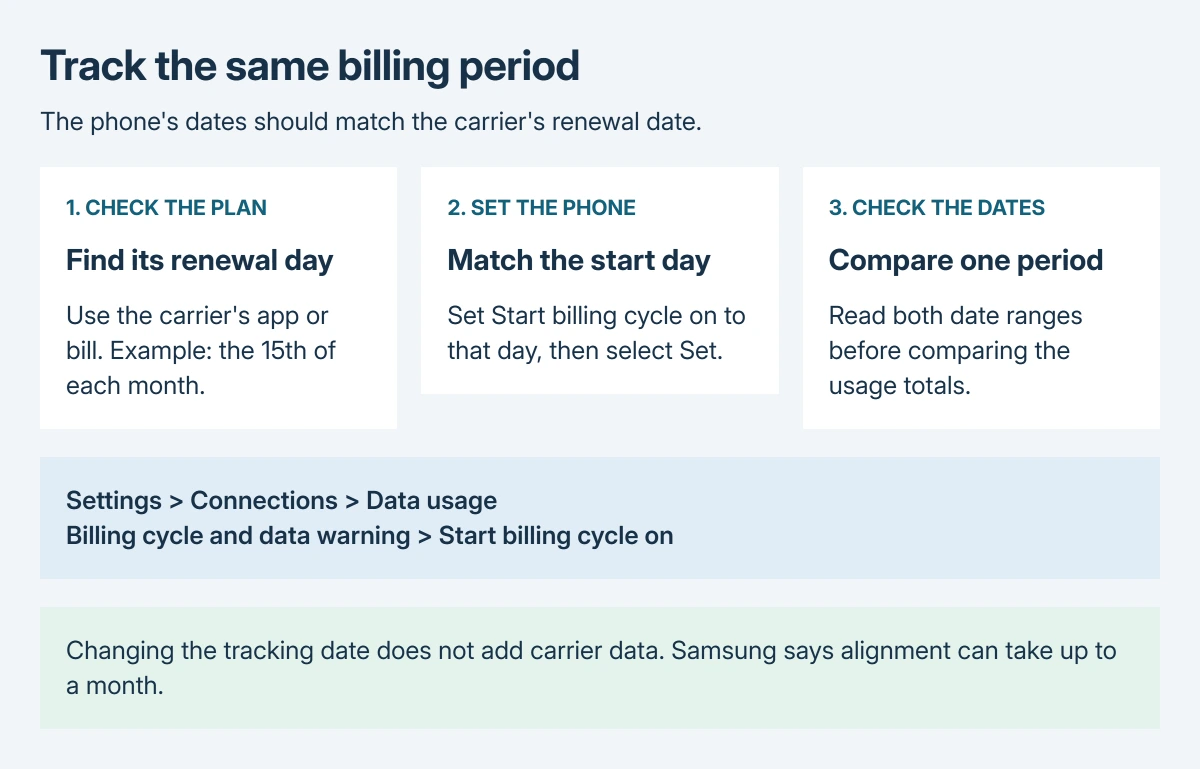
Resetting data usage on Samsung starts with the phone's monthly tracking date. Open Settings > Connections > Data usage > Billing cycle and data warning > Start billing cycle on. Set the day your carrier renews the allowance, then tap Set.
This aligns the phone's counter with the plan. It does not give the account extra data or erase usage already recorded by the carrier.
Set the monthly reset date to the carrier's renewal day
Check the renewal date in the carrier's app, bill or account first. A plan that renews on the 15th needs a different tracking period from one that starts on the first day of each calendar month.
Samsung's data-usage instructions describe a default calendar-month tracker that resets each month. Its documented adjustment changes that monthly start date.
Status: Samsung's billing-cycle controls and Google's measurement guidance reviewed October 28, 2026. No Galaxy counter or carrier account was changed.
- Open Settings, then Connections > Data usage.
- Tap Billing cycle and data warning.
- Choose Start billing cycle on and select the day the allowance renews.
- Tap Set, then return to the usage graph and check the displayed period.
For the other layout in Samsung's US instructions, open the cellular-usage graph from Data usage and tap its Settings gear. The start-date control is inside those settings.
Changing the date does not promise an immediate zero. Samsung states that alignment can take up to a month to reflect usage more accurately, depending on the billing date. Leave the correct date in place through the next renewal.
Check the period before treating a large total as an error
Read the start and end dates on the usage view and compare them with the carrier's current period. An earlier period can include data consumed before the new allowance began.
Samsung treats the phone's counter as an estimate. Google says carriers can measure usage differently in its cellular-data guidance, directing users to the carrier for measurements and plan limits.
Use the carrier's record to settle the remaining allowance or a charge. Changing a phone setting cannot correct the carrier's billing record. For a disputed amount, keep the dates and totals from both records and contact the carrier.
The Wi-Fi data usage view tracks a different connection. Our Wi-Fi and internet explanation covers the distinction; a large Wi-Fi total is not the cellular-plan counter being adjusted here.
Adjust a warning without changing the billing date again
For an alert appearing too early, return to Billing cycle and data warning. Check Data warning and enter the intended amount, then tap Set. Set data warning controls whether that alert is enabled.
For an automatic cellular-data cutoff, check Data limit separately. Samsung documents the switch as Set data limit, with wording that can differ by carrier. The limit disables cellular data when that amount is reached.
Set the warning and limit deliberately against the actual plan. Raising a limit or disabling its switch allows further use, which can incur charges under that plan. A warning threshold is not a new allowance.
If the cellular-data controls are missing
Samsung says some controls need an active SIM and mobile service. Confirm that the line is activated and recognized. With several SIMs, check which line supplies cellular data before comparing its counter with an account.
If a supported Galaxy still lacks the billing-cycle control, contact Samsung with its exact model, One UI version and carrier. Use the carrier's own usage display while that menu question is resolved.
The Samsung network-reset guide concerns connection settings. A reset there is a different operation from choosing the dates used to display data consumption.
The Short Version
Set Start billing cycle on to the carrier's renewal day and compare matching date ranges. Adjust warnings and cutoffs separately. The phone estimates usage; check the carrier's record for the allowance and charges.

Isaac Smith is the founder and editor of PC Glance, a website that covers computers, laptops, and technology. He is a tech enthusiast and a computer geek who loves to share his insights and help his readers make smart choices when buying tech gadgets or laptops. He is always curious and updated about the latest tech trends.