Claude Code's Mac sandbox can block a command that needs another folder or server. For Operation not permitted, check the output path; for a blocked host, approve the specific server the command needs.
The steps start with Claude Code's local /sandbox. Cowork's workspace unavailable message needs the separate check in section 6 because its code runs in a different environment.
In this guide
1. Check that the sandbox is enabled in this project
Start Claude Code from the project you intend to work in and enter /sandbox. Check which mode and settings it's using. The sandbox is off by default; an ordinary permission prompt doesn't tell you whether it's running.
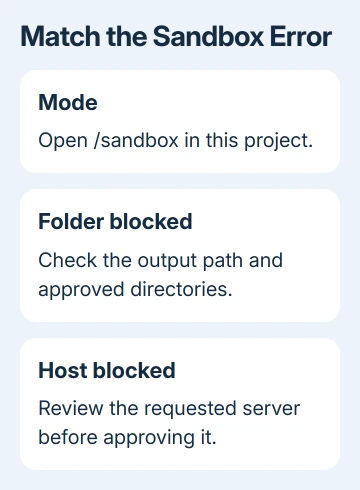
Current versions offer Mode, Overrides, and Config tabs. Select the mode you need, then ask Claude to run a small, familiar project command. Let it run that command rather than entering it yourself at the ! shell prompt.
Commands entered at that shell prompt usually run outside the sandbox. A successful manual command can therefore behave differently from the same command run by Claude. Compare how each command was started before changing access rules.
macOS uses Seatbelt, its built-in system for limiting what a command can access. Linux packages such as bubblewrap and socat aren't the Mac fix. The processor doesn't change that: Seatbelt supports Intel hardware and Apple silicon.
If Claude actually runs inside a Linux container on your Mac, follow the dependency error from that Linux environment. A command running in that container follows Linux's rules, even though your laptop is a Mac.
2. Give the command access to its actual output folder
Read the failed command and the full path in its error. By default, sandboxed commands can write in the working directory, a per-user temporary directory, and additional approved directories. Writing elsewhere can be blocked as intended.
For a project in the wrong location, leave the session and start Claude Code from the correct project folder. If the task genuinely needs a second folder, use /add-dir to add that specific directory, then retry the failed command.
To keep that access in your settings, the sandbox settings reference describes sandbox.filesystem.allowWrite. Add only the output location the task needs rather than granting write access to your entire home folder.
A path that doesn't start at the drive's root is read from the folder containing the settings file. A dot in a project settings file and a dot in your user settings file can point to different locations.
Check /sandbox to see which settings are taking effect.
A project may also contain a link pointing to a folder somewhere else. In that case, check the destination path in the error. Permission for the visible project directory doesn't automatically grant access to the folder the link points to.
If only Desktop or Documents access fails outside Claude too, open System Settings > Privacy & Security > Files & Folders. Check the relevant terminal or app's access using the Mac folder-permission controls.
That macOS privacy permission and Claude's sandbox rules are separate checks. Granting an app access in System Settings doesn't remove the sandbox's limits. Use the error's path to decide which control actually needs attention.
3. Approve the host named in a network error
A sandboxed command's network connections go through a local proxy that checks allowed hosts. When Claude asks permission for a needed domain, inspect the domain and approve it only when the command needs that service.
For a repeated project requirement, add the host to sandbox.network.allowedDomains in the project's .claude/settings.local.json file.
Retry the command that failed and check whether the error now names another host, such as a package registry or authentication service.
A package download can need more than the website you originally opened. Add the hosts your task needs rather than a broad wildcard just to stop prompts. A rule that blocks a domain can still take priority over a rule that allows it.
If your organization controls allowed domains, give the administrator the hostname and failing command so they can approve the right service. Changing your own settings won't override that list.
A server running on your own Mac needs a different check. For direct localhost connections on macOS, sandbox.network.allowLocalBinding enables local listening and access.
It also exposes other services listening on localhost to sandboxed commands.
Use that setting only when your workflow needs local services. Adding the word localhost to a domain list isn't the same as enabling a direct local connection. Give support the full address and port if it still fails.
4. Match known tool errors to a narrow exception
For jest hanging because of watchman, try jest --no-watchman. That keeps the test inside the sandbox while avoiding the incompatible file-watching component. Check that the test completes before making wider configuration changes.
Some Go-based tools, including gh, gcloud, and terraform, may fail TLS certificate verification under Seatbelt. Anthropic recommends an excludedCommands pattern for the affected tool, such as gh *.
An excluded command runs outside the sandbox with your full access and stored credentials. Review that tradeoff before adding it.
I'd start with the narrowest command pattern that supports the task, rather than excluding every shell command.
Docker commands can also need an exclusion. Use the specific command family required, such as docker compose *. A Docker failure isn't a reason to disable the sandbox for unrelated file edits or tests.
For open, osascript, or browser authentication failing with -600, the sandbox blocks Apple Events by default. Finish a one-time sign-in yourself outside the sandbox, then retry the authenticated command.
The allowAppleEvents setting is another option, but it removes code-execution isolation by letting sandboxed commands launch other applications. It belongs in user, managed, or CLI settings; project settings don't enable it.
5. Escalate a startup failure with the actual error
For Sandbox is required but failed to initialize, follow the stated restart or configuration action. With sandbox.failIfUnavailable enabled, Claude refuses affected commands instead of silently running them without sandboxing.
Use /sandbox to review higher-priority settings if your change won't save. Ask your administrator about managed restrictions. Mac privacy permissions and an organization's sandbox configuration need to be checked separately.
If the project folder is hard to locate, the Mac hidden-file controls can help you inspect its configuration files. Change the intended settings file, rather than creating a second copy in the wrong folder.
To start in the intended project, open Terminal at that Mac folder before launching Claude. That keeps the working directory aligned with the files you want it to change.
If you can make the failure happen again, file an issue with Claude Code support.
Include claude --version, macOS version, whether Claude runs directly on the Mac or inside a container, the command, the exact error, and relevant sandbox settings with secrets removed.
6. Handle Cowork's workspace unavailable message separately
In a local Cowork session, workspace unavailable means its virtual machine, a separate environment for running commands and code, isn't available. File and web tools can still work. The Cowork architecture details explain that distinction.
Save any work, quit Claude Desktop fully, and reopen it before trying a new local task. The local virtual machine stops when Claude quits. If it still won't start, give Claude support the desktop app version, macOS version, and exact error.
For a session running in the cloud, report that location too. Its code runs on the service, so changing the Mac's Claude Code sandbox settings won't repair it. Don't remove your task data as a startup fix.
The Short Version
Check /sandbox, the working directory, the denied path, and the blocked host. Use the matching tool workaround only when needed.
Mac sandboxing uses Seatbelt; Linux dependency installs and broad security changes aren't the repair for a native Mac session.
Checked November 12, 2026.
 If you have any business, I can build it online