
Yes in theory, but ordinary PC hardware isn't practical for direct Bitcoin mining. Dedicated ASIC miners do that work efficiently. A Windows PC can set one up, but installing an app won't give your PC the same mining hardware.
Some PC services pay in Bitcoin for other computing work. That's different from your PC mining Bitcoin itself. Check what work the service actually does. Getting paid in Bitcoin doesn't mean your PC mined it.
In this guide
Decide whether you mean mining or a Bitcoin payout
Bitcoin mining hardware repeatedly performs specialized calculations to compete for blocks. An ASIC is a chip designed for a particular job; a Bitcoin miner uses hardware made for that work instead of a general-purpose laptop processor.
Bitcoin.org's mining guidance explains why the early CPU-mining approach gave way to specialized hardware. An old tutorial that starts with a desktop CPU reflects a different stage of the network.
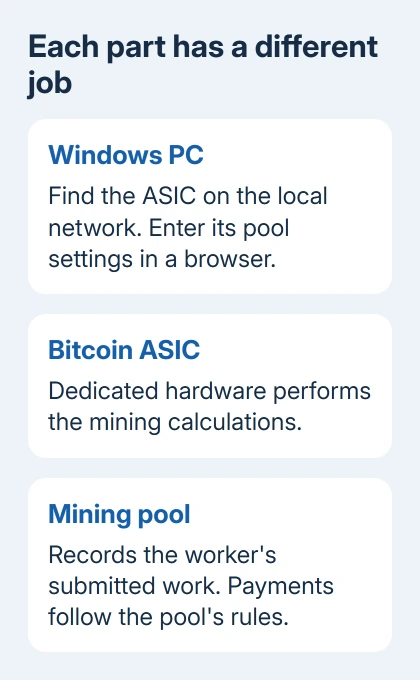
Check what performs the calculations. A PC controlling an ASIC isn't doing that miner's work. Likewise, a program paying in Bitcoin can pay for a different task rather than mining Bitcoin on your graphics card.
I'd settle that distinction before installing anything. A promised payout currency doesn't tell you what the software runs, what permissions it needs, or whether the hardware you already own is suitable.
These steps are for an ASIC you already have that supports direct Bitcoin mining. They aren't advice to buy one. The older S19 example shows the PC's role; other miners can have different menus.
Check the miner's requirements before connecting it
Read the exact miner and power-supply manuals. Check input power, networking, cooling, and operating conditions. Don't assume a spare desktop power cable or your usual room setup will meet those requirements.
Keep the miner's airflow clear and follow the maker's electrical instructions. If the required supply or circuit isn't available, stop the setup and have a qualified person check it. Software settings can't correct unsuitable power wiring.
Connect the miner to the network in the way its guide specifies. The PC needs to reach that same local network so its browser can open the miner's management page. That page belongs to the miner, not to a mining app running on the PC.
Have the chosen pool's current connection instructions ready. You need its Bitcoin mining server address and worker format. Get those values from the pool rather than copying a random example into every miner.
Find the miner from a Windows PC
For the S19/S19 Pro procedure, the maker supplies IPReporter.zip. Get the tool through the official model-support instructions, extract it, and run IPReporter.exe as an administrator when the guide calls for it.
IP Reporter finds the miner's address on your local network. It isn't Bitcoin mining software for your laptop. This IP Reporter package supports Windows; it isn't a Mac utility.
Start the reporting tool and use the miner's IP Report control as its manual directs. When the tool displays the address, enter that address into Chrome or Firefox on the PC. This should open the miner's sign-in page.
The S19/S19 Pro guide uses root for the initial username and password. Don't try that on every miner. For a used machine or one that's already been set up, get its current username and password from its owner.
After signing in, change the initial password through the miner's System controls. Keep management access on your trusted local network. Configuring from a nearby PC doesn't require a publicly accessible sign-in page.
Enter the pool and worker details on the miner
On the documented S19/S19 Pro layout, open Miner Configuration. Enter the pool's mining URL and its worker name under Worker, then select Save. Use any additional fields exactly as the pool's instructions require.
A worker identifies the miner's work to the pool. It isn't automatically your wallet address or Windows username. Mixing those up can leave a machine connected without credit going where you expect.
Other firmware layouts put these controls under Settings or Server Settings. Use the manual matching the installed firmware rather than looking for a tab that belongs to a different interface.
Leave clock speeds and fans at the manufacturer's defaults during setup. The first check should answer a simple question: can the miner connect and send work to the pool with the details you entered?
The PC has now sent your settings to the miner. The miner's own hardware does the calculations; the browser isn't doing that work. Closing it doesn't change which device is mining.
Check submitted work before expecting a payment
Open the miner's monitoring page. Look at its pool status, real hashrate, fan information, and temperature readings. Hashrate means the rate of mining calculations, not the amount of Bitcoin earned.
Then check the worker in the pool account. Check both that the miner is working and that the pool is recording work from that worker. A payment depends on that pool's rules, fees, balance requirements, and the work credited.
If the miner shows no useful activity, check the pool address and worker format against its instructions. For hardware errors or abnormal temperatures, ask the maker's support team for help with your model instead of turning up performance.
A warm or busy PC isn't evidence of Bitcoin production. For a computer running unexpectedly hot after installing an unknown miner, the PC temperature guide explains which readings Windows actually exposes.
What to do when you only have a laptop or desktop
Don't follow an obsolete CPU-mining tutorial expecting ordinary hardware to compete with dedicated miners. Running Bitcoin Core as a full node checks and relays Bitcoin data; it doesn't automatically mine or pay you a mining reward.
For unwanted mining software, uninstall it through Windows' installed-app controls and run a Windows Security scan. Check an unfamiliar process in Task Manager if the PC stays busy afterward.
If the ASIC still won't submit work, send its maker the model, firmware version and error log. Ask the pool to verify worker and server settings separately. Never include wallet recovery words or private keys in a support request.
The Short Version
A PC isn't a practical direct Bitcoin miner. Use it to set up dedicated hardware through the miner's local controls. Check its activity against the work recorded by the pool. Getting Bitcoin for other computing work is a different service.
Checked November 12, 2026.





