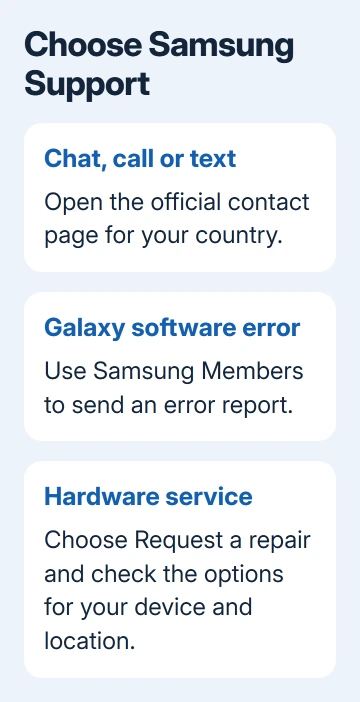
Samsung's official Contact Us page offers live chat, phone and text support for a Galaxy phone or laptop. In the US, call 1-800-726-7864, or choose the contact method on that page. Start there to reach Samsung support directly.
For a phone software bug, Samsung Members can send an error report with system logs. Repair booking is a separate route. Pick the channel that handles the job, rather than messaging individual employees or community accounts.
In this guide
Start with the contact page for your country
Open the official US contact page if you're seeking support for a device in the US. For another country, use the region selector on Samsung's website and open that region's Support section.
Phone numbers, opening times, supported products and repair arrangements differ by country. An American toll-free number isn't the right starting point for every reader, even when the device model has the same Galaxy name.
The page offers a product search and several quick-help choices. Enter the model number or product name when asked. For a phone problem, choose the phone rather than a TV, appliance or unrelated registered product.
Keep the model number, software version and exact problem message ready. For a Galaxy phone, Settings > About phone shows identifying information. Keep proof of purchase handy if you need service or want to check warranty coverage.
Describe the failure, when it began and what you've tried. For an app that closes, name the app and describe what you pressed just before it closed. That helps support follow the problem without a list of every setting you've used.
Choose chat, a call or text for direct support
For written help in the US, select Live chat under Chat with us. Follow the product and problem prompts. Keep that conversation open while following an adviser's instructions so you can report what changed.
The US contact page lists chat support around the clock. It also offers text support by sending SUPPORT to 800-726-7864, plus a WhatsApp option. Use the controls on the official page to start the channel you prefer.
For voice help, call 1-800-SAMSUNG, which is 1-800-726-7864. The page lists phone hours of 8 AM to 9 PM EST Monday through Friday, and 8 AM to 6 PM EST Saturday and Sunday.
Check the live page before calling, since those hours can change. If a call isn't available when you need it, the page's chat or text choice gives you another direct support route.
Support can begin with automated questions. Answer the product and issue questions, then follow the offered route for more help. No published phrase guarantees you'll reach a particular employee immediately.
Before ending the conversation, save the case number and next action. Ask whether you need a repair booking, error report or account-recovery step. You can then follow up with the existing case history.
Send a Galaxy software error through Samsung Members
For a repeatable bug on a Galaxy phone or tablet, open Samsung Members > Support. Under Send feedback, tap Error reports and select a category for the failure.
Explain the action that triggers the problem and what happens instead. Include the app or device feature involved. Add a screenshot or other attachment with Attach if it helps show the error.
Select Send system log data to include stored technical details about what happened on the device. Then tap Send. A log records technical details that a short chat description may leave out.
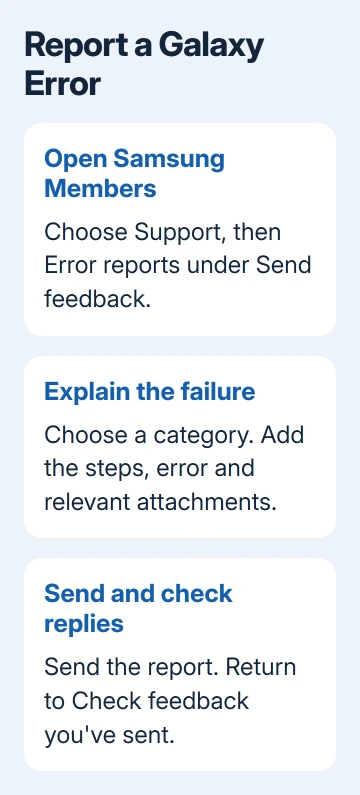
Samsung explains where to read replies in its Members reporting instructions: return to Support > Send feedback > Check feedback you've sent, then select the report.
Use this for a Galaxy device or app error. Sending a report doesn't arrange an immediate repair. Use direct support when the device won't turn on, the screen can't be used, or Members itself won't open.
For a Galaxy laptop, start with the website's computer product choice and the model number. Don't follow the phone-only Members reporting steps as though every Galaxy Book has the same Android support app.
Book service when the device needs hands-on attention
On the contact page, select Request a repair or the service option under Request service. Select your device, then follow the service options offered for your model and location.
The US page lists walk-in, mail-in and We Come to You repair choices. Availability depends on the product and location, so a listed service type doesn't mean every laptop or phone qualifies for it.
Read the appointment or shipping instructions before handing over the device. Confirm what to bring or send, how the repair will be tracked, and whether support has already created a service request for your case.
Save important data before service when the device still works. For a phone, use the Android backup guide to check which information has a recoverable copy before any repair that could involve a reset.
I'd get the service request details in writing before sending a device away. A case number, destination and agreed next step are much easier to follow than an informal promise in a community reply.
Use account help or order help for the right problem
The contact page separates Samsung Account Issues from Order Help. Choose the account route for a sign-in or verification problem. Choose order help for tracking, trade-in or an order placed through Samsung.
For a forgotten account password, try the Samsung password reset procedure before requesting a hardware repair. Replacing a phone part won't recover your online account password.
Community posts can help compare symptoms, but a reply from another owner isn't a private support case. Keep personal contact information, verification codes and purchase documents out of public posts.
If the first channel can't finish the job, return with the case number and ask for the next action. Explain where you're stuck, such as failed verification or an unavailable repair appointment, instead of starting the description over.
The Short Version
Use your country's official contact page. In the US, choose chat, text or 1-800-726-7864. Send Galaxy software errors through Members; choose Request a repair for service. Keep the case number for follow-up.
Checked November 15, 2026.
 If you have any business, I can build it online