The most recent Windows 10 update is KB5136493, released November 13, 2026, for eligible 22H2 and LTSC 2021 PCs. It's a manual package; Windows Update delivers the regular November security release, KB5131096, to eligible devices.
Start with Windows Update if you simply want your PC protected. A computer showing the November 10 security update hasn't necessarily missed an automatic download, because the newer November 13 package uses a different delivery channel.
In this guide
Match the latest update to your Windows edition
For Windows 10 version 22H2, KB5131096 brings the OS build to 19045.7846. The newer KB5136493 brings it to 19045.7850 and includes the earlier package's changes. Your PC must be eligible for those updates.
Windows 10 Enterprise LTSC 2021 uses a different build family: 19044.7846 for the November security release and 19044.7850 for the out-of-band package. Don't use the 19045 number to judge whether an LTSC installation is current.
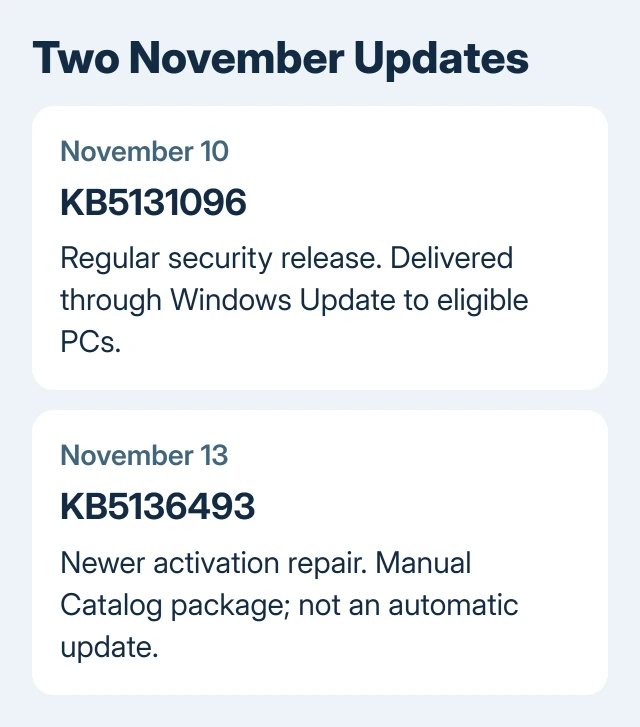
Microsoft's November 13 release notes list that newer package as available through the Microsoft Update Catalog, rather than Windows Update. Out-of-band means it arrived outside the regular monthly schedule.
Older LTSC releases have their own servicing schedules and packages. If your edition says LTSC 2019, for example, neither build pair is the right target. Match the entire edition name before comparing update numbers.
Check what is already installed
Press Windows+R, enter winver, and press Enter. Read Version and OS Build together. Version 22H2 identifies the Windows 10 release; the build tells you which cumulative update level it has reached.
For the edition, open Start > Settings > System > About and read Windows specifications. The Windows version and build guide explains the other labels if the details look unfamiliar.
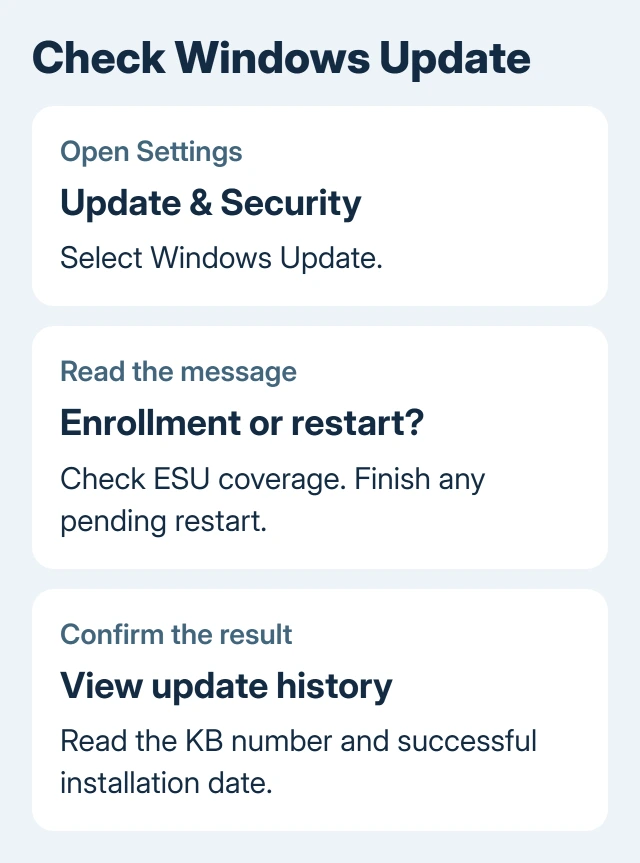
Next, open Settings > Update & Security > Windows Update > View update history. Expand Quality Updates and read the KB, date and result. A failed entry records an attempt; confirm the current build too.
I'd check those two places before downloading anything manually. Together, they show whether your PC has the monthly security fixes, even if the update notification has disappeared.
Install the regular November security update
Save your work and plug in your laptop. Open Settings > Update & Security > Windows Update, then select Check for updates. Let Windows install the applicable package instead of searching for an installer by name.
If Restart now appears, choose a convenient time to use it. The new build may become active only after restarting. When the desktop returns, read the installation result in update history.
On an eligible 22H2 PC, the monthly release gives KB5131096 and build 19045.7846, unless a newer package has replaced it. Each cumulative package includes earlier fixes, without separate installations of older monthly releases.
An update error needs its exact code. Record that code and the failed KB, then use the Windows Update error guide for the matching failure. Repeating the same download without reading the error often leaves the real problem untouched.
Check ESU enrollment when no update appears
Regular Windows 10 support finished on October 14, 2025. Home and Pro PCs need enrollment in consumer Extended Security Updates, or ESU, for covered security fixes after that date.
The consumer program now runs through October 12, 2027. That is different from the earlier October 2026 end date. ESU extends critical and important security updates; it doesn't turn Windows 10 into a new feature release.
Check the ESU enrollment message in Windows Update. If enrollment is offered, follow it with the Microsoft account you'll keep using. Review the requirements and terms displayed before choosing an option.
Enrollment requires 22H2, current updates and the KB5126256 licensing-preparation package, plus an administrator Microsoft account. If Windows says your PC isn't eligible, ask support to check those requirements before you retry.
Work PCs use your company's licensing and update process. Ask IT whether your device has ESU and whether November's package is approved. Consumer enrollment steps can't replace the organization's process.
LTSC 2021 has its own support dates. Don't enroll it as though it were an ordinary Home PC, or assume that the consumer October 2027 date applies to its edition. Give support the complete edition name from About.
Decide whether the November 13 package solves your problem
KB5136493 fixes licensing operations that can fail with 0x80041008, an invalid-parameter error. The affected operations use slmgr.vbs, including certain product-key and KMS configuration commands.
KMS is an organizational activation system. An already activated home PC doesn't need its key removed and re-entered for this check. The fault primarily affects licensing commands or automated setup in organizations.
Devices already activated kept their activation. Existing KMS configurations weren't affected unless they needed to use the affected commands. If that describes your PC, seeing a newer update date doesn't mean it has an activation problem.
For a company PC with that exact error, ask IT to check and install KB5136493 for the installed Windows edition and processor type. The package is cumulative, so its purpose isn't to remove the November security protections.
When Windows still won't take an eligible update
A PC set up from an old Windows image can need earlier updates before the current package is offered. The release notes require an update from July 8, 2025 or later, such as KB5062554, and the applicable servicing-stack requirements.
The offline-image instructions are for administrators updating Windows installation files. Don't apply them to a running PC simply because they're in the release notes. Normal Windows Update handles parts of that work for you.
Open Get Help from Start. Describe the failed KB, exact error, edition, build and ESU enrollment status. For a managed PC, send IT this information and ask them to check approval and prerequisites.
The Short Version
KB5136493, from November 13, is newest for the covered editions but is Catalog-only. KB5131096 is November's normal security release. Compare your edition, build and ESU coverage before deciding a download is missing.
Checked November 16, 2026.