October 2025's Google Pixel update fixed flickering and unexpected shutdowns on Pixel 7 phones, plus frozen or fuzzy displays on Pixel 10 phones. Check Settings for the update available now rather than searching for October's download.
The release also addressed casting crashes and several smaller interface faults. The fixes differed by model, so check which ones apply to your Pixel and the problem you're seeing.
In this guide
Match October repairs to your Pixel model
Open Settings > About phone, or About tablet on Pixel Tablet, and read Android version. Write down the Android version, security date, and full build number. Google Play system components have a separate update entry.
Google says the rollout began on October 8, 2025, in its October release announcement. Supported devices ran Android 16, with availability depending on model and carrier.
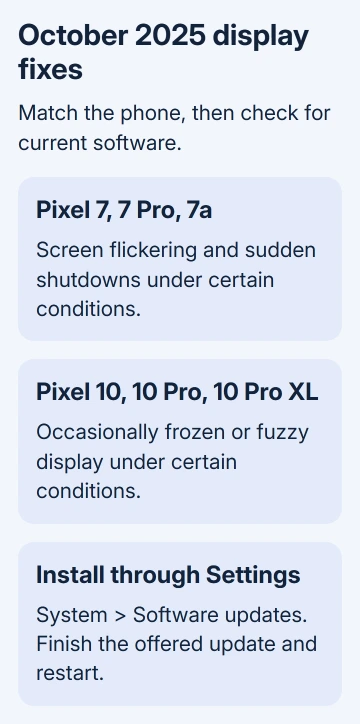
For Pixel 7, 7 Pro, and 7a, the display fix addressed flickering and sudden shutdowns under certain conditions. For Pixel 10 / 10 Pro / 10 Pro XL, it addressed an occasionally frozen or fuzzy display.
Check the model list before expecting the update to fix your screen. A Pixel 8 with a cracked display doesn't become part of the Pixel 7 shutdown fix because it has a similar symptom. Have physical screen damage assessed for repair.
The original list also covered Pixel Tablet system instability. The missing flashlight status in At a Glance applied to the Pixel 9 family, 9a, and the three listed Pixel 10 models, rather than every supported device.
Read the build number without choosing the wrong download
The published global build for the Pixel 7 through Pixel 9a phone models listed in that announcement was BP3A.251005.004.B1. That group includes both Pixel Fold / Pixel 9 Pro Fold.
The Pixel Tablet used BP3A.251005.004.A2. The listed global Pixel 10 / 10 Pro / 10 Pro XL builds used BD3A.251005.003.W3. Don't compare just the first characters and assume every device should match.
Japan had separate entries: BP3A.251005.004.A2 for Pixel 9a and BD3A.251005.003.J5 for the three listed Pixel 10 models. A regional suffix can explain why two otherwise similar phones show different builds.
The announcement didn't list the Pixel 6 family. It also didn't list a Pixel 10 Pro Fold build. Check your model's support schedule. Don't use another model's download just because yours isn't listed.
If your security patch is newer than October 2025, you don't need to make its build match this historical list. The September 2025 Pixel release has its own builds and model differences.
1. Install the available system release and restart
Use a Wi-Fi connection and start with 75% charge or more. Open Settings > System > Software updates. Some releases label the entry System update. Follow the update status and installation prompts shown there.
If an update notification is already waiting, tap it to open the installation. The Android update instructions cover both routes. There isn't a month selector for picking an old release.
Let the download finish and use the restart prompt when it appears. The Pixel can install software while you use it. The new release takes effect after the restart, so downloading it isn't the last step.
Return to About phone > Android version afterward. Compare the security date and build with what you wrote down. Then repeat the action that failed, such as opening the camera or starting a cast, to check the actual symptom.
I'd use that normal update route before considering a manual installation. It selects software for the phone and avoids turning a display problem into a separate recovery task.
2. Check casting, camera backgrounds, and flashlight status
The camera fix addressed a semi-transparent background that stayed on screen after opening the camera. It didn't cover every crash, blurry photo, or focusing problem. Describe what remains on screen after the app opens.
Another fix addressed System UI crashes when starting or stopping casting through the Media Output Switcher. System UI is the Android interface around your apps, including controls and panels.
After updating, repeat the casting action. If the interface no longer crashes, the fix has helped with that problem. If only one media app closes, update it and compare another app before reporting the failure as an Android interface crash.
For missing flashlight status, check At a Glance while the flashlight is on. The fix was for that indicator. A missing indicator with a working flashlight needs different checks from an LED that won't turn on.
Write down the failing action if it still happens. Name the casting control, camera background, or widget indicator in your report. Support can check that behavior more easily than a general complaint about October.
3. Deal with a stalled download or an old date
The phone can automatically retry an unfinished download within a few days. Leave the phone connected and respond to its next notification. For insufficient space, clear room in Settings > Storage, then retry.
Check which date is old. Android security update and Google Play system update are separate entries, so an older Play system date doesn't identify the installed October phone firmware. Record both if you're asking for help.
A later release uses a different build. For example, the December 2025 Pixel update shouldn't be judged against October's build suffixes. Compare dates before attempting any repair.
If the phone is on a beta or modified Android installation, include that fact in your support request. The regular release announcement doesn't give all the steps for leaving a beta or modified installation.
When the display still freezes or the phone shuts down
For a phone frozen with its screen on, keep Power held for about 60 seconds until it restarts. Then check its software and free storage. If freezing continues, move to support rather than repeating restarts.
Use Pixel support for the display or power problem. Include your carrier, model, full build, and which action triggers the failure in your support request. Mention whether it happens in several apps and whether you can see physical damage.
Ask which repair or recovery step to try next for your exact model. Don't erase the phone just to reproduce an old October build. A backup should come before any reset that support recommends.
The Short Version
October's display fixes differed between Pixel 7 and Pixel 10 models. Check the model and installed build, install the release Settings offers now, and restart. Report the precise remaining symptom if a newer release hasn't resolved it.
Checked November 16, 2026.
 If you have any business, I can build it online