ERR_CONNECTION_CLOSED at onedrive.live.com means the connection ended before the page loaded. Compare the same computer on a phone hotspot first. If it loads there, check your usual network's filtering before changing passwords.
A sign-in form that rejects an account needs account help instead. When the page never reaches sign-in, a firewall, VPN or provider filter can be responsible even though Outlook and other websites still open.
In this guide
1. Compare the failing connection with a hotspot
Keep the same browser and computer for the comparison. Disconnect from the usual Wi-Fi or Ethernet connection, connect to your phone's hotspot and open the same OneDrive address again. Your mobile plan may charge for data.
If the page loads through the hotspot, record that result before changing browser settings. It tells the network administrator or internet provider that this computer can reach the service through another connection.
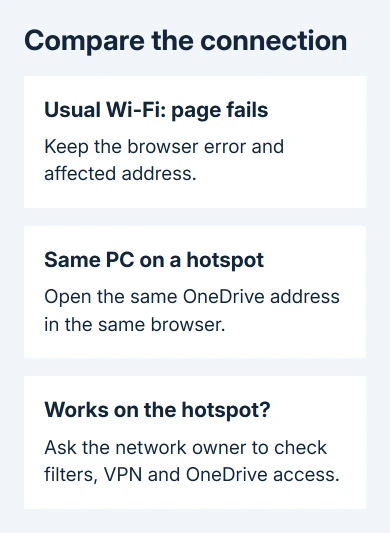
If it fails through both networks, try another current browser on that computer. If another device can reach OneDrive on the original Wi-Fi, the fault may be confined to the first computer, its browser or its installed security software.
In the original access report, Chrome and Firefox failed while other Microsoft sites worked. One owner confirmed hotspot access, then reported broadband working in both browsers the next day.
The owner suspected a provider repair, but no provider cause was confirmed. Compare your own networks before assuming your provider caused it too. A hotspot comparison tells you more than another Microsoft website loading successfully.
2. Check BT Web Protect on BT connections
For a BT Broadband connection using BT Web Protect, there is a specific workaround to try. Microsoft's OneDrive known-issue page lists the filter as a cause of blocked OneDrive access across devices.
Sign in to the BT account that manages the broadband service. Open My Security Settings and switch BT Web Protect off. Then try OneDrive again on the affected connection and check whether its sign-in page loads.
This changes network-level filtering, so the broadband account holder should decide whether to use it. It affects devices using that connection, rather than changing only one browser's settings.
If the OneDrive page loads after that change, the filter is a likely cause. If it doesn't, keep the result for BT support and continue with the other network checks. A router not supplied by BT can need additional configuration.
Skip this setting on other providers. I'd check a named provider filter before resetting Windows networking; a network-wide block won't be removed by reinstalling the OneDrive desktop app.
3. Have the network owner check VPN and filtering rules
With a personal VPN connected, pause it briefly and retry OneDrive. Reconnect the VPN after the comparison. On a managed work VPN, ask IT to do the test or approve an alternative route.
Tell IT whether the failure occurs on office Wi-Fi, home Wi-Fi, the VPN or all three. Include onedrive.live.com, the exact browser error and when the connection failed so they can check the matching network logs.
Ask them to review OneDrive's required addresses and ports, plus any web filter or security tool that checks encrypted traffic on the connection. A rule that permits Outlook doesn't automatically permit every OneDrive endpoint.
Keep the firewall and security software active while the administrator checks the rules. Broadly disabling protection changes several things at once and isn't a lasting repair for a blocked destination.
If every device fails only on your home broadband, contact the provider and ask them to check access to OneDrive through their filtering service. Give them the successful hotspot result if you have one.
For a desktop app showing the separate code 0x8004de40, use the OneDrive connection-code checks. That code has app and Windows checks that don't apply automatically to a browser page.
4. Check a problem confined to one browser
Update the browser, close it fully and reopen it. Try OneDrive in an InPrivate or private-browsing window. If the page loads there, compare extensions and site data in the ordinary window rather than resetting the entire PC.
Turn off one browser extension temporarily, then retry OneDrive before changing another. Re-enable extensions that don't change the result. For a filtering extension, check its settings for a suitable site exception.
Before removing OneDrive's site data, confirm that you have the details needed to sign back in. It can remove that site's saved session. Avoid clearing every saved password or all browser data for a problem affecting one destination.
If Chrome and Firefox both fail in the same way, an extension in only one becomes a weaker explanation. Return to the network and installed-security comparisons, especially if a second device also fails on the same connection.
For websites failing generally rather than OneDrive alone, the Windows internet connection checks address a wider connection failure. Keep the working and failing sites in your support notes.
5. Use the right support route when the page stays closed
If a sign-in form now loads but rejects the account, follow its account recovery prompts. Give IT any sign-in error for an organization account. Repairing a connection and recovering an account are different jobs.
For a personal account that fails on different networks and browsers, use Contact Microsoft Support on the OneDrive help page. Explain that the failure happens before sign-in, so support doesn't start with a password reset.
Send the browser versions, operating system, exact error, affected address and network comparisons. For a provider-specific failure, keep the provider ticket as well so each support team knows what the other has checked.
If an already-connected OneDrive app still works, use it to access files while the website is being repaired. Don't unlink that working app simply because the website won't load.
The Short Version
Compare a hotspot, check BT Web Protect where applicable and have the network owner review filtering. Repair one browser only when the comparison points there. An unreachable page needs connection troubleshooting before account recovery.
Checked November 16, 2026.
 If you have any business, I can build it online