A Send button that disappears on pointer hover can be an Outlook 2016 display problem in messages opened by another program. Save the draft and close its window. Reopen that copy in Drafts to send it through Outlook.
Check whether ordinary new messages still have a Send button before choosing the next fix. A button missing everywhere points to the account setup; one that vanishes only on an invoice created by another app needs a different approach.
In this guide
1. Reopen the message from Drafts
Keep the message you've already written. Close its window and choose to save the changes when Outlook asks. In Outlook, open Drafts, double-click that saved message, and check whether Send stays visible.
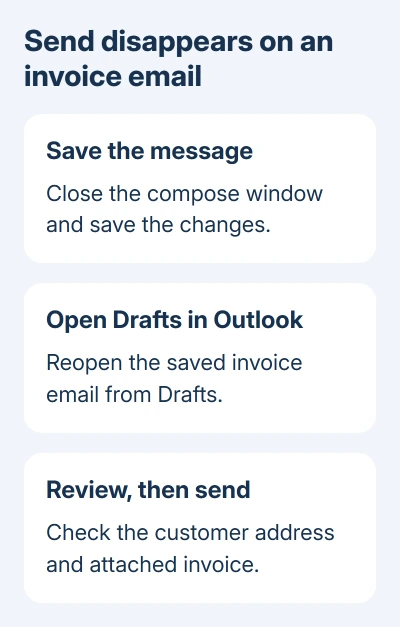
Review the recipients and attachment names before sending. An invoice generator can supply both, so check the actual customer address rather than relying on the document's heading.
In the original report, reopening the saved draft allowed the messages to send. The fault happened when another program created the email: moving the pointer over Send made extra To and Cc controls appear instead.
Reopening the draft lets you send the message while the business app still needs attention. It doesn't require rebuilding the account or recreating an invoice, and it keeps the existing message available for review.
After sending, check Sent Items for the new copy. If several attempts have left duplicates in Drafts or Outbox, review those copies before trying again. That avoids sending the same invoice more than once.
2. Compare a message created inside Outlook
Choose Home > New Email in Outlook itself. Write a brief test email to a mailbox under your control. Move the pointer over Send and watch whether the button stays in place.
If the normal window works, compare it with a fresh message opened by the invoice, accounting, or document app. Keep the same Outlook account selected so the comparison isn't between two different mailboxes.
If Outlook's own messages work, the missing button isn't affecting every message from that account. Tell the other app's support team that Outlook's compose window works, while messages made through their software lose Send.
If both windows lose Send, continue with Office updates and the account check. If Send remains visible but messages stay in Outbox, use the separate Outlook sending checks.
I'd compare those two windows before rebuilding anything. It takes one new draft and helps you choose between repairing Outlook's setup and reporting how the other program opens its messages.
3. Install available Office updates
Open Outlook and select File > Office Account. Under Product Information, look for Update Options > Update Now. Let the update finish, close the Office apps when prompted, and reopen Outlook.
Some installations show Enable Updates first. An employer-managed copy can lack Update Options. Give IT the installed Office build so they can check which updates it needs.
One owner reported an update stopped the disappearing button on their most affected PC. Several invoices sent successfully afterward. They didn't give the update number, so I can't recommend a specific update package.
Try sending through the original business app again after updating. A successful new email from Outlook alone won't tell you whether its externally created message window has recovered.
October 14, 2025 was the end of support for Office 2016. An available old update won't extend that support. Ask the business app's maker which current Outlook versions its email feature works with.
4. Check the account when Send is missing everywhere
For a button that's absent even in an ordinary new message, open File > Account Settings > Account Settings. On the Email tab, locate the address that should send these messages.
An Outlook window can contain old data without having a working sending account configured. Opening an archive or data file doesn't add a sending account to that Email tab.
Microsoft's missing Send button instructions start with this account check. If the account isn't listed, select New and complete its sign-in setup.
Complete the sign-in prompts using the provider's instructions. A company mailbox needs the setup supplied by its administrator. Finish the wizard before opening another new message.
If the account is present, keep a note of its type and address for the next step. Removing it immediately can create extra work when local mail or business software depends on the existing setup.
5. Try a separate profile before disturbing local mail
A profile holds Outlook's account and data-file setup. A separate profile lets you check a fresh configuration while keeping the current one available. This is useful when Send is missing throughout Outlook despite a listed account.
Close Outlook, then hold Shift while starting it. In the profile picker, choose Options > New. Name this separate profile and complete the setup for the affected email account.
The profile picker's Options also offers a startup profile prompt. Enable it to choose between setups at startup. Open the new profile and compose a message there.
Keep your original profile while you check for messages stored only on the computer. A new profile doesn't automatically move every local folder, archive, or business app setting into the replacement setup.
If the button works there, give IT that result and ask them to help transfer the required setup. If it still disappears only through another program, tell that program's support team how the two windows behaved.
When the business app still opens a broken message
Send its support team the Outlook version from File > Office Account > About Outlook, the business app's version, and the exact steps that open the faulty message. Include whether reopening Drafts restores Send.
A screenshot of the changed controls can help, but remove customer addresses and invoice contents first. Ask the developer to check its Outlook message creation against the supported Office version you're using.
For a separate need to repeat an already sent message, follow the Outlook resend commands. Resending a Sent Items copy is different from reopening the unsent draft in this fix.
The Short Version
Save and reopen the draft when Send vanishes only in messages made by another app. Compare Outlook's own New Email window, install available Office updates, and check the account or a separate profile if Send is missing everywhere.
Checked November 17, 2026.