Excel's General mail failure can mean the handoff to desktop Outlook is broken. For the Excel 2016 fault after Windows 10's Fall Creators Update, several owners fixed it by repairing Office.
First check whether Outlook can send a normal attachment. That tells you whether Excel is failing to pass the file to Outlook or the mail account can't send anything.
In this guide
1. Send the workbook from Outlook while checking the fault
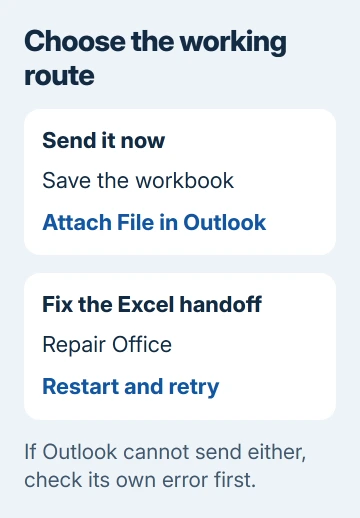
Save the workbook in Excel and note its folder. Open desktop Outlook, create a new message and use Attach File to select that saved workbook. Check the filename before sending, especially if you keep several revisions.
This route bypasses Excel's File > Share > Email > Send as Attachment command. If the message sends, you can send the saved file from your account without Excel starting the message for you.
For a PDF, save or export the PDF from Excel first, then attach that PDF in Outlook. Choose the file you intend to share rather than expecting the mail command to finish an export after it has already failed.
If a manual attachment fails too, fix Outlook's own error first. The Outlook startup checks help when the app won't open. Office repair isn't an account-password fix.
If normal mail works but Excel's command consistently fails, close Excel and Outlook, reopen Outlook and then Excel, and retry with a harmless workbook. If the error returns, try the Office repair.
2. Repair Office and restart Windows
The historical reports describe Windows 10 updating from version 1703 to 1709. Owners confirmed that Word and Excel's attachment commands could fail after the update even when they could still use mail normally.
One owner repaired Office and Excel could create attachment messages again. Several later replies confirmed the repair too. Try Office's repair tool before changing a file that other apps use for mail.
Close Office apps and save other work. On Windows 10, open Settings > Apps > Apps & features, select Microsoft Office or Microsoft 365 and choose Modify. Accept the administrator request only with the required permission.
Windows 11 places Modify in Office's three-dot menu under Settings > Apps > Installed apps. That opens the current repair tool; the historical 1709 reports concern Windows 10.
For Click-to-Run Office, try Quick Repair, then Online Repair if needed. Online Repair needs internet access. For MSI Office, select Repair in the installation-change window, then Continue.
Microsoft's Office repair instructions explain these differences. Repair affects the suite, not just Excel.
Finish repairing Office, restart if prompted, then open Outlook and try Excel's attachment command. If it works, a message opens with the intended workbook attached and no mail error.
3. Check which Outlook installation is handling mail
Look in Start and the installed-apps list for multiple Outlook or Office versions. One later owner fixed the fault by removing an old Outlook installation after the organization switched to Outlook 2016.
Don't remove the currently used suite just because several Office entries appear. Note each product's name and version, then ask IT which one is obsolete. Work computers can have components installed for a specific application.
In Windows 10, inspect Settings > Apps > Default apps > Email. Check that the intended installed desktop Outlook is selected when that's the mail client your organization uses with Excel.
In Windows 11, open Settings > Apps > Default apps, search for the intended Outlook app and inspect its defaults. The app set to open mailto email links isn't the only part of Excel's old mail handoff to check.
The older Excel 2016 workflow was built around desktop mail integration. If you've changed to another mail app or new Outlook, use a manually attached workbook while IT checks whether that combination supports the command you need.
If the app is also slow, use the classic Outlook performance checks. Include its exact app name and version in your support report.
4. Leave the historical DLL repair to IT
The old thread's accepted reply removed MSMAPI32.DLL while Outlook was closed, then relaunched Outlook. Other owners confirmed success too. This shared mail component is separate from your workbook.
The examples differed by Office installation and language: some used Program Files (x86) and others Program Files, with 1043 or 1033 language folders.
I'd repair Office before touching that file. If that fails, ask IT to inspect MAPI, the system that lets desktop apps hand files to mail software. Give them the original thread and your installed Office versions.
Ask IT to check which copy of the file your installation uses and how to restore it before trying that older workaround.
5. Report the exact Excel and Windows combination
In Excel, record the product and build from File > Account. Run winver through Windows+R to see the Windows version. Include whether the mail client is classic desktop Outlook or another app.
Test a small blank workbook too. Note whether Send as Attachment and Send as PDF both fail. This shows whether the problem follows one file or the shared mail command.
Apply current updates to supported Office installations. Office 2016 has stopped receiving support, and Windows 1709 is historical too. Include the product and build you're using now when reporting a similar failure.
When the handoff still fails
Use your workplace Office help desk or Microsoft's Contact Us page. Include the error, repair outcome and direct-attachment result, and ask for desktop mail integration and conflicting installations to be checked.
The Short Version
Attach the saved workbook in Outlook for urgent mail. If Outlook sends but Excel fails, repair Office, restart and check for an obsolete Outlook installation. Leave the historical DLL workaround to IT.
Checked November 17, 2026.