Web links that open in a browser but fail inside OneNote point to a problem with the app. Repairing or resetting helped an owner of the old Windows 10 app, but today you should move its notebooks into current OneNote first.
Support for the old Windows 10 app ended on October 14, 2025, and it's moving to read-only use. Current OneNote has a File menu and its own repair route.
In this guide
1. Copy the destination and check which links fail
Right-click the failing link and look for an option to edit or copy the link. Copy the destination address into your browser's address bar. Check the address itself, rather than copying only the blue words displayed in your notes.
If the page opens there, use the browser to reach the page while you repair OneNote. The words shown for a link can hide a mistyped address, so compare the actual destination with the page you intended to open.
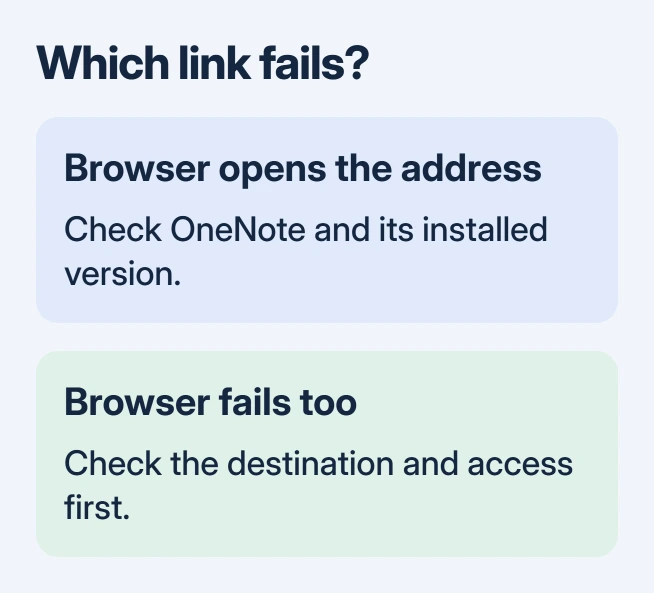
Try another website link in the notebook. If unrelated sites fail only inside OneNote, several broken sites are less likely than a problem in OneNote. If just one fails, correct that link before changing the installation.
For a link into another notebook, check that your signed-in account can open that notebook. A website address and a notebook link don't use the same permissions. Links to files on your computer need a different check.
The historical Windows 10 app didn't support local file and folder hyperlinks in the same way as desktop OneNote. An address beginning with a drive letter needs that distinction; a normal https address doesn't.
In the original hyperlink discussion, the owner could open the destinations in a browser and on iOS. Changing the default browser and adding www didn't help. The later reply confirmed that the app repair advice worked.
2. Move the retired Windows 10 app to current OneNote
Read the app name shown in Start or in the window's title bar. OneNote for Windows 10 is the retired application. The current Windows desktop app is called OneNote and includes File near the upper-left corner.
Microsoft's current retirement notice changes the advice from the old discussion: the retired app no longer supports creating, editing or syncing notes. A reset won't make it a supported editor again.
Before removing or resetting an old installation, compare its recent pages with your cloud notebooks and preserve anything missing. Copy important text and save attachments separately if they haven't reached the cloud.
Open Microsoft Store, search for OneNote, and choose the current Microsoft app. If OneNote already comes with your Office installation, open that version instead of installing another copy unnecessarily.
Sign in with the notebook owner's account. In current OneNote, choose File > Open, select the relevant OneDrive or SharePoint account, and open the existing notebook. Don't create a new notebook with its old name.
Check several recent pages and attachments. Then choose File > Info > View Sync Status and read the status for each notebook. A notebook name appearing in the sidebar doesn't confirm that all your latest pages arrived.
Try the failing hyperlink in this app. If it works, keep using current OneNote. The Windows OneNote setup guide explains its notebook, section and page controls if the new layout feels unfamiliar.
3. Repair the installation that actually opens the notebook
If links still fail in current OneNote, choose the repair steps for the version you've installed. Start with Repair rather than Reset. I'd check that your notes are available elsewhere before any repair that might remove local app data.
On Windows 11, open Settings > Apps > Installed apps. Find OneNote. Open its three-dot menu and look for Advanced options. If the page offers Repair, select it, wait for completion and reopen the app.
On Windows 10, use Settings > Apps > Apps & features, select the app and look for Advanced options > Repair. The installation type determines the controls shown. If Advanced options is missing, use the Office repair steps instead.
For OneNote installed as part of Microsoft 365 or Office, select that suite's entry and choose Modify. On Windows 11 this is in the entry's three-dot menu; Windows 10 shows it after selecting the product.
Choose Quick Repair if offered, let it complete, and retry the same web link. If it remains broken, return to Modify and use Online Repair. Close other Office work first because the repair can affect the suite.
A Windows Installer edition can offer Repair directly instead of Quick Repair and Online Repair. Use the Repair option shown for your installation. The OneNote repair walkthrough explains these package differences in more detail.
4. Use Reset only with your notes safely available elsewhere
The owner didn't specify whether Repair or Reset helped. Try Repair first, then consider Reset if the fault remains and your notes are safely available outside the app.
When an installed app offers Advanced options > Reset, read the warning before confirming. Reset can remove local app data. Keep any unsynced notes and attachments outside the app before accepting it.
For the retired Windows 10 app, moving to current OneNote is the better next step. Resetting its local data first can make it harder to retrieve material that never reached your online notebook.
After a supported app repair or reset, reopen the same notebook and try the same address. Working web links confirm the repair. If only one notebook still has a failing link, check its address and your access to its destination.
If several web links still fail, ask your work help desk to open a OneNote support case, or use the current app's Help support options. Include the app name, version, exact error and whether copying the address into a browser works.
Provide a harmless example address and describe whether all notebooks are affected. Keep private notebook links out of public posts. That gives support an example they can try and tells them which OneNote app needs repair.
The Short Version
Test the actual address in a browser, then check your OneNote app. Move off the retired Windows 10 version, preserve missing notes, and repair current OneNote if links still fail. Reset comes after protecting local data.
Checked November 17, 2026.