Windows 11 supports CP2102 USB-to-UART adapters when the matching driver is installed. Use the CP210x Universal Windows Driver for a Silicon Labs bridge; Code 10 needs another check if that package is already installed.
A missing COM port, a device that can't start, and an upload that fails after the port appears are different problems. Check the chip name and Device Manager's message first so you don't keep replacing a driver that already works.
In this guide
1. Match the driver to the adapter's actual chip
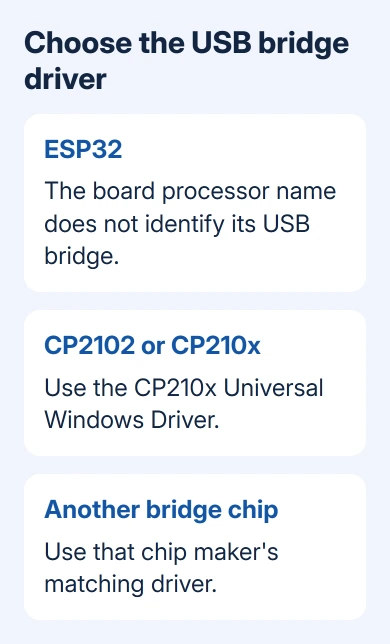
Check your board's model or product listing to find which USB-to-serial chip it uses. An ESP32 is the main processor on many development boards, but it doesn't identify the separate chip connecting that board to USB.
Look for CP2102, CP2102N, or another CP210x name before choosing the Silicon Labs package. A board using a CH340 or an FTDI chip needs that manufacturer's driver instead. Similar-looking boards can use different chips.
Right-click Start > Device Manager and connect the adapter. Watch for its entry under Other devices or Ports (COM & LPT). Disconnect it once to confirm which entry belongs to the board, then reconnect it.
Open that entry's Properties > General and read Device status. With Code 28, Windows is missing the device driver. Code 10 means the device can't start, which is a different result from having no driver at all.
For a CH341A used for chip programming, check its serial versus programming mode. Its programming interface doesn't become a serial port just because the product name contains UART.
2. Install the CP210x Universal Windows Driver
Use the CP210x Universal Windows Driver from Silicon Labs' official downloads, rather than one chosen just for Windows 11 in its filename. Check which Windows versions the current package supports instead of trusting an older forum reply.
Konnected's Windows installation instructions specifically use this package on Windows 10 and 11. So a claim that Windows 11 can't use CP210x devices shouldn't stop you from trying the matching driver.
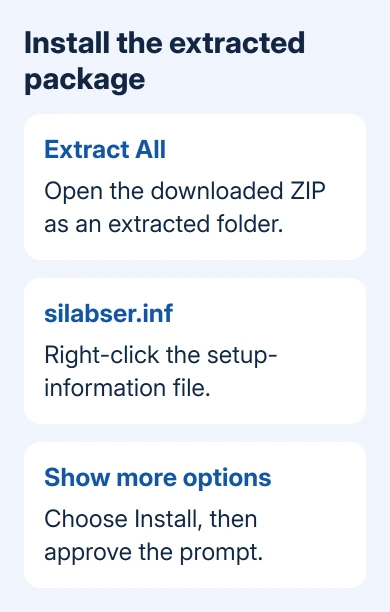
Open Downloads, right-click CP210x_Universal_Windows_Driver.zip, and choose Extract All. Open the extracted folder. Installing from inside the unopened archive can leave the installer without the files it needs.
Find silabser.inf. If Windows hides file extensions, the name may appear as silabser with a setup-information file type. Right-click it, select Show more options when needed, then choose Install and approve the administrator prompt.
Wait for the installation result, reconnect the board, and check Device Manager again. A CP210x entry with a COM number and no warning is the result you want. Keep that number for the application setup in section 5.
If the INF install command isn't available, use Update driver > Browse my computer for drivers on the adapter's Device Manager entry. Select the extracted package folder, include subfolders, and continue with Next.
Your workplace or school may require IT approval for driver installation. If Windows refuses permission, ask IT to approve the installation; downloading the package again won't change that restriction.
3. Read Code 10 before reinstalling the same package
The driver can be installed even when Windows can't start the adapter. Open the failing device's Properties > Driver and record its provider and version, along with the full Device status message.
Microsoft's Code 10 guidance recommends updating the device driver. Use the board maker's compatible package when the board uses a customized adapter configuration.
Check Settings > Windows Update > Advanced options > Optional updates for a matching driver. Install a relevant offered update and restart if requested. No optional driver listed doesn't mean your USB serial adapter is incompatible.
If this adapter worked until a driver update, open its Driver tab and choose Roll Back Driver if that button is active. With a gray rollback button, the older package isn't available through Device Manager.
The original CP2102 owner returned to Windows 10 after drivers and a system restore failed. They didn't report a Windows 11 repair. That accepted answer isn't a reason to rule out every CP210x adapter.
October 14, 2025 was the end of regular Windows 10 support. I'd keep a current Windows 11 installation and ask for a compatible adapter or driver before downgrading a working computer to solve one serial connection.
4. Check USB detection when the board never appears
Try a USB cable you know carries data, then connect directly to another computer port. A board can light up because it's receiving power even when it has no data connection. The cable's data connection can still be missing.
Compare the same board and cable using a second computer when possible. A device that appears there but never on this PC points toward this PC's connection or software. Failure on both makes the cable or board a stronger suspect.
The laptop USB checks explain how to compare one failed accessory with failures across several ports. Check that difference before changing your computer's USB setup.
Keep any attached project hardware disconnected while making this basic USB comparison if the board maker's setup allows it. Follow its power instructions before reconnecting an externally powered circuit.
When a replacement cable restores detection, look for the COM entry again. If Windows still shows an unknown-device or descriptor error, send that exact message to the board maker rather than forcing a serial driver onto it.
5. Select the COM port once Windows can start it
Open the serial monitor or development app and select the COM number shown beside the CP210x device. Recheck it after moving the board to another port or changing adapters, because the assigned number can change.
Close another serial monitor that might already have that port open, then retry your application. A busy port means another program is using it. Reinstalling the USB driver won't close that program.
If the port opens but an upload still fails, follow the board maker's upload and boot-mode instructions. A working serial port doesn't confirm the correct board selection, boot procedure, or project wiring.
Send the board supplier the exact failure
For persistent Code 10, ask the board supplier for a Windows 11 package matching the exact bridge chip and board revision. Include the hardware ID from Properties > Details > Hardware Ids, driver version, and the second-computer result.
The Short Version
Identify the USB bridge, install its matching driver, and check whether Device Manager gives it a working COM port. Code 10 needs a driver or device check; an existing port with a failed upload needs the app and board setup checked next.
Checked November 17, 2026.
 If you have any business, I can build it online