
A CH341A not working as USB UART-LPT may need a matching driver or another board mode. Check the hardware ID first. The chip supports both serial communication and chip programming, which use different interfaces.
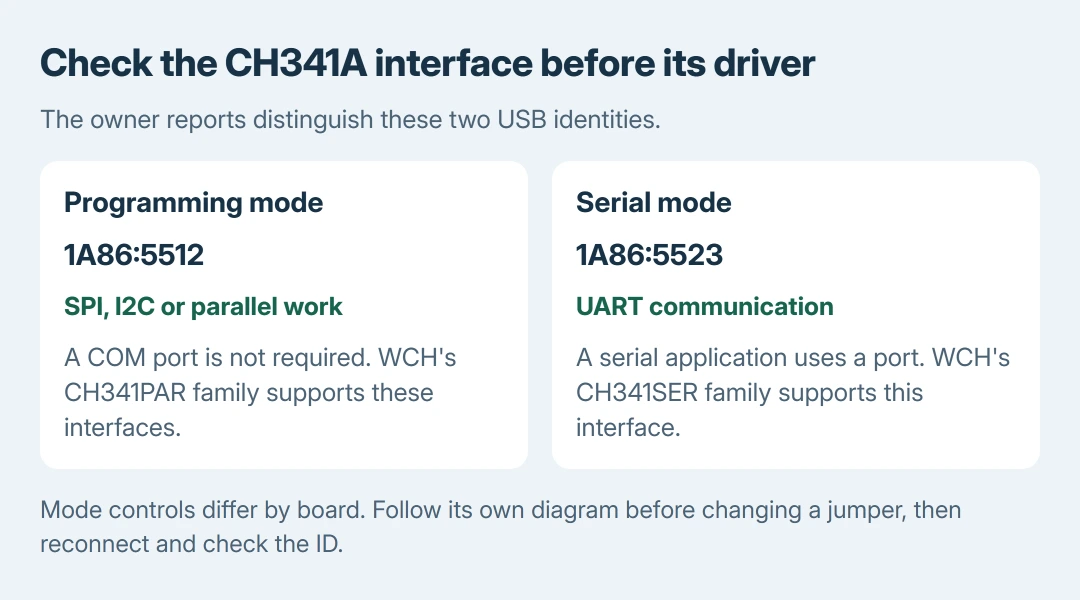
The important distinction is between 5512, associated with programming interfaces in the owner reports, and 5523, associated with serial mode. A programming-mode device is not expected to create a serial port.
Read the identity Windows receives
Open Device Manager from Start. Find the connected USB UART-LPT or CH341 device, right-click it and choose Properties > Details. Set Property to Hardware Ids and copy the displayed values.
Microsoft documents the identification steps in the hardware-ID reference. The IDs are used to match a device with a driver package; its friendly name alone is insufficient.
Status: WCH driver descriptions, Microsoft hardware-ID guidance and Stack Exchange answers checked October 28, 2026. Board mode controls vary; no programming adapter or chip was tested.
Look for VID_1A86 with PID_5512 or PID_5523. Record the full ID and the board model. If neither appears, do not assume that a similarly named download is suitable.
If Windows cannot identify the device at all and reports a descriptor failure, use the USB recognition checks. That happens earlier than selecting the CH341 interface driver.
Match the driver to the job the board should perform
For a board intended to provide a serial port, WCH's CH341SER package supports USB serial operation, including CH341A. Successful serial setup should expose a usable port to the serial application.
For SPI, I2C or parallel programming, WCH's CH341PAR package supports those CH341 interfaces. A working programming adapter does not have to appear as a COM port.
Download from WCH or the board maker's official support page. Follow that board's software and mode instructions. These package families serve different interfaces; one is not simply an update to the other.
If using extracted Windows driver files, right-click the device, choose Update driver > Browse my computer for drivers, and browse to the correct extracted folder. Continue with Next and follow the result.
Microsoft says to obtain the compatible package from the manufacturer in its manual driver instructions. A driver that does not match is a reason to recheck the board, not force an unrelated package.
Change board mode only with its own instructions
An owner on Unix & Linux Stack Exchange saw 1a86:5512 and no /dev/ttyUSB0 across several computers. An answer explains that this was the device's EPP/MEM/I2C mode, rather than a serial interface lacking a port number.
The serial-mode result was confirmed by an owner after a board change: removing a jumper on their board made it enumerate as 1a86:5523. They also installed a modified driver, so the report does not establish a universal jumper-only cure.
That report concerns Linux and one board. It supports checking the interface being presented; it does not prove that every Windows USB UART-LPT problem is fixed by moving the same jumper.
For a board sold for both jobs, read its diagram for UART/serial versus SPI/I2C selection. Disconnect USB and attached target hardware before a documented configuration change. Reconnect and check the ID afterward.
Do not copy a pin number from a different CH341A board. If the maker provides no mode diagram, ask the seller to identify the setting or replace an unsuitable adapter. Driver reinstalls cannot turn a fixed programming interface into a UART.
Check the application's result after the device is configured
For serial use, find the assigned port under Ports (COM & LPT) and select that number in the serial program. A port that exists but has an unsuitable number needs the COM-port assignment checks.
For chip programming, use the software and interface specified by the board maker. Detection of the USB adapter does not establish that an attached chip is supported, correctly connected or safe to write.
For an undocumented board, our recommendation is to stop after identification and connection checks. Send the seller the hardware ID, driver package, software name and board revision before attempting a firmware write.
If the documented mode and matching driver leave it unusable, ask for board-specific support. Repeated BIOS writes or generic voltage modifications are not a way to diagnose a missing serial port.
The Short Version
Read the hardware ID and establish whether serial or programming mode is intended. Select the matching CH341SER or CH341PAR package. Board jumpers vary. Verify the interface before changing COM numbers or debugging the application.

Isaac Smith is the founder and editor of PC Glance, a website that covers computers, laptops, and technology. He is a tech enthusiast and a computer geek who loves to share his insights and help his readers make smart choices when buying tech gadgets or laptops. He is always curious and updated about the latest tech trends.