
You plug something in and Windows makes the wrong noise. A balloon says the device is not recognized. Or Device Manager shows a yellow triangle with a name that is not the name of your thing.
That is a horrible little moment when the thing you plugged in matters, and I would rather narrow it for you than hand you a list.
Most pages give you the same eight steps whatever your machine said, and that wastes your evening. Windows is telling you something specific, and the exact wording narrows this a long way. So this page sorts by what yours actually says.
"Unknown USB Device (Device Descriptor Request Failed)"
This is the most common one and the most misunderstood.
A descriptor is the introduction every USB device sends the moment it gets power: name, type, how much current it wants. Windows asks for it before any driver exists.
This message means the device never got as far as saying what it is, not a driver problem in the way people mean. Something failed before drivers were ever a consideration.
That narrows it to power, the cable, the port, or the device itself.
Ours, and marked as ours: start with the cable, and use one you know carries data. Charging cables that carry power but no data are everywhere, and they produce exactly this.
If the device charges but never appears, suspect the cable before anything else.
Plug the device straight into the machine next, with no hub, no dock, no extension.
Reported by advisers on Microsoft's own boards more than once: a hub or a poor cable that cannot supply enough current produces this same failure.
Try a port on the back too, if you have a desktop. Back ports run straight off the motherboard. Front panel ports run through an internal cable somebody fitted in a hurry, which is ours to say rather than anybody's documentation.
The same device works on another computer
Then the device is fine. Your machine has stopped enumerating it properly, which is a different job.
Reinitialize the USB controllers. Open Device Manager, expand Universal Serial Bus controllers, right-click each USB Root Hub and Generic USB Hub, choose Uninstall device, then restart.
Windows rebuilds them on the way back up.
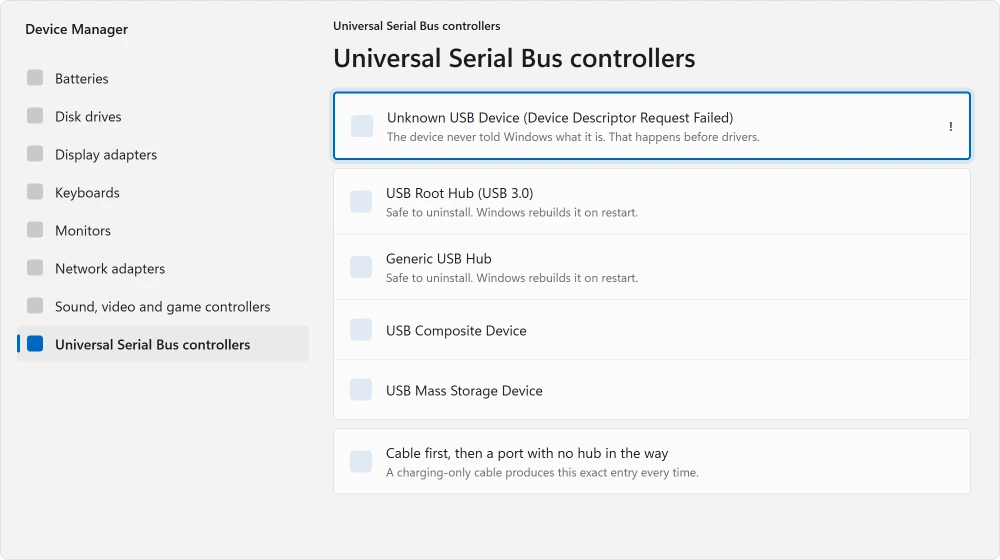
Nothing gets deleted here. Uninstalling a root hub removes the software entry, not the hardware, and Windows puts it back at the next boot. It feels alarming and is routine.
Ours, and marked as ours: do this with your keyboard and mouse plugged in, and expect them to stop working for a moment during the restart. On a desktop with only USB input devices, that moment is unnerving if nobody warns you.
It worked yesterday and stopped after a shutdown
This one has a specific cause and almost nobody connects the two.
Windows does not really shut down when you tell it to. Fast Startup saves the kernel state and reloads it. That is why your PC boots quickly, and it also means hardware is never fully reinitialized.
Reported by advisers repeatedly on Microsoft's boards: with Fast Startup on, USB devices may not initialize correctly, and turning it off resolves it for some people.
Open Control Panel, then Power Options, then Choose what the power buttons do. Click Change settings that are currently unavailable, then untick Turn on fast startup (recommended).
The tell for this one is timing. If a full restart fixes your USB and a shutdown-then-power-on does not, that difference is Fast Startup, because a restart genuinely reinitializes and a shutdown does not.
Nothing on any port works at all
Then stop looking at individual devices and drain the machine.
Shut it down completely. Unplug the power, and take the battery out if you can. Hold the power button down for about thirty seconds with nothing connected. Then plug in and start up.
That empties the residual charge in the board's capacitors, and it is what clears a controller latched into a bad state.
Ours, and marked as ours: this is the same discharge that fixes a machine that will not power on, and it is worth doing properly rather than quickly. Thirty seconds feels much longer than it sounds when you are standing there counting.
If the machine is behaving oddly in other ways too, a PC that will not turn on at all starts from the same place.
The device shows up but does not work
That is not this fault. Your device introduced itself and Windows accepted it. Descriptors and ports are not your problem.
Go and get the maker's own driver, from the maker's own site, for your exact model. Where an external drive is the thing missing, a drive that will not show up starts differently.
If the drive appears but big copies to it stall near the end and give up, another port or a USB 2.0 cable fixed that for owners.
A flash drive that appears with no space and cannot be formatted is its own case, and it usually means the stick's memory has failed.
Reported by advisers, and worth repeating: chipset drivers from your laptop or motherboard maker matter here too, and Windows Update does not always supply them.
What happened to the person who asked
Most pages leave this part out, and it is why I want you working in the order above rather than randomly.
Reported by an owner in November 2024, on an Acer Aspire 5 running Windows 11, with the descriptor failure. A volunteer moderator sent him a guide. He came back: "I tried it, but it did not work."
He then tried the registry edit, uninstalling the unknown device, and restarting. Still nothing. You may recognize the sequence.
His last message is the one that stayed with me: "I stopped attempting to fix it as I am not an expert in this matter and I do not want anymore problems."
A Microsoft Community Support Specialist then gave him a proper ordered list. Different ports. Test on another computer.
Disable USB selective suspend, fetch chipset drivers from Acer, disable Fast Startup, reinitialize the controllers, replace the cable or hub.
Nobody ever confirmed a fix on that thread. He said he would report back and did not.
I am printing that because this fault often is the hardware, and pretending otherwise wastes your evening. A USB port is a physical connector that gets pushed, pulled and levered for years.
If you have worked through this page and one specific port is still dead while others work, that port has probably failed, and no setting brings it back.
Status: written 22 August 2026. A descriptor failure means the device never identified itself, which rules out drivers before you start. No owner on the thread I read reached a fix.
What does Device Descriptor Request Failed actually mean?
That the device never told Windows what it is. Every USB device sends a descriptor the instant it gets power, before drivers are involved.
A failure there points at the cable, the port, the power available, or the device, and not at software.
Why did my USB stop working after a Windows update?
Check whether it stopped after a shutdown rather than after the update itself.
Fast Startup reloads a saved system state instead of initializing hardware properly, so a device can work after a restart and fail after a shutdown. That difference is the tell.
Does uninstalling USB Root Hub break anything?
No. It removes the software entry, not the hardware, and Windows rebuilds it on the next restart. Your keyboard and mouse will drop out briefly during that restart, which is normal and worth expecting rather than panicking about.
Should I use a different cable or a different port first?
Cable first, and specifically one you know carries data rather than just power. Charging-only cables are everywhere and they produce exactly this failure.
After that, plug straight into the machine with no hub, and prefer a back port on a desktop.
The Short Version
- The descriptor failure message means the device never identified itself, so drivers are not the cause.
- Charging-only cables produce this exact fault and are the first thing to rule out.
- Hubs and docks that cannot supply enough current cause it too. Plug straight in.
- Uninstalling USB Root Hub in Device Manager is safe and rebuilds on restart.
- Fast Startup skips hardware initialization, which is why a restart can fix what a shutdown does not.
- One owner worked the full adviser list on an Acer Aspire 5 and never got a fix.
Where to Next
A card reader that Windows will not acknowledge looks exactly like a dead memory card. Work out which of the two you have before formatting anything.
Try a different cable before anything else on this page. It costs nothing, it takes ten seconds, and it is the single commonest cause of the message you are looking at.
If your machine is struggling in other ways as well, a PC that has got slower starts by measuring rather than guessing.
And if an external drive is what will not appear, a drive that does not show up has a different first step.
And if the device Windows cannot see is a game controller that also wanders on its own, drift is a separate fault with a warranty answer.
When the same device works in one socket and not another, the ports on your PC are genuinely not the same as each other.
When the device Windows will not recognize is a webcam, that has a version-specific answer of its own.
Where Device Manager shows a code beside it, that number narrows this considerably and two of the common ones need no driver work.
And once Windows can see the stick, what it is formatted as decides what will copy to it.
Where the drive is recognised but never appears, the fault is further along. A partition with no drive letter has nowhere to show up.
Once the stick does show up, the five everyday steps for using it include when you can skip Safely Remove Hardware.
If a specific device or cable turned out to be yours, name it in the comments. I read them, and on this fault the details save other people real time.

Isaac Smith is the founder and editor of PC Glance, a website that covers computers, laptops, and technology. He is a tech enthusiast and a computer geek who loves to share his insights and help his readers make smart choices when buying tech gadgets or laptops. He is always curious and updated about the latest tech trends.