UNEXPECTED_KERNEL_MODE_TRAP, stop code 0x7F, means the processor hit an error the core of Windows, the kernel, couldn't catch. Faulty or mismatched memory and failing hardware cause most of these crashes, with drivers close behind.
Windows 11 adds a third suspect. In 2024 a Windows bug made the whole PC crash with this code when certain desktop apps closed a window, and a cumulative update fixed it.
So install every update first, then test the memory, and let the crash's first parameter, a code in the crash record, point you at the rest.
In this guide
Which trap number did the crash report?
The blue screen shows the stop code, but the detail lives in the crash record. Open Event Viewer, go to Windows Logs > System and look for an Error from the source BugCheck just after the crash.
Its text gives 0x0000007f and four values in brackets, known as parameters. The first is the trap number, the kind of error the processor hit, and it narrows things down fast.
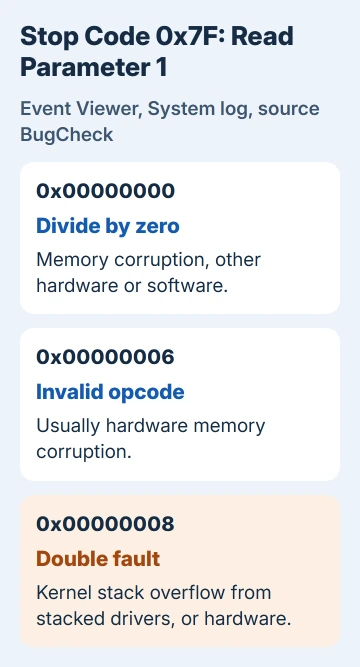
Microsoft's reference for bug check 0x7F lists them. 0x00000000 is a divide by zero, which memory corruption, other hardware problems or software can cause.
0x00000006 is an invalid opcode, an instruction the processor can't run, and hardware memory corruption is its usual cause.
0x00000008 is a double fault: a second error while the first was being handled. Its two common causes are a kernel stack overflow, often from several drivers stacked on one device, and a hardware fault.
To get the name of the driver involved, open the newest file in C:\Windows\Minidump with WinDbg from the Microsoft Store and run !analyze -v. A driver that turns up crash after crash is your culprit.
1. Install the latest Windows update
In early 2024, Windows 11 version 23H2 started crashing with this code when certain desktop apps built with Windows Forms or Eclipse SWT, two developer toolkits, closed parts of their windows. It hit Intel and AMD PCs alike.
Builds before 22631.3235 didn't do it. The April 2024 preview update KB5036980 fixed it, and two developers in the forum thread about the crash came back to confirm, one writing "We couldn't reproduce the problem."
Every later cumulative update carries that fix. Open Settings > Windows Update, select Check for updates and install everything, optional quality updates included. Then type winver in Start to see your version and build.
Version 23H2 no longer gets updates in any edition, so move a 23H2 PC to 25H2 through Windows Update and keep it current from there.
If the crashes stop after updating, the Windows bug was your trigger. If they carry on, keep working down the list.
2. Test the memory
Faulty or mismatched memory heads the list of causes for this stop code. Type Windows Memory Diagnostic in Start, open it and choose the first option, which restarts the PC and checks the RAM before Windows starts.
Windows shows the result once you sign in again. Any error points at a bad stick or a bad slot: try each stick on its own and swap slots to find which one, then replace it.
A clean pass is good news, but it isn't the last word on a crash that comes and goes. The MEMORY_MANAGEMENT guide covers reading the results and the longer tests.
3. Undo overclocking and recent hardware
Running a processor past its rated speed can cause this crash, so load the BIOS defaults if you've raised any clock speeds. I'd also turn off XMP or EXPO memory profiles while you test, since those run the memory faster than its default.
If you added a part shortly before the crashes began, take it out and see whether they stop. A failing power supply or motherboard can do it too, and that's harder to pin down at home.
While you're at it, check for a newer BIOS for your motherboard or PC model. With an Intel 13th or 14th Gen desktop processor, pick one with microcode 0x12F or later (Intel's fix for those chips) and keep Intel Default Settings on.
4. Update or roll back drivers
If the crashes started after you installed or updated a driver, roll it back.
In Device Manager, right-click the device, choose Properties, open the Driver tab and select Roll Back Driver. If that's grayed out, uninstall the device and let Windows reinstall it.
Get current chipset, storage controller and network drivers from whoever made the PC or motherboard. A device with a yellow exclamation mark in Device Manager is the first one to update.
A double fault (trap 0x00000008) can come from two file system filters on the same drive, the kind of driver antivirus and backup programs install. If you run two of those, uninstall one and watch whether the crashes stop.
When the crash hits before you can sign in, let the PC fail to start a couple of times. The recovery screen that follows has Troubleshoot > Advanced options > Startup Settings, where Safe Mode is option 4, and you can do the rollback there.
Still crashing after all four?
Run the hardware diagnostics your PC maker supplies, often from a key you press at startup, and take any failure code to their support for a warranty repair.
On a self-built PC, swapping in a known-good power supply or memory kit is the next real test.
If Windows itself is the suspect, take the stop code, the first parameter and the !analyze -v output to Microsoft's support team through Get Help. The stop code basics help with any other code that turns up.
The Short Version
UNEXPECTED_KERNEL_MODE_TRAP (0x7F) points at memory, other hardware or a driver, plus a 2024 Windows 11 bug that crashed PCs when some apps closed a window.
Install every update, which carries the KB5036980 fix, then run Windows Memory Diagnostic. Read the first parameter in Event Viewer, undo overclocks and XMP, roll back recent drivers and remove new hardware.
Checked November 19, 2026.