App & browser control that's missing from Windows Security, or opens for three seconds and then closes, points to a fault inside Windows Security, not in your protection settings.
Usually your copy of the app is damaged or doesn't match your version of Windows, and a repair install of Windows puts the right one back. A Page not available message is a different case: a policy is hiding the section on purpose.
In this guide
Three ways it shows up
The entry can be missing altogether, with no App & browser control tile on the Windows Security home page and no icon in its left-hand menu. That's either a damaged app or a policy, and the test in fix 1 tells you which.
It can also open a new Windows Security window that stays up for about three seconds and then closes. One owner on Microsoft's Q&A forum saw exactly that a week after reinstalling Windows 11 from scratch.
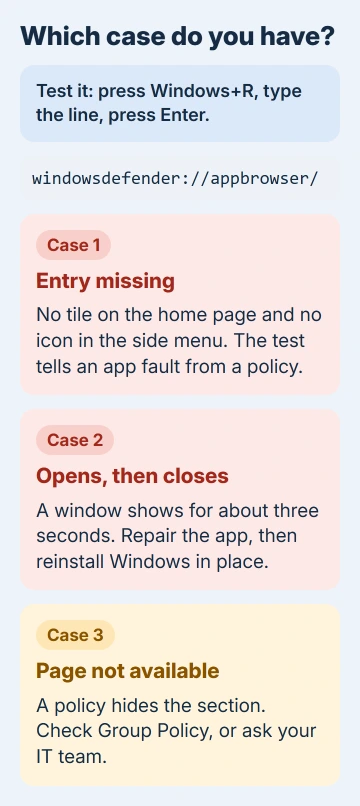
The third case opens the page but shows Page not available, with a line about your IT administrator limiting access. Windows is doing what a policy tells it to, and fix 6 covers it.
1. Open the page directly to see which case you have
Press Windows+R, type windowsdefender://appbrowser/ and press Enter. It's the same shortcut the App & browser control help page uses to jump straight to the section.
If the page opens and you can see Smart App Control, Reputation-based protection and Exploit protection, only the menu entry is broken.
If the window closes again, the app itself is at fault, so work through fixes 2 to 5. If you see Page not available instead, go to fix 6.
2. Install every update, then restart
Open Settings > Windows Update, press Check for updates and let everything offered install, optional updates included. Restart afterward, even if Windows doesn't ask you to.
The asker had already done all of this, so don't expect miracles here. It rules out the easy case in five minutes, and the later fixes need a fully updated PC anyway.
3. Repair, then reset the Windows Security app
Open Settings > Apps > Installed apps and find Windows Security. Open the three-dot menu beside it, then Advanced options. Select Repair first; if the page still won't open, come back and select Reset.
Prefer a command? Our red X guide has the one-line PowerShell reset for the same app. Either way, restart and try the shortcut from fix 1 again.
A reset doesn't always do it. Reinstalling the app changed nothing for the asker, whose copy didn't match their version of Windows; only the repair install in fix 5 sorted that out.
4. Check which version of the app you have
Right-click Start, open Terminal (Admin) and run this line. The Version line in the result is the one that matters:
Get-AppxPackage Microsoft.SecHealthUIThe second number in the version normally matches or comes close to your Windows build number, which you can see by typing winver in Start.
The asker's app said 1000.25183.1000.0 on a PC running build 22000, and the moderator pointed out that 25183 looked like an Insider build, a preview version of Windows for testers.
A version that clearly doesn't belong to your Windows can't be fixed with a reset. The next fix replaces the app together with the rest of Windows.
5. Reinstall Windows over itself
This is what solved it for the asker, who installed the current version of Windows over their existing one and wrote back, "Updated and solved." Repairing Windows this way keeps your apps, files and settings.
On Windows 11, open Settings > System > Recovery and select Reinstall now (its entry reads Fix problems using Windows Update). Choose whether the PC restarts automatically 15 minutes after setup finishes, and don't unplug it or go offline.
The Reinstall now button needs a 22H2 or later release of Windows 11 plus the optional update Microsoft shipped in February 2024, or anything newer. School or company PCs can hide it.
Without the button, download Windows 11 Installation Assistant from Microsoft's download page and run it as an administrator.
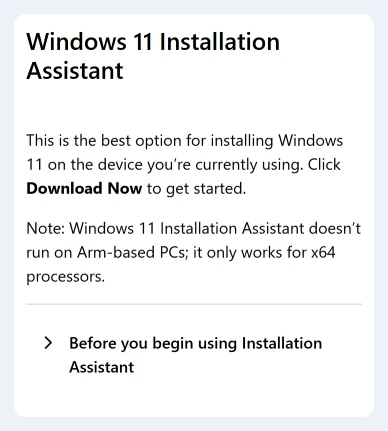
Installation Assistant runs on Windows 10 version 2004 and newer, wants 9 GB free on the drive and an x64 processor, and doesn't run on Arm-based PCs. Select Accept and Install, then Restart Now when it asks.
If neither option works, our Windows 11 repair guide covers the ISO route, which runs the same repair from a downloaded copy of Windows.
Windows 10 has App & browser control too. There, the repair comes from the Media Creation Tool on the Windows 10 download page.
Choose Upgrade this PC now, then make sure Keep personal files and apps is selected under Change what to keep.
6. Page not available? Look for a policy
A policy (a setting companies and schools use to lock PCs down) can hide the section on purpose. This one is called Hide the App and browser protection area.
Microsoft's documentation for IT admins says that when it's on, the section doesn't appear on the Windows Security home page and its icon isn't shown on the side menu.
If your work or school manages the PC, your IT team set this policy, so ask them about it. On your own PC, you can switch it off.
With Windows 11 Pro, you can press Windows+R and type gpedit.msc to reach the Group Policy settings. Go to Computer Configuration > Administrative Templates > Windows Components > Windows Security > App and browser protection.
Set Hide the App and browser protection area to Not Configured, then restart.
On a Home edition, gpedit.msc isn't available, but the same policy is a registry value named UILockdown under this key:
HKLM\SOFTWARE\Policies\Microsoft\Windows Defender Security Center\App and Browser protectionBack up the registry before you delete that one value, then restart.
When the page still won't open
For Microsoft's support, open Get Help, which is already on your PC. Give them your Windows build from winver and the app version from fix 4, since that's the first thing they'll check.
If the PC is new and still under warranty, the maker's support can reinstall Windows for you. A full reset with Remove everything is the last resort, and I'd only reach for it after the in-place repair has failed.
The Short Version
Test with windowsdefender://appbrowser/. A closing window or missing entry is the Windows Security app: update, repair or reset it, then reinstall Windows in place. Page not available means a policy is hiding the section.
Checked November 20, 2026.
 If you have any business, I can build it online