A PowerPoint theme missing from the startup screen can still be on the Design tab. Open a blank presentation and check Design > Themes first; a missing theme and missing color variants need different fixes.
The Office 2013 problem affected designs such as Wood Type and Banded. If it isn't there either, load a trusted theme file. Keep its original file when you need its variants, since saving a replacement can lose those choices.
In this guide
1. Look in Design before replacing the theme
Open PowerPoint and create a blank presentation. Select Design, then expand the Themes gallery to see the available designs. Point to a thumbnail to read its name; previews can look similar.
Compare that list with File > New. The startup choices and the themes available inside a presentation aren't necessarily identical. A design missing from New can still be usable from the ribbon.
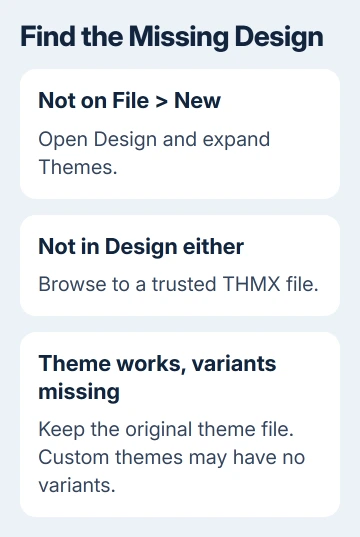
One owner confirmed that Wood Type and Banded had disappeared from the startup screen but remained on Design. If that's what you see, apply the theme from Design instead of reinstalling Office.
Select the theme and inspect the slide. Theme colors, fonts and effects should change where the slide uses them. A manually chosen font or color can stay unchanged, so check several objects before deciding the theme didn't load.
If a particular slide ignores the expected layout, check its Slide Master settings. That's a different repair from adding a design that isn't available in the theme gallery at all.
2. Apply a trusted theme file to the presentation
Ask the presentation author, your workplace or your school for the required theme file. Its extension is .thmx. Use the exact named design when an assignment requires it rather than choosing something with similar colors.
Save a copy of your presentation before applying a replacement. A theme changes design settings across slides, and you'll want the original available if its fonts or spacing don't suit the new design.
Choose Design, expand Themes, and select Browse for Themes. Find the THMX file, select it and open it. Microsoft's theme selection instructions include this route for a file stored elsewhere.
Check a title slide, a normal text slide and a slide with graphics. Look for altered line breaks as well as colors. A theme can load successfully while still needing adjustments to fit your existing content.
I'd ask for the organization's original theme before downloading a collection from an old forum link. The original gives you the intended design and lets you compare its result with a correctly formatted presentation.
If the file loads but some text looks different, check whether the required font appears in PowerPoint. Loading a theme doesn't install its fonts on your computer.
3. Keep original files when the variants matter
Look at Variants on Design after applying the theme. Some themes provide alternative color and design choices there. These aren't separate templates; fewer theme thumbnails don't tell you whether variants are missing.
The Office 2013 answer calls these designs superthemes. Opening and saving the supplied theme files removes their variants. Keep the original THMX file instead of recreating it through Save Current Theme.
For those Office 2013 files, the answer gives this per-user Windows folder:
%APPDATA%\Microsoft\Templates\Document ThemesPress Windows+R, paste that path and press Enter. Put the trusted original theme file in Document Themes. APPDATA opens the folder for your Windows account, without needing your username typed out.
Open PowerPoint again and look under File > New. In the older interface, choose Custom > Document Themes if the design isn't on the starting screen. Select the design and check whether its variant choices appear.
That folder procedure belongs to the Office 2013 workaround. Don't expect a current edition's startup screen to reproduce every old gallery entry. Browse for Themes remains the useful route when you already have the file.
Missing variants can also be normal for a custom theme, an older theme or a presentation containing slides imported with such a theme. If its colors and fonts work but it offers no variants, don't keep reinstalling Office to create them.
4. Save a reusable custom theme when variants aren't needed
For a design you created yourself, use Design > Themes > Save Current Theme. Give it a clear name and keep the proposed THMX file type. The saved theme can then be reused without recreating its colors, fonts and effects.
This is useful when another presentation already has the design you want. Open a copy of that presentation, save its current theme, then browse to the resulting file from the presentation you're repairing.
This saves the design settings. It doesn't turn all the source presentation's slides, text and pictures into a ready-made template. If you need those items too, ask for the actual presentation or template.
On a shared computer, check the gallery while signed in as the person who needs the design. A theme added to one Windows profile doesn't mean another person's custom gallery will contain it.
If the file disappears after signing out, ask IT whether the profile or its template folder resets. Give them the theme's filename and its saved location. Replacing Office won't resolve a policy that removes a custom file.
When the required design still isn't available
For a school or company design, ask the template maintainer for the original THMX and whether variants are expected. Give your PowerPoint version and say whether the design is missing from New, Design or both.
Choose Help > Contact Support when a current PowerPoint release rejects a working THMX. For a managed installation, send IT the message and filename, plus the result from trying that file in another presentation.
Office 2013 is past its support period. A newer installation gives you a supported way to work, though retired startup themes may still be missing. Keep the trusted design file available separately.
The Short Version
Check Design before replacing a missing startup theme. Browse to a trusted THMX if it's absent there too. Preserve original Office 2013 supertheme files for their variants; use Save Current Theme for an ordinary reusable custom design.
Checked November 21, 2026.
 If you have any business, I can build it online