Copilot appears in Outlook when you sign into a supported app with an eligible account. It isn't a separate mail add-in to download. Add the account with Copilot access, then look for its controls while composing or reading mail.
A missing drafting button and a missing chat button can have different causes. Features depend on the subscription, account, and Outlook version. A Copilot icon elsewhere on Windows doesn't tell you which features your mailbox can use.
In this guide
Check which account supplies Copilot access
For a personal plan, check which Microsoft account owns it and receives its Copilot benefits. Microsoft 365 Family shares Office access with other people, but Copilot access belongs to the person who owns the subscription.
Being a family member who can install Outlook doesn't give that person the owner's Copilot features. Sign in with your own eligible subscription account rather than expecting shared access to the apps to include Copilot too.
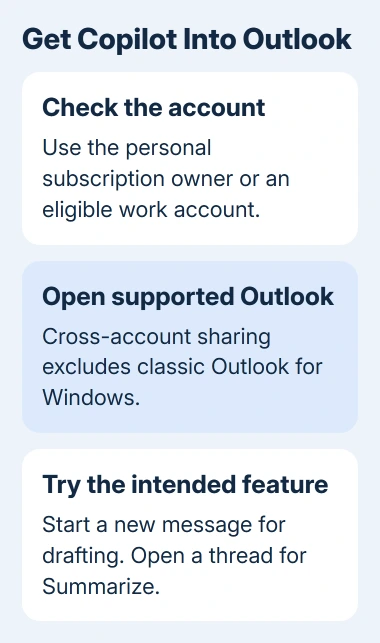
For work or school, ask the administrator which Copilot access your account has. Name the feature you need, such as drafting or mailbox chat. General Copilot access and Outlook features can have different requirements.
Microsoft says its Outlook account-sharing feature now allows eligible Copilot access across connected accounts on the same device. That includes providers such as Gmail and iCloud, but excludes classic Outlook for Windows.
That changes older advice that a third-party mailbox can never use Outlook Copilot. Keep the eligible account signed into the supported app alongside your other mailbox. Don't remove it once the other account is added.
Find the controls in the Windows app or browser mailbox
Open your mailbox in new Outlook, or sign into its usual Outlook web service. Check the account first if Copilot is missing. Opening an unrelated Copilot chat page doesn't enable features inside that mailbox.
To try drafting in new Outlook, select Home > New mail. In the compose toolbar, select Copilot > Draft. Some layouts also show a Copilot control or Draft with Copilot in the empty message area.
Type what the email needs to say, generate the draft, and review it. Use Keep it when the draft is suitable, then edit the message before sending. Starting a draft shouldn't send an email by itself.
For an existing conversation, look for Summarize near the start of an open conversation. That is the summary action, separate from the drafting controls in a new message. Try the action that matches your actual task.
If drafting isn't available for a plain-text message, open Settings > Mail > Compose and reply and choose HTML for the message format. The current new Outlook and web drafting feature doesn't support plain-text composition.
The browser mailbox needs a sign-in, so its controls are visible only after authentication. If web Copilot works while the desktop button is absent, focus the next checks on the desktop application's license, version, and settings.
Start a draft in Outlook for Mac
In Outlook for Mac, select New Message, then choose Copilot > Draft with Copilot from the toolbar. Enter the details for the message and select Generate. Review the proposed text before adding it to your email.
Use Neutral to change the tone or Short to change the length when those controls are shown. Choose Regenerate draft if needed. Select Insert to put the chosen draft into the message, then make your own final edits.
The Mac button labels differ from new Outlook's Keep it, so don't wait for an identical Windows dialog. The useful check is whether the generated text now appears in the message you're composing.
If the eligible account was just added and access hasn't appeared, refresh its license using the Mac steps in the license section. Signing into your mailbox doesn't refresh the app's license; that takes a separate step.
Use the Outlook app on iPhone or Android
Open Outlook for iOS or Android with the eligible account added. Select New Mail, tap the Copilot control in the toolbar, and choose Draft with Copilot. Enter a request that includes the facts the email needs.
Generate the draft, review it, and use Options if you want to adjust its tone or length. Keep It accepts the text; Discard or Regenerate gives you other choices. Edit the message before sending it.
Coaching by Copilot comments on text you've already written. The current mobile instructions require at least 100 characters for coaching. An empty message isn't the right place to test that feature.
Use the account selector to check which mailbox you're writing from, especially with personal and work accounts together. An eligible account on one device doesn't mean another device already has the same accounts added.
Refresh a license that Outlook hasn't picked up
On Windows desktop Microsoft 365, open an app such as Word and choose File > Account > Update License. Close and restart the open Microsoft 365 apps afterward so the refreshed license can take effect.
On a Mac, open a Microsoft 365 app, choose its app-name menu, then About > More Info > Refresh License. Close documents and restart the Microsoft 365 apps after the refresh. Check the same Outlook action again.
On a work computer, check the update channel in a desktop Office app's File > Account page. Copilot features aren't available through Semi-Annual Enterprise Channel in the way they are through Current or Monthly Enterprise Channel.
Ask IT to handle a channel change on a managed PC. For regular app updates, the Office update steps show the supported update controls; a license refresh alone doesn't install a newer build.
Copilot also needs permission to use connected experiences, the Office features that use online services. On managed accounts, ask IT to check the privacy policy.
On personal Windows Office, check File > Account > Manage Settings under Account Privacy for content analysis and connected experiences.
Treat a classic Outlook regression separately
Classic Outlook supports eligible Copilot features, but not the cross-account sharing described earlier. Use Home > New Email > Copilot > Draft with Copilot to compose. A store add-in isn't needed for that built-in control.
For a button that disappeared after an update, the classic Outlook Copilot guide covers that separate fault. That problem was unresolved earlier, but the current support page marks it fixed.
I'd check whether your account includes Copilot before reinstalling. If it still fails, give IT or Microsoft Support your account type, Outlook version, subscription, and missing feature. Include whether the same mailbox works on the web.
The Short Version
Add your eligible Copilot account to Outlook and try drafting or summarizing. Family sharing doesn't share the owner's Copilot benefits. Use the Windows, Mac, or mobile controls, and refresh the license if access hasn't appeared.
Checked November 12, 2026.