
You press the AirPods stem expecting the camera to fire, and nothing happens. That one confuses everybody, and I can tell you why.
The AirPods camera remote does not add a new control. It takes over one you already use, and iOS 26 does not decide which until you tell it.
That is why the first press does nothing. Pick one option and the stem stops skipping tracks while a camera app is open, pick the other and it stops switching noise modes or calling Siri.
It needs AirPods 4, Pro 2, Pro 3 or Max 2, on iOS 26 or later, with current AirPods firmware. Using AirPods as the camera microphone is a separate feature with its own switch and its own regional block.
Turn on Camera Remote and choose the press
Wear the AirPods and make sure they are connected, then open Settings, tap the name of your AirPods near the top of the screen, tap Camera Remote, and choose Press Once or Press and Hold.
Until you make that choice there is no shutter gesture at all, so this is the first thing to check.
Apple spells out the cost of each option:
- Press Once. Media control gestures are temporarily unavailable while you use a supported camera app. No play, pause or skip from the stem until you leave the camera.
- Press and Hold. Listening modes and Siri gestures are temporarily unavailable in the same way. You cannot switch between Noise Cancellation and Transparency, and you cannot summon Siri by holding.
Both are temporary, and the gesture returns the moment you leave the camera app.
That still bites in the moment: filming a school concert with music paused is fine, but filming on a busy street and finding you cannot flip into Transparency to hear traffic is a real cost, and so is losing skip control halfway through a long recording session.
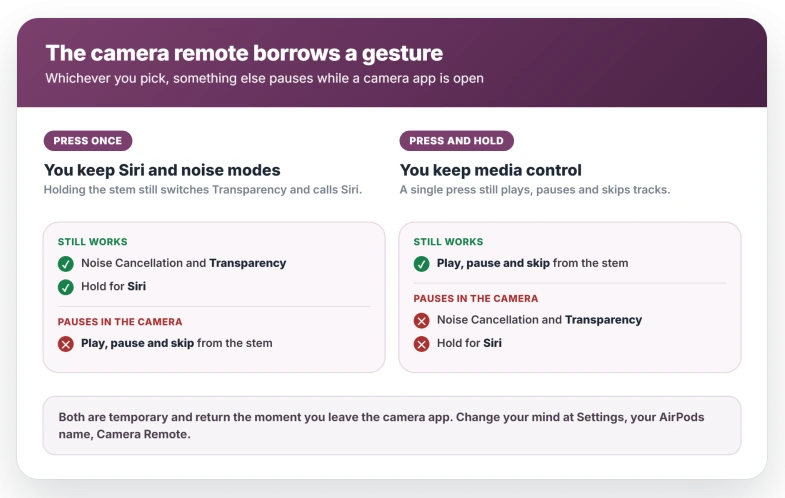
Pick by what you would miss less. If you listen to something while shooting, keep media control and take Press and Hold. If you switch noise modes constantly, keep those and take Press Once.
The choice is not locked in. The same Camera Remote screen lets you switch between them at any time, or turn the feature off again.
To shoot, open the Camera app, then press or press and hold the stem. On AirPods Max 2 it is the Digital Crown instead. For video, select Video mode first, then press to start and press again to stop.
No Camera Remote row? Check firmware before the model list
A missing Camera Remote row does not automatically mean the wrong hardware.
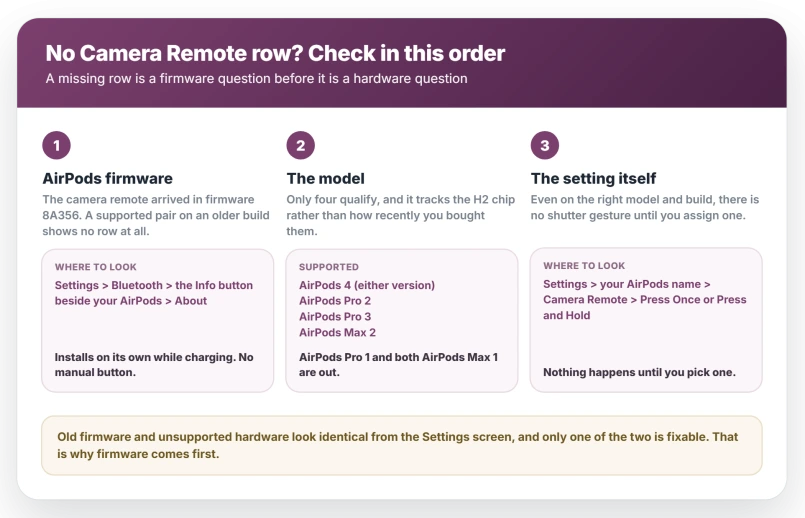
The feature arrived in an AirPods firmware update, not in iOS 26 alone. Apple's release notes for firmware 8A356 describe it directly, as capturing photos or videos at a distance with a press from the stem.
So a supported pair still running older firmware will show no row at all.
Check the build at Settings, then Bluetooth, then the Info button beside your AirPods, then scroll to the About section.
Apple's firmware page lists the current builds to compare against.
Firmware installs on its own while the AirPods are charging near an unlocked iPhone, and there is no manual update button, so this is a case of confirming rather than triggering.
Only once the firmware is current does a missing row point at the model.
Which AirPods support the camera remote
Apple limits it to AirPods 4, AirPods Pro 2, AirPods Pro 3 and AirPods Max 2, on iOS 26 or iPadOS 26 or later.
AirPods 4 here means both versions, with and without Active Noise Cancellation. That is different from Live Translation, which does require the ANC model, so do not carry that exclusion across.
Age is not the test. AirPods Max 1 with USB-C was still on sale well after AirPods Pro 2 launched in 2022, and the older Max is excluded while the older Pro qualifies.
The dividing line is the H2 chip, which is why the same four models also carry head gestures.
Apple now names the excluded over-ear models AirPods Max 1 (USB-C) and AirPods Max 1 (Lightning), so owning AirPods Max is not enough on its own.
To identify a pair, connect them and open Settings, then tap the name of your AirPods at the top of the screen.
The cases also tell you apart: the AirPods Pro 3 case has no button on the back, and the AirPods Pro 2 case does.
Apple lists the physical differences on Which AirPods do I have?. AirPods Pro 1 does not qualify.
Why there is no shutter sound when you press
In Photo mode the press does not fire instantly. It starts a 3-second countdown, so give it a beat before deciding nothing happened.
On top of that, Apple documents two cases where the confirmation is missing entirely. In some countries and regions the 3-second timer and the feedback tone in Photo mode are not available at all.
And you will hear no feedback tone when the ringer is turned off or when Live Photos is turned on.
The ringer is the side switch, or Settings, then Sounds & Haptics. Live Photos is the concentric-circles button at the top of the Camera app, highlighted when it is on.
Apple's note is about the tone rather than the capture, so before changing anything, run the countdown and then open Photos and look.
How to use AirPods as the camera microphone
This is a second feature with a separate switch. The remote fires the shutter. The microphone changes where the sound comes from.
Select Video mode in the Camera app, open Control Center, tap Camera Controls, then tap Input and choose your AirPods. You may also see Same as System there.
The same screen carries Mic mode, with Automatic, Standard, Voice Isolation and Wide Spectrum, the same modes that govern how your AirPods microphone sounds on calls.
A second route skips Control Center: Settings, then Sounds & Haptics, then Input, then your AirPods.
The two settings are separate, though Apple's own microphone steps end by pressing the stem to start recording, so a fully hands-free take needs both configured.
Third-party camera apps get the remote only if they adopted Apple's capture-event API.
Apple told developers at WWDC25 that apps already using it pick up AirPods stem clicks for free on iOS 26, and Apple's firmware notes call them compatible third-party camera apps.
An app that never adopted it will not respond, so test in the built-in Camera app first.
That removes app support from the question and narrows a failure to your model, your firmware or your Camera Remote setting.
Why you cannot select AirPods as the camera microphone in the EU
Apple states it plainly: using AirPods as a camera microphone "isn't available in all countries or regions, including the EU." In the EU your AirPods simply do not appear in the Input list.
No amount of resetting produces a feature your region does not receive. The EU sentence covers the microphone specifically, so the shutter can keep working while the microphone option never appears.
Apple also notes more broadly that some features vary by country and by local law.
In one Apple Community thread from late September 2025, two owners reported the same thing independently. One wrote that trying Blackmagic Camera let them change the input.
Two days later another, after a ninety-minute call with Apple Support, wrote that recording is unsupported in Apple's own Camera and Final Cut Camera apps in the EU but works in third-party apps.
Both are owner accounts rather than Apple guidance.
Treat that carefully, because the two things may not be the same feature. A third-party app can record from a Bluetooth microphone the ordinary way, which is not what Apple gates here, and it does not sound the same.
Regional gates do come off. The EU block on AirPods Live Translation was lifted in iOS 26.2. Apple has announced no date for the camera microphone.
If the AirPods audio is out of sync with the video
A handful of owners have reported AirPods audio arriving behind the picture.
In one MacRumors thread three people compared notes between November 2025 and April 2026, across AirPods Pro 2 and Pro 3 and four iPhone models, with one owner putting the offset at 100 to 300 milliseconds.
One of those phones was an iPhone XS Max, which cannot run iOS 26 at all.
That matters: the offset predates this release rather than arriving with it, so it is not something a future iOS update is obviously going to correct.
No fix emerged in that thread and no Apple reply appeared in it. If precise sync matters, record the audio separately or use a wired microphone.
What does not help
- Looking for a Camera Remote row before checking firmware. The row needs both a supported model and current firmware, so confirm the build before concluding the hardware is wrong.
- Turning the ringer back on to make it work. The ringer governs the confirmation tone. Run the countdown and check Photos instead.
- Re-pairing the AirPods. Nothing about a missing Camera Remote row points at the Bluetooth link, and re-pairing costs you a trip back through setup for nothing.
- Hunting for a microphone option in the EU. The camera microphone is regionally withheld, so there is no setting to find.
- Changing Mic mode to fix the shutter. Mic mode shapes recorded sound and has no bearing on whether a press takes a photo.
Status: both features need one of four AirPods models plus current firmware. As of iOS 26.6 the camera microphone is still unavailable in the EU and the recording lag is unacknowledged.
Which AirPods work as a camera remote?
AirPods 4 in both versions, AirPods Pro 2, AirPods Pro 3 and AirPods Max 2, running iOS 26 or iPadOS 26 or later with current firmware.
AirPods Pro 1, AirPods 3 and both AirPods Max 1 models are excluded. The common factor is the H2 chip rather than how recently you bought them.
Why does pressing my AirPods stem not take a photo?
Most often the feature was never assigned. There is no shutter gesture until you open Settings, tap your AirPods name, tap Camera Remote and choose Press Once or Press and Hold.
If that row is missing, check your firmware build first and your model second. In Photo mode, also allow the 3-second countdown before deciding the press failed.
Does the camera remote stop my AirPods controls working?
Only inside a camera app, and only the one you traded away. Press Once suspends media control gestures while a supported camera app is open.
Press and Hold suspends listening modes and Siri gestures instead. Both return the moment you leave the camera, and neither affects anything outside it. You can swap between them whenever you like.
The Short Version
- The feature is unassigned until you choose. Settings, your AirPods name, Camera Remote, then Press Once or Press and Hold.
- Each choice costs something while a camera app is open: Press Once suspends media gestures, Press and Hold suspends listening modes and Siri. Both come back after.
- No Camera Remote row is a firmware question before it is a model question. Check Settings > Bluetooth > Info > About.
- Only AirPods 4 (either version), Pro 2, Pro 3 and Max 2 qualify. It tracks the H2 chip, not the purchase date.
- On AirPods Max 2 the control is the Digital Crown, not a stem.
- A press in Photo mode starts a 3-second countdown, and the tone is silent with the ringer off or Live Photos on.
- The microphone is a different feature: Video mode, Control Center, Camera Controls, Input. Or Settings > Sounds & Haptics > Input.
- The camera microphone is unavailable in the EU, and a small number of owners report recorded audio landing late with no fix yet.
Where to Next
- Gestures missing on your pair: AirPods head gestures not working on iOS 26
- The microphone sounding wrong on calls: AirPods microphone muffled on calls
- Another feature gated by region: AirPods Live Translation not working on iOS 26

Isaac Smith is the founder and editor of PC Glance, a website that covers computers, laptops, and technology. He is a tech enthusiast and a computer geek who loves to share his insights and help his readers make smart choices when buying tech gadgets or laptops. He is always curious and updated about the latest tech trends.