Bose headphones that aren't charging need a cable and USB power check before a reset. Try a second suitable cable and USB charger. If they still don't respond, follow your exact headphone model's reset sequence.
Headphones that never start charging need different checks from a battery that drains soon after unplugging. Start with the connection when nothing happens after plugging in.
If the headphones do charge but won't stay on, check the power controls and battery behavior too.
In this guide
1. Check the cable, power source and temperature
Disconnect the cable and inspect its fit at the headphones. Reconnect it without forcing the plug. Keep that charger connected and swap in a second cable. Next, compare a different USB charger.
Bose recommends comparing the cable and charger in its QuietComfort Ultra Headphones 2nd Gen charging steps. It recommends a charger rated at least 1 A (1000 mA) for that model.
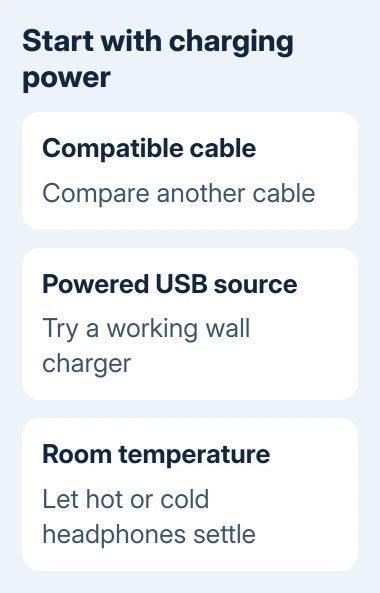
If you're charging from a laptop, keep the computer powered on during the comparison. A wall charger removes the computer's USB-power behavior from the check, so it helps when charging stops after the laptop sleeps.
Let headphones left in a hot car or cold surroundings reach room temperature before retrying. The battery can refuse charging outside its permitted temperature range. Don't use a heater to speed that up.
If another cable gets charging working, the first cable or its fit is the problem. If another power source helps, check the original supply. Keep the combination that works while checking whether your headphones also switch on.
The USB connection guide explains why the socket's shape alone doesn't describe its capabilities. A plug fitting the headphones isn't a complete check of the cable or power source.
2. Identify the model before pressing reset controls
Check the exact product name in the Bose app, on the product information or on the original packaging. QuietComfort 35, QuietComfort 45, standard QuietComfort Headphones and QuietComfort Ultra use different reset sequences.
I'd confirm the name before holding buttons. A pairing-list clear or factory restore isn't the same operation as rebooting the headphone controls, and it can create another setup task without fixing the charging connection.
Use the matching section here. For Noise Cancelling Headphones 700 or another model, select that exact product in Bose support and open its reset instructions.
Don't apply the QC35 timing to a different headset just because it has a power button.
These checks are for headband headphones. Earbuds that charge inside a case need their case power and charging contacts checked too, so don't use an earbud charging procedure for an over-ear model.
3. Restart QuietComfort 35 using its timed sequence
For the original QuietComfort 35, switch the headphones off and leave them off for 30 seconds. Attach the headphones to USB power from a wall charger. Leave that connection in place for 5 seconds.
Remove the cable from the headphones and wait 1 minute. Switch them on and check whether they respond normally. The QC35 reset instructions say this restart keeps product settings.
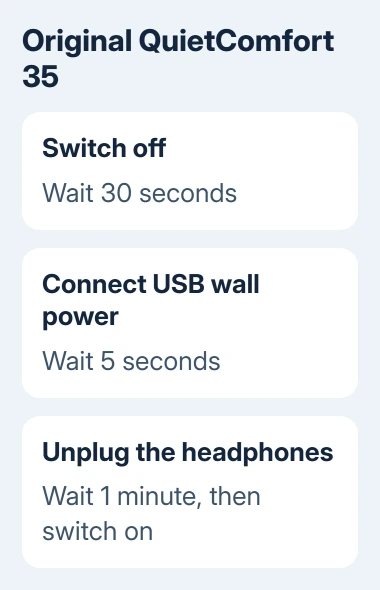
After checking power, reconnect the working charging cable and look for a charging response. The short USB connection during the reset is part of the restart procedure; it isn't a full battery recharge.
If the headphones remain dead with the cable and supply already compared, go to service rather than repeating the timed sequence indefinitely. Report that the original QC35 restart didn't restore power or charging.
For QC35 II, select QuietComfort 35 II in support before using its reset page. Keeping the product name in the instructions avoids confusing it with later USB-C QuietComfort models.
4. Reset QuietComfort 45 or standard QuietComfort
On QuietComfort 45, attach the USB charging cable to the right earcup. Slide the Power/Bluetooth switch right and keep it there while connecting the cable's other end to a USB wall charger. Release the switch after connecting.
The QC45 reset page separates this from its factory-restore procedure. Use the reset steps, rather than the longer button combination for erasing settings.
For standard QuietComfort Headphones sold from 2023, connect the cable to the left earcup's USB-C port. Slide Power/Bluetooth right while connecting the cable's other end to a USB-A power source.
Its power troubleshooting instructions describe the status light returning according to the battery's charge level after the reset. This procedure reboots the controls without clearing device settings.
The earcup difference matters. Use the port on your actual model rather than a remembered drawing of another QuietComfort headset. If it responds, check charging again with the cable and power source you checked first.
5. Reboot QuietComfort Ultra Headphones 2nd Gen
Remove any USB or audio cable from the headphones. Connect the USB charging cable to a powered charger or a computer that is on, leaving the headphone end disconnected for now.
Hold Power/Bluetooth on the headphones. While holding it, insert the USB cable into the left earcup. The power light should flash twice quickly. Wait 2 seconds, then release the button.
This model's charging page says the reboot keeps product settings and suggests trying it a second time if the headphones don't respond. Afterward, compare normal charging with the known working cable and supply.
For the original QuietComfort Ultra Headphones, follow the original Ultra power instructions: remove its Bluetooth entry on your phone, then attach USB-C to the left earcup.
Hold Bluetooth/Power while connecting the cable's other end to USB-A power. Release the button after connection. The status light flashes white for 3 seconds, then shows the charge level. Re-pair the headphones afterward.
6. Separate failed charging from a connection problem
Once the headphones turn on, check whether they retain charge after unplugging. Report a battery that immediately drops or a headset that shuts down separately from a charging port that never responds.
Standard QuietComfort power troubleshooting also includes the power-switch position and automatic power-off settings.
Those controls matter when a charged headset switches off; changing them isn't a repair for a USB plug that makes no connection.
For headphones that now start but won't connect, follow the Bose-to-iPhone pairing steps. The iPhone accessory checks also start with a powered, charged accessory.
If charging still fails, open Bose support for the exact product and choose Start a repair or replacement. Supply the serial number, purchase details, cable and charger results, and the reset tried.
A loose charging socket or failed battery needs to be checked for repair.
The Short Version
Compare the charging cable and power source, let the headphones reach room temperature, then use the model's reset. QC35, QC45, standard QuietComfort and Ultra controls differ. Continued failure needs Bose repair or replacement support.
Checked November 12, 2026.