
Bose QuietComfort headphones pair with an iPhone through Settings > Bluetooth after entering pairing mode. A previously used pair may reconnect to an old device when switched on, leaving it unavailable to the new phone.
These controls are for the standard Bose QuietComfort Headphones with a power slider. QuietComfort Ultra, earbuds and other Bose models have different controls; check the model before following the slider instruction.
Put the QuietComfort headphones into pairing mode
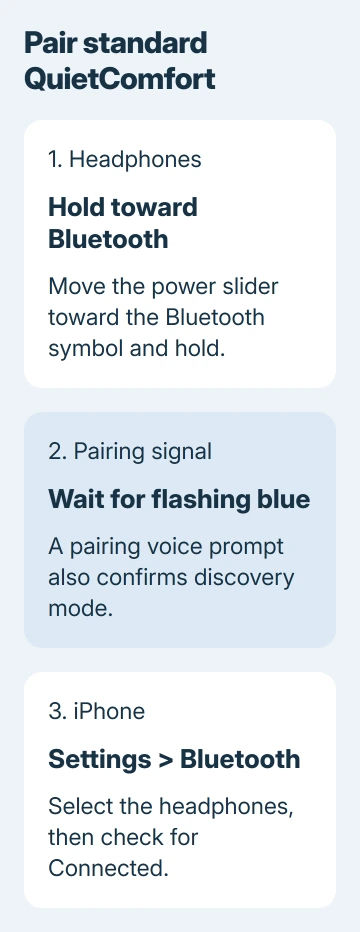
Move the power slider to its middle On position. Slide it toward the Bluetooth symbol and hold it there until the Bluetooth light flashes blue or the voice prompt announces pairing mode. Release the switch after that signal.
Bose says the first connection enters pairing mode automatically. For an already-used pair, the QuietComfort product FAQ documents the hold-to-pair action.
Status: Standard Bose QuietComfort slider controls and Apple's iPhone pairing steps checked November 3, 2026. No headset was physically tested.
The blue light is the useful checkpoint. If the headphones only announce a connection to an old laptop, return to the pairing action before searching repeatedly on the iPhone.
Select the headphones in the iPhone's Bluetooth list
Open Settings > Bluetooth and turn Bluetooth on. Keep this screen open while the headphones are discoverable. Tap the Bose headphones' name when it appears to establish the connection.
Apple documents this process in its Bluetooth accessory pairing guide. Wait for the device to show Connected, then play a short audio clip to check that sound reaches the headphones.
For a connection dropped through Control Center, check how its Bluetooth button differs from Settings before removing a working pairing.
The Bose app is optional for this basic connection. Bose states that pairing can be completed in the phone's Bluetooth settings, although its app provides additional product settings.
If the Bose app cannot see an otherwise connected pair, open Settings > Privacy & Security > Bluetooth and allow the app access. Apple's accessory guidance lists this permission separately from the phone's main Bluetooth switch.
The headphones do not appear or will not reconnect
Keep both devices nearby, charge the headphones and switch them off and on. Then put them into pairing mode again. A charged, discoverable pair is the starting point for Apple's connection troubleshooting.
For a Bose entry already saved on the iPhone, tap its information button and choose Forget This Device. This removes that pairing, so the headphones must be selected again after returning to pairing mode.
Apple says the unpairing can extend to the account's other linked devices. Consider that effect when the headphones serve an iPad or Mac as well.
For headphones that connect elsewhere but fail on this iPhone, Apple recommends removing their pairings on the other devices before another attempt. This is narrower than resetting all of the iPhone's network settings.
For an iPhone 17 with broader connection trouble, use the iPhone Bluetooth fault checks. Check the phone separately when several working accessories fail to connect.
When to ask Bose or Apple for help
Contact Bose with the exact model if pairing mode never starts or the headphones fail with multiple phones. Contact Apple if Bluetooth is unavailable on the iPhone or no working accessory will connect.
Our recommended support detail is the last successful step: flashing blue, appearance in the list, or a completed connection with no audio. That describes the failure more precisely than saying Bluetooth does not work.
The Short Version
On standard QuietComfort headphones, hold the slider toward Bluetooth until pairing starts. Select the pair in iPhone Bluetooth settings. Check discovery mode, saved pairing and app permission according to where the connection stops.

Isaac Smith is the founder and editor of PC Glance, a website that covers computers, laptops, and technology. He is a tech enthusiast and a computer geek who loves to share his insights and help his readers make smart choices when buying tech gadgets or laptops. He is always curious and updated about the latest tech trends.