
You hold Alt, type a code, and the wrong symbol lands in your text. Alt+2713 gives Ö instead of a check mark, or a code for £ prints ú. On some laptops nothing appears at all.
I would check three things before any registry fix: which keys you typed the digits on, whether the code starts with a zero, and whether it is bigger than 255. Each one gives you a different wrong result.
That exact Ö sits in a January 2016 Super User question, read 100,906 times. On Microsoft Q&A, a March 2026 question about Alt codes dead on an HP laptop drew an answer from Microsoft external staff.
Two old tables behind one key
Alt codes are older than Unicode. On a US English PC without a leading zero, Windows looks the number up in the old DOS table, code page 437. With the zero, it uses the Windows table, code page 1252.
Ours: this laptop's registry lists exactly those two, OEMCP 437 and ACP 1252. Feeding the same number to both gives Alt+163 as ú and Alt+0163 as £, which is the swap one Super User owner kept hitting.
Big numbers wrap around. Super User's accepted answer puts it simply: "Codes bigger than 256 get wrapped around". The arithmetic shows it. 2713 minus ten lots of 256 leaves 153, which is Ö in code page 437.
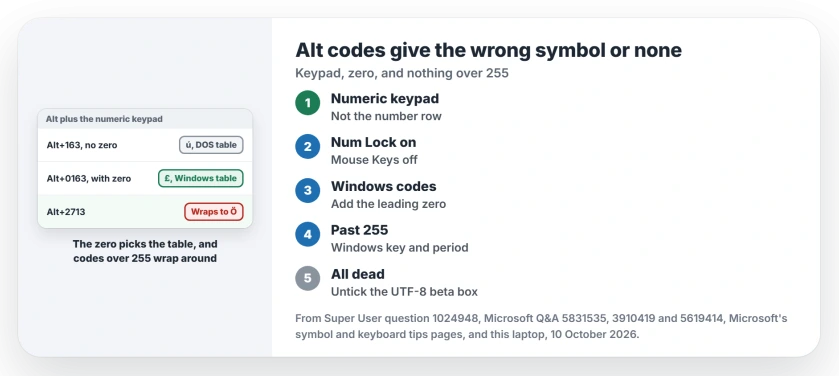
Status: Microsoft's symbol and keyboard pages, this laptop's two code pages and Alt code owners on two forums, compared on 10 October 2026. The keypad and the zero fixed most wrong symbols.
1. Type the digits on the numeric keypad
Microsoft documents this on its ASCII and Unicode symbols page: "You must use the numeric keypad to type the numbers". The number row over your letters does nothing.
It adds: "Make sure that the NUM LOCK key is on if your keyboard requires it to type numbers on the numeric keypad". On a laptop with a built-in keypad, that means Num Lock or Fn first.
If Num Lock keeps turning itself off whenever Windows starts, a separate value set just for the sign-in screen is the fix.
Mouse Keys can take your keypad over. The 2026 Q&A owner had it on, and once they turned it off, the keypad's numbers worked again. Our page on arrow keys moving the mouse pointer shows where that switch sits.
No keypad at all? A Q&A answer suggests the On-Screen Keyboard, opened with osk in the Run box, with its Num Lock on.
2. Put the zero in front
Microsoft's keyboard tips page lists codes such as Alt + 0169 for ©, Alt + 0174 for ® and Alt + 0150 for the en dash. It also says "When required, make sure to include the leading 0".
Drop the zero and you get the DOS table instead. Ours: Alt+169 without it gives ⌐, a symbol you never asked for.
Old code lists without zeros are not wrong. They just point at that DOS table. Alt+130 still gives é and Alt+164 still gives ñ, while Alt+0241 is the Windows route to the same ñ.
One Super User owner found that left and right Alt gave different results for 0163, ú on one and £ on the other. If that matches your PC, try the right Alt key with your left hand.
On layouts with AltGr, that right key works differently, as our AltGr page explains.
3. Over 255, skip Alt codes
A check mark has no place in either old table, so no plain Alt code can reach it. Press the Windows key and period, then choose Symbols, which Microsoft's keyboard tips page describes.
In Word and Outlook you can type the Unicode code itself. Microsoft says to "type the character code, press ALT, and then press X", so 2713 then Alt+X becomes a check mark.
There is also a registry route. The Super User answer adds a string value called EnableHexNumpad, set to 1, under HKEY_CURRENT_USER\Control Panel\Input Method.
Sign out and back in. Then hold Alt, press plus on the keypad, type the hex code and let go.
I would try the emoji panel first. The 2026 Q&A owner already had EnableHexNumpad set to 1, and it did not bring their codes back.
When no Alt code works at all
Look at one box in your language settings. It sits in Control Panel, Region, Administrative, Change system locale, and reads "Beta: Use Unicode UTF-8 for worldwide language support".
An owner on Q&A whose low codes did nothing had an advisor suggest unticking it. They removed and reinstalled their language, unticked the box, restarted, and wrote "Now everything's working as intended!"
The 2026 owner with dead codes had that box ticked as well. If yours is ticked and you never meant it, untick it and restart.
The Short Version
- Type the digits on the numeric keypad, with Num Lock on and Mouse Keys off.
- A leading zero switches from the DOS table to the Windows table.
- Codes over 255 wrap around, so 2713 lands on Ö.
- For a check mark and other symbols past 255, use Windows key and period, or Alt+X in Word.
- All codes dead? Untick the UTF-8 beta box and restart.
Where to Next
Which code were you trying to type? Type it into a comment beside the symbol that came out, and I will work out which table it came from.

Isaac Smith is the founder and editor of PC Glance, a website that covers computers, laptops, and technology. He is a tech enthusiast and a computer geek who loves to share his insights and help his readers make smart choices when buying tech gadgets or laptops. He is always curious and updated about the latest tech trends.