
Your AltGr key suddenly types plain letters, so @, € or ć will not come out. Only a restart seems to bring it back, while Ctrl and Alt pressed together may still work.
I would look at what else you have open before touching the keyboard settings. On Windows, AltGr is really Ctrl plus Alt. Any program that grabs that pair can take the key.
A Super User question from November 2016 has 172,354 views. Two Microsoft Q&A questions about it each list 100+ under Same question.
AltGr is two keys in disguise
Windows sends no separate AltGr key to your apps, which Microsoft confirms on its PowerToys page: "AltGr behaves as (L)Ctrl + (R)Alt". A shortcut built on Ctrl and Alt can catch it.
Ours: I opened three layout files on this laptop without installing them, the Polish, Swedish and German ones, and each keeps its AltGr characters in the Ctrl plus Alt column.
So ć sits under C on the Polish one, and @ under 2 on the Swedish one. When AltGr fails, something holds your Ctrl and Alt, or something answers to Ctrl, Alt and a letter before your app does.
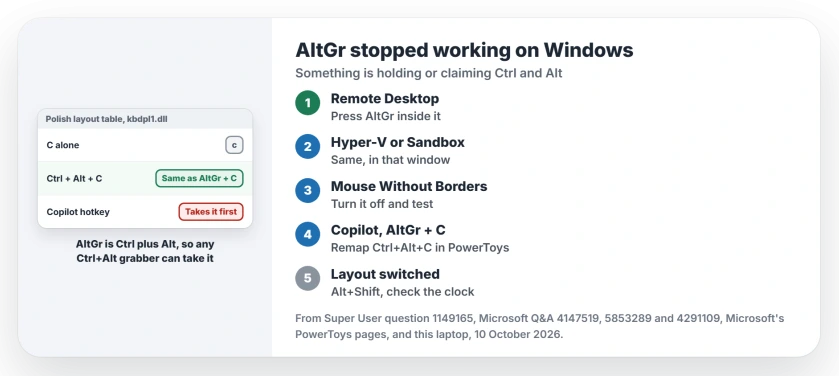
Status: Microsoft's PowerToys pages and the owners who posted fixes on Super User and Q&A, checked 10 October 2026. Pressing AltGr inside the remote window freed it for most of them.
1. Press AltGr inside the remote window
Super User's highest-voted answer, with 328 votes, blames Remote Desktop: bring its window to the front and press Alt+Enter there. The fault clears in your other windows too.
That fix was confirmed by owners again and again, each with a twist. One had to visit "each RDP window in turn, press altgr there". Another simply minimized the Remote Desktop window.
Hyper-V and Windows Sandbox can do the same to you, as one owner found with a virtual machine waiting for input. Another saw it with Sandbox.
Do you close the lid with a session open? One owner lost AltGr after every sleep that way. Tapping AltGr inside the session brought it back.
2. Find the app that owns Ctrl, Alt and a letter
Some apps claim Ctrl+Alt shortcuts across your whole PC. Microsoft's own Mouse Without Borders page lists its shortcuts as Ctrl and Alt plus a letter. It adds that "Ctrl + Alt + 3 switches to the third machine".
If AltGr and 3 types a character on your layout, the two collide. An owner on Microsoft Q&A traced a dead AltGr to it, and with Mouse Without Borders disabled, "ALT+GR is back again".
The Super User asker's culprit was a leftover of WinCompose, still running. They had uninstalled it. It kept reading their AltGr presses as shortcuts anyway.
Others named a virtual desktop tool and a gaming keyboard's macro button, so open Task Manager and quit your background tools one at a time. Test AltGr after each.
3. Copilot and AltGr+C
Polish and Hungarian typists hit a newer case in 2026, and a Microsoft external staff moderator explained it on Q&A.
"AltGr is treated as Ctrl + Alt, so AltGr + C (used for ć on Polish keyboards) triggers Ctrl + Alt + C, which opens Copilot".
They called it a design issue with no official toggle yet, and their workaround remaps Ctrl+Alt+C to nothing in PowerToys Keyboard Manager. Another owner remapped it to send the text ć instead, so the letter still comes out.
One more owner fixed it in Settings, under Bluetooth & devices, then Keyboard, by setting the Copilot key's action to Microsoft 365 Copilot. After that, ć typed normally.
Microsoft documents a warning on its Keyboard Manager page: remapping Ctrl or right Alt alone can break AltGr. I would remap your whole Ctrl+Alt+C shortcut and leave single keys alone.
4. Did your layout switch instead?
Sometimes AltGr is fine and your layout changed. Alt+Shift flips between the layouts in your list, as one commenter noted. English (US) has no AltGr characters at all.
Ours: the US layout file here carries no AltGr flag. It has no Ctrl plus Alt column either. Click the language letters near your clock and pick the layout you meant.
Holding Alt and typing digits is a separate trick from AltGr. If those codes print odd symbols, the leading zero and the code page explain it.
Keyboard language on Windows separates layouts, display language and input language, and when a removed layout keeps returning, the ghost layout page clears it for you.
When none of it sticks
Two odd moves helped some owners. Left Shift, Caps Lock and AltGr pressed together was "the only solution that worked for me", one wrote. Another ran ctfmon.exe again.
A restart clears it too. One Q&A owner found that after trying the rest. If it returns within minutes, a background program on your PC is behind it. Step 2 is where I would look again.
The Short Version
- On Windows, AltGr is Ctrl plus Alt, so any Ctrl+Alt grabber can take it.
- A Remote Desktop, Hyper-V or Sandbox window is the classic cause: press AltGr inside it.
- Mouse Without Borders and other Ctrl+Alt shortcut tools collide with AltGr.
- Copilot's Ctrl+Alt+C eats AltGr+C; remap that shortcut in PowerToys.
- Check that Alt+Shift did not switch you to a US layout.
Where to Next
Typing @ and ć again? Which window or app was holding your AltGr? Let me know in a comment, so the next reader finds it faster.

Isaac Smith is the founder and editor of PC Glance, a website that covers computers, laptops, and technology. He is a tech enthusiast and a computer geek who loves to share his insights and help his readers make smart choices when buying tech gadgets or laptops. He is always curious and updated about the latest tech trends.