
You add a playlist in the Watch app and nothing ever arrives. The watch tells you the download will resume later, and later never comes.
The alert blames charging, while Apple's own guide gives a slightly different condition, which is a good part of why this is so maddening.
Let me sort out what it actually needs before you try anything drastic.
The charger is not the condition
The alert reads Download Failed, then the name of your playlist, then that sentence about charging and the internet. If the watch is not reaching your phone at all, an Apple Watch that will not connect is the page to read first.
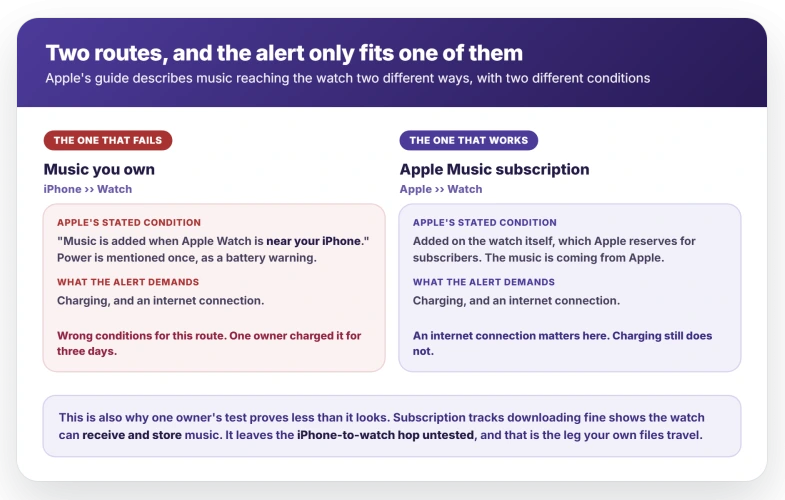
Apple's watchOS 26 User Guide describes the transfer differently.
Its only condition is proximity: "Music is added when Apple Watch is near your iPhone." Power appears once, and only as a battery warning: "Downloading music when your Apple Watch isn't connected to power uses more of its charge than normal."
The alert is not quite nonsense. A subscriber adding music on the watch is pulling it from Apple, so a connection matters there in a way it does not for files already on your iPhone.
Apple never gives charging as a condition for either route, though, and the failing route is the other one.
So keep the watch near an unlocked iPhone instead. Leaving it on a charger overnight is the one thing the alert asks for and the one thing Apple's own instructions never mention.
Try this first: it takes a minute and needs no computer
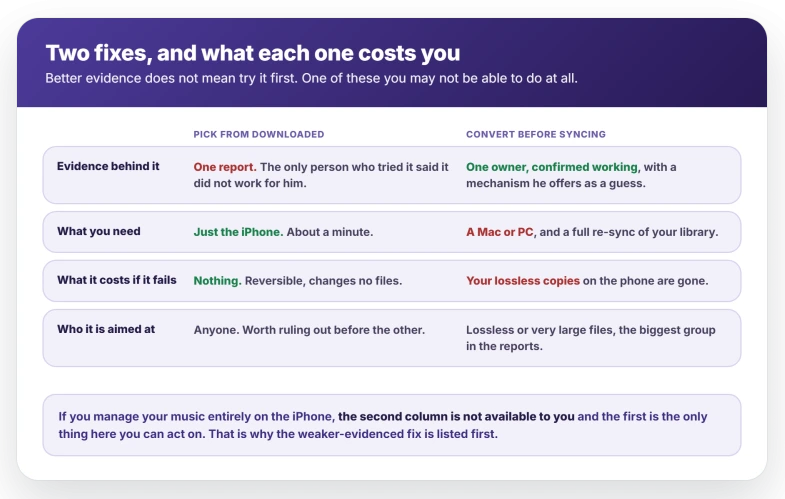
This has a single report behind it, and the only reader who tried it said it did not work for him. It goes first anyway, because it takes a minute, changes nothing permanently, and needs no Mac or PC.
The better-evidenced fix further down needs both.
One owner found the Add Music picker would not act on a selection made from his general library, while the same playlist chosen from the Downloaded section began transferring at once.
The one person who reported back had a large playlist and said it still would not sync that way.
> "I was able to select the playlist from within the downloaded section and it started syncing right away. It wouldn't progress syncing when I tried selecting the playlist from the main library section."
In the Watch app, tap My Watch, tap Music, then Add Music under Playlists & Albums. In the Library sheet, scroll to Downloaded and pick the playlist there.
If there is no Downloaded row in that sheet, stop rather than hunting.
Apple documents the picker only as "Navigate to albums and playlists you want to sync to your Apple Watch", naming no sections at all, so nothing published says whether that row can be turned on or off.
The tell is whether anything happens at all. The owner who found this described it starting to sync right away from Downloaded, against refusing to progress from the main library. If nothing moves, this was not your fix.
Better evidenced, but it needs a computer
This one comes with a mechanism and a confirmed result, and it is aimed at the largest group in the reports: people with lossless or very large files.
An Apple Watch Ultra 2 owner with ALAC files ripped from CDs got the transfer completing by changing how the music reached his iPhone in the first place.
Apple documents the setting on both platforms, and points at it for this kind of trouble itself: turning it on "can also help if you're having problems syncing music or videos".
- Connect the iPhone and select it in the Finder sidebar, or in the Apple Devices sidebar on Windows.
- Click General.
- Tick Convert higher bit rate songs to, then pick a bit rate from the menu. The owner who reported this used 256 kbps AAC. Apple does not list the choices, so take that figure from him.
- Click Apply, let the music sync to the iPhone, then add the playlist to the watch.
Your originals stay on the computer; the copy on the phone is what gets converted. One caveat: Finder only offers music syncing with Sync Library off, so an iCloud library leaves that screen empty.
His reading of why is that the Watch app transcodes lossless files during the sync and the conversion is what stalls.
He offered that as a question, and no Apple page describes any such conversion, so take the mechanism as his and the result as tested.
It has a known failure too. One owner with very large MP3s tried converting to AAC and it changed nothing, so this looks aimed at lossless rather than size alone.
Two costs, both real. You need a computer, so if you manage music entirely on the iPhone there is nothing here you can act on, and the Downloaded route is your only option.
And you no longer have lossless copies on the phone, so keep the originals somewhere else first.
The file pattern behind it is consistent. One owner has ALAC only. Another could sneak 15 songs out of a 153-track Apple Lossless playlist and no more.
A third has 27 MP3s of about 55 minutes each, between 60 and 150 MB, that will not transfer while his other playlists do.
It is not a rule, though, and two cases say so.
The same ALAC files synced without trouble on another household member's different hardware, and that 27-track playlist eventually reached an Ultra while still refusing a Series 8.
Treat size and format as a risk factor, not a diagnosis.
The pattern is the music you own
One owner ran the cleanest test available. He signed up for an Apple Music subscription purely to troubleshoot, downloaded from it, and it worked immediately. His own library still refused.
> "music downloads fast and easy. Crazy how that 'just works' but all the music I actually own, either ripped from CD or bought from iTunes will not download to the watch."
That carries more than its sample size suggests, because it is a comparison on one watch, one route against the other. It shows the watch can receive and store music perfectly well.
A watch and iPhone genuinely losing each other looks nothing like this, and that fault announces itself with a red icon.
It does not clear everything, though.
Apple describes two separate routes: a subscriber adding music on the watch is pulling it from Apple, while your own files come across from the iPhone on proximity.
So the test shows the watch can fetch and store music, and leaves the iPhone-to-watch hop untested. That is the leg your own files travel.
The rest of the reports point the same way, though not by counting subscriptions. Most of these owners never say whether they subscribe.
What they do say is what kind of music it is, and every one of those descriptions is of files they hold themselves: CDs ripped to ALAC, iTunes purchases, MP3s built on a Mac.
Not one report anywhere describes an Apple Music download failing.
Three owners also got music onto the same watches through Spotify, TIDAL and a third-party app. Those use their own download paths, not the Watch app's, so it does not isolate a cause.
What it does show is that the watch will hold and play local music quite happily, which narrows the fault to Apple's own transfer of files you own.
What does not help
- Leaving it on the charger. The alert asks for it, Apple's guide does not, and one owner gave it three days.
- Turning off music in iCloud. Apple's own suggestion at a Genius Bar appointment, tried in store, and the sync still failed. The same visit killed another theory too: the store reproduced the failure on Apple's own network, so a slow home connection is not it.
- Clearing space. One owner says plainly his storage is fine, another points at 64 GB sitting unused, and a third synced over 30 GB of albums before watchOS 26 broke it. No case here traced to a full watch.
- Replacing the watch. One owner sent his in, the technician reproduced the fault, and the replacement did the same thing.
- Re-pairing. One owner re-paired at least four times and reset his iPhone, with no change.
- Restarting, or removing and re-adding the playlist. No report in these threads has either one fixing it, and none has anyone trying and failing, so treat them as untested rather than ruled out. One owner's trouble did begin after he removed a playlist and tried to put it back.
One more thing while you test.
Two owners found Music settings on the watch switching themselves back, one seeing Add Playlist Songs turn itself off and the other seeing add favorite songs re-select itself.
Nothing connects that to the sync failure, but a toggle that reverts will make a working fix look like a failed one, so re-check anything you change.
Status: no fix from Apple through watchOS 26.6, whose notes never mention music sync. Reports run out on 14 December 2025, and the one forum still open has stayed quiet since.
How do I put my own music on my Apple Watch without Apple Music?
Apple offers exactly one route, and it starts on the phone. Tap My Watch, tap Music, then Add Music under Playlists & Albums, and choose your playlist.
Keep the watch near the unlocked iPhone while it transfers. Adding music on the watch itself is a subscriber feature, so it will not help here.
Why will my Apple Watch not download my music?
If the music is your own rather than an Apple Music subscription, that is the pattern across every report. Try picking the playlist from the Downloaded section of the library first.
If you have a computer and your files are lossless or unusually large, converting them to 256 kbps AAC before syncing to the iPhone is the better-supported fix.
Does Apple Watch music sync need the watch to be charging?
Not for the music you own. Apple's watchOS 26 guide gives proximity to your iPhone as the condition and mentions power only as a battery warning.
The Download Failed alert says otherwise, and owners who followed it have left watches charging for days with nothing to show.
How much music can an Apple Watch hold?
Apple does not publish a figure. Its page on full Apple Watch storage offers no cap and no percentage, and the current Series 11 tech specs do not list capacity at all.
One owner keeps about 10 GB on his watch and another synced over 30 GB of albums onto his before watchOS 26, so the numbers circulating elsewhere are not Apple's.
The Short Version
- The Download Failed alert blames charging. Apple's guide gives the condition as being near your iPhone.
- Apple gives charging as a condition for neither route. The failing one is the music you own.
- Try Downloaded first: it takes a minute, needs no computer, and one owner says the picker only acts on a selection made there.
- Downloaded may not be on your list, and nothing Apple publishes says whether that row can be turned on or off, so stop rather than hunting for it.
- The better-evidenced fix is converting to 256 kbps AAC before syncing, but it needs a computer and costs you your lossless copies.
- Lossless and very large files dominate the failing cases, though the same files worked on other hardware for one owner.
- One owner subscribed to Apple Music purely as a test: subscription tracks downloaded, his own files would not.
- That shows the watch can fetch and store music. It leaves the iPhone-to-watch hop untested, which is the leg your own files use.
- Apple has shipped no fix through watchOS 26.6, and a replacement watch reproduced the fault for one owner.
Where to Next
The alert blames charging and Apple's own guide gives a different condition, so trust the guide rather than the alert.
Get the watch near the phone, on Wi-Fi, and leave it. That is what the transfer actually wants.
Where it is Notes rather than music that will not arrive, that syncs by a different route.
If your playlist still refuses after a night of that, tell me how large it is in the comments, because size changes the behaviour more than people expect.

Isaac Smith is the founder and editor of PC Glance, a website that covers computers, laptops, and technology. He is a tech enthusiast and a computer geek who loves to share his insights and help his readers make smart choices when buying tech gadgets or laptops. He is always curious and updated about the latest tech trends.