On Windows, change Chrome's menu language in Settings > Languages: add your language, choose Display Google Chrome in this language, then restart Chrome. Android, Mac and iPhone use different controls.
Changing the language of a webpage is another choice. Use translation settings when Chrome's menus are already readable and only the page needs translating. That avoids changing the whole browser to fix one foreign-language site.
In this guide
Change the menus in Chrome for Windows
Open Chrome and enter chrome://settings/languages in the address bar. Press Enter. This reaches the language controls even when the current menus use a language you can't read comfortably.
Under Preferred languages, look for your language. If it isn't listed, select Add languages, search for it, check it and select Add. That adds it to the list. You'll choose whether to use it for Chrome's menus in the next step.
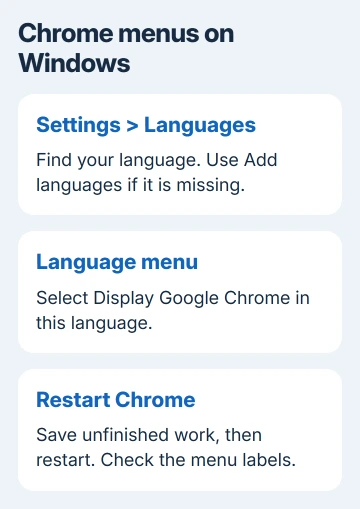
Open the three-dot More menu beside the language you want. Select Display Google Chrome in this language. Save any unfinished web forms, then restart Chrome using its relaunch control when offered.
Open Chrome's main menu or Settings again. Its labels should now use your chosen language. If a website stays in its previous language, that doesn't mean the browser setting failed. Websites have their own language preferences.
Google says this checkbox is available only on Windows in its Chrome language instructions. On Mac or iPhone, you'll need the device's language controls instead.
If Windows typing still uses the wrong letters or punctuation, change the keyboard input language. The language of your browser menus doesn't control which characters your keyboard types.
Set Chrome's language on Android
Open Chrome > More > Settings > Languages. Under Chrome's language, tap the current language, then select your preferred replacement. Let the language download finish. Chrome restarts automatically once it's downloaded.
The language entry can show Language ready once the download is complete. Open the main menu again to check the new labels. If the download hasn't finished, give it a working connection before changing the preference repeatedly.
The Preferred languages list on the same screen tells websites with several language options which ones you prefer. Adding English there isn't the same as choosing English under Chrome's language.
For page translation, the Android route is Settings > Languages > Advanced > Translate into this language. Choose the language you want translated pages to use, rather than changing the browser menus a second time.
I'd check the heading over the selected language before restarting. Android puts several language choices close together, and it's easy to change a website preference when you meant the app's menus.
Use the Mac language controls
On a current Mac, open Apple menu > System Settings > General > Language & Region. Chrome normally follows the Mac's preferred system language, rather than offering the Windows display-language checkbox.
To change the whole Mac, add the required language, then place it first in Preferred Languages. Follow the confirmation shown. A restart may be needed before every app reflects the new choice.
For Chrome alone, find Applications in Language & Region. Use the add button, choose Google Chrome, select an available language and add it. Quit Chrome completely, then reopen it to use the language you chose.
The Mac app-language controls let you edit an existing entry too. Remove Chrome from that list to use the system language again.
Older Macs use System Preferences > Language & Region. Look there instead of searching Chrome for the Windows checkbox. On Linux, change your distribution's system language and reopen Chrome.
Change the language on iPhone or iPad
For a device-wide change, open Settings > General > Language & Region > Add Language. Select the language, then choose it as the primary language when prompted. The phone or tablet then uses that language for its menus.
Choose this when you want the whole phone or tablet in that language. The iPhone language guide explains why changing Region isn't required to change menus.
The Languages page inside Chrome on iPhone handles webpage preferences and translation. It doesn't offer the Windows display-language checkbox. Those preferences are separate from the primary device language.
To translate the current page, open Chrome's three-dot menu and choose Translate. Pick the destination language in the translation panel. The page changes without switching the phone's menus.
Translate pages without changing every menu
On desktop Chrome, open Settings > Languages and find Google Translate. Choose Translate into this language to set the language you normally want pages translated into. Turn on Use Google Translate if translation is disabled.
For a single page, select the Translate control beside the address bar, or right-click the page and choose its translation option. Pick your language. If translation doesn't start, refresh the page and try the control again.
Put the languages you read in order under Preferred languages. Websites with several language options can use that order to choose which one to show. Other sites still need translation or their own language selector.
On iPhone and iPad, open Chrome > More > Settings > Languages to add languages and manage translation prompts. If you previously told Chrome never to translate a language, you may need to turn Offer to translate back on for it.
When a language choice doesn't apply
First check what stayed unchanged. Menus, the webpage, search results and keyboard input can each use a different language. Change the control for that part instead of clearing all browser data.
An organization can restrict the settings of its managed computers and phones. Ask the administrator about the exact unavailable control and the language you need. Include whether you're changing Chrome menus or website translation.
When asking Chrome Help, include your device's operating system, Chrome version and your chosen setting. Say whether the choice disappears, won't download or stays selected while menus remain unchanged. That helps narrow the next step.
The Short Version
Windows uses Display Google Chrome in this language. Android uses Chrome's language. Mac and iPhone have operating-system language controls. Choose Translate into this language when only webpages need changing.
Checked November 11, 2026.
 If you have any business, I can build it online