
Use your phone maker's tools to check battery health on Android. On Pixel 8a and later, use Settings > Battery > Battery health. On a Galaxy, open Samsung Members > Phone diagnostics and run its battery check.
The charge percentage in the status bar isn't battery health. It shows how full the battery is today; health describes how its condition or remaining capacity compares with a new battery.
In this guide
Find the right check for your phone
Open Settings > About phone and write down its model name. The manufacturer and exact model matter more than the Android version alone. A software update doesn't give every older handset the same health-reporting features as a new one.
Choose Battery health on a supported Pixel or Samsung Members on a Galaxy. A usage chart isn't the same check. For other brands, search Settings for battery health or battery capacity, then read the model's support instructions.
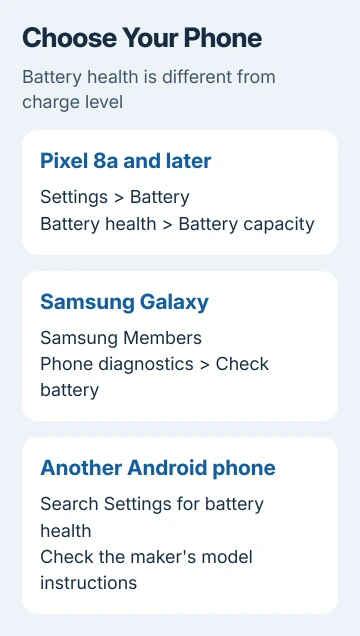
Battery usage reports where power went. Battery protection controls charging behavior. Battery health, when available, reports condition. Read that label before treating a charging-limit switch as a health assessment.
If a health result isn't available, keep your model name handy when checking with support. A missing menu doesn't tell you that the battery is good or bad, so keep the phone set up while checking what your model supports.
Check a Pixel 8a or later
Open Settings, tap Battery, then Battery health. Read the status. To see the capacity estimate, open Battery capacity within that health page.
Google's Pixel battery health instructions limit this reporting feature to Pixel 8a and later. The Pixel Tablet doesn't support it. Pixel 8 and Pixel 8 Pro aren't included just because their model numbers look close to 8a.
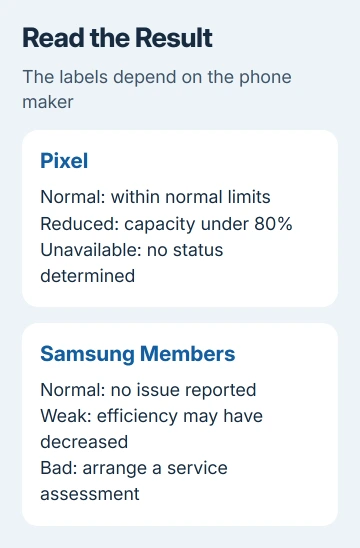
The result can be Normal, Reduced, or Unavailable. Normal means capacity is within normal limits. Reduced means the estimated remaining capacity has fallen under 80%, and a battery replacement is recommended.
Unavailable means the phone can't determine its battery status. It isn't a zero-capacity reading. Record that message if you contact support, especially when the phone also has short runtime or unexpected shutdowns.
Settings > About phone > Battery information shows cycle count on Pixel 8a and later, plus manufacturing and first-use dates. Those dates describe the battery and its use; they don't calculate the remaining warranty.
One cycle means you've used a full battery's capacity, even in smaller amounts. Using half a charge, recharging and later using another half adds up to one cycle. Plugging the phone in twice doesn't automatically mean two full cycles.
Keep the health status, capacity estimate and cycle count together when comparing results over time. Those numbers make more sense when you also know whether your phone lasts as long as it used to during normal use.
Check a Samsung Galaxy with Samsung Members
Open Samsung Members and look for Phone diagnostics. On versions with a Support tab, tap Support > Get started under Phone diagnostics, then choose Battery status. Other versions show Check battery directly in diagnostics.
Run the check and read its result. Menu names differ with the device, software and Members version, so use the battery item offered in that diagnostics screen instead of expecting a numeric Pixel-style page.
Samsung says its battery-status test reports Normal, Weak, or Bad. These labels describe the battery's condition. Don't expect the same health percentage shown on supported Pixels.
Normal means no battery performance issue was reported by that check. Weak means efficiency may have decreased with use or conditions. Bad means battery life has degraded significantly and needs a service assessment.
If Members reports Bad, arrange a battery assessment with an authorized Samsung repair provider. For Weak, keep the result and describe the runtime or shutdown problem when asking whether replacement is appropriate.
I'd use the built-in result before installing a battery-estimation app. Your repair team can use that result, and you won't have to wait for an app to collect your charging history.
When Android doesn't show a health percentage
Older Pixels, including Pixel 6a, the Pixel 7 family, Pixel 8 and Pixel 8 Pro, don't show the health status described for Pixel 8a and later. Not seeing it on those models is expected behavior.
Some phones have a charging limit or battery-health assistance option without offering a numeric capacity result. Those controls manage how the battery charges or ages. Finding their switch doesn't mean a hidden percentage must also exist.
For another brand, find the maker's support instructions for the full model name. Ask about a built-in capacity report or official diagnostic. Samsung Members instructions apply to Galaxy phones, not every Android handset.
Read how a battery app calculates its estimate. An estimate based on charging sessions can differ from the maker's battery check. Check the measurement method before comparing the two numbers as though they must agree.
A secret dialer code isn't required for this assessment. An authorized repair service can still check a phone without a health display. Tell them about its symptoms and how it charges.
Decide whether the battery needs service
If health looks normal but runtime suddenly drops, inspect the apps listed in battery settings for that period. Compare similar use: a day of gaming consumes power differently from a day when the phone sits idle.
The Android battery-drain checks help with app activity and post-update drain. They address power being consumed quickly, which can happen even when the battery still has healthy capacity.
If the phone barely gains charge or only works with one cable, use the Android charging checks before blaming a capacity result. A faulty charging connection and a worn-out battery need different repairs.
For a Reduced or Bad result, or repeated shutdowns even when the result looks normal, contact the maker's repair service. Give the model, software version, diagnostic result, cycle count if available and a description of the runtime change.
Arrange professional help and stop charging if the screen lifts, the back separates or the battery appears swollen. Don't press the casing back into place to keep using it while collecting more readings.
The Short Version
Use Pixel Battery health or Galaxy Samsung Members diagnostics. Read health separately from the current charge. A missing report needs model-specific advice; poor health or repeated shutdowns call for a repair assessment.
Checked November 13, 2026.





