
You type the name of your NAS, printer page or test server into Chrome, say nas or myserver.lan, and Google search results appear instead of the site.
I would add one character first. Chrome is guessing, and a slash ends the guess.
Super User's 2011 question on it has 128,768 views. Chrome 155 still follows the same rule.
How Chrome decides between a site and a search
Google's search engine help page puts the design plainly: "You can use the address bar (omnibox) to search the web". So every line you type gets a guess.
Chrome's own code spells out the guess for a single word: "possibly an intranet site, but more likely a search". A name ending in something Chrome does not know as a domain, such as .lan or .home, lands in the same pile.
Chrome then searches. It may also show a Did you mean bar. The 2011 asker saw it often, as a link "under the address bar", and found clicking it each time very annoying.
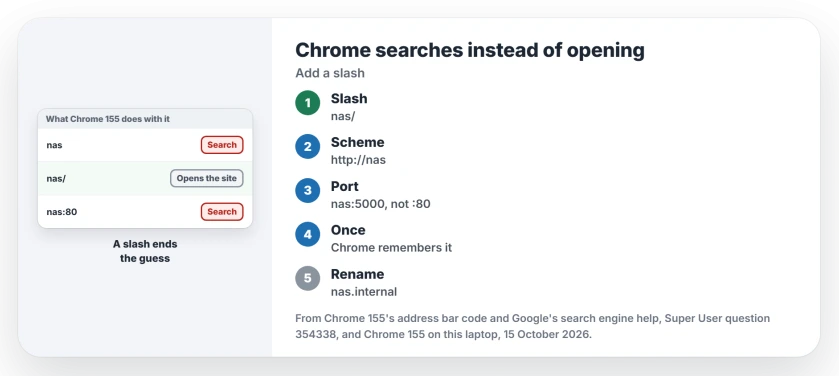
Status: Chrome's address bar code read at the 155.0.8059.40 tag on 15 October 2026, the same build installed on this laptop. No address was typed into Chrome here.
1. Type a slash at the end
Type nas/ instead of nas. The code says it directly: "Generally, trailing slashes force the input to be treated as a URL".
The 70-vote Super User answer agreed in 2012. Typing "the / at the end will always treat it as a url instead of keyword", in their words.
One reader added an exception in the comments. Link-local IPv6 addresses with a zone, the kind that start fe80, are the exception. They "will trigger a search even if a / is present".
2. Or type http:// first, or a port
A scheme you type settles it, because "the presence of a scheme means this is likely a URL". A port works too: "If the host has a known TLD or a port, it's probably a URL".
Port 80 is the odd one out. Chrome drops it from an http address as the default, so nas:80 counts as no port at all. A commenter on Chrome 69 hit exactly that: "Doesn't work in Chrome 69 even using :80".
So nas:5000 opens, and nas:80 still searches. If a local site you open with http:// then jumps to https, that is a separate Chrome behavior with its own fix.
3. Open it once, and Chrome remembers the name
Chrome checks your history before it settles on a search. Its code looks for an address that "has an intranet hostname that the user visited", even on another port or path.
So open http://nas/ once, scheme and all. After that, nas on its own is offered as the site first.
That memory lives in your history. I would expect the search to come back after you clear browsing history, so open it once more afterwards.
A bookmark helps as well, since the star marks it in the list, the same star that explains why some suggestions will not leave.
4. Name ends in .lan or .home? Use an ending Chrome knows
Chrome treats localhost, a known domain ending or a port as an address. Its code also names four reserved endings that count, as long as a name sits in front: .example, .test, .local and .internal.
They "must have at least one subdomain to be a URL", so nas.internal opens while internal alone searches. Of the four, .internal is the one set aside for private networks, and the code cites ICANN's July 2024 decision on it.
Renaming means changing the name on your router or in your hosts file. Ours: Chrome 155's language file on this laptop still holds the bar's text, Did you mean to go to $1?, so the guess and the bar both remain.
Why don't the older answers work any more?
Two old fixes fill that thread. One was a blank search engine with the keyword null. A commenter found it blocked from Chrome 26, and another wrote that by Chrome 33 it could be added again, "but this does not solve the problem".
The other was a setting to resolve navigation errors through a web service. A later commenter put it bluntly: "this feature is no more exist in todays chrome". I would not chase either of them today.
On a work PC, your admin has a policy called IntranetRedirectBehavior. Google states it controls DNS interception checks and the did-you-mean bars. It does not stop the search itself. Ours: the registry here holds no Chrome policy keys.
The Short Version
- Chrome searches a single word or an unknown ending like .lan by design.
- Add a slash: nas/ opens the site.
- Or type http:// first, or a port other than 80.
- Open the site once and Chrome remembers it, until you clear history.
- For a lasting fix, name devices with .internal or .test after a name.
Where to Next
What ending does your network use, .lan, .home or something else? Add it in a comment, along with whether the slash worked for you.

Isaac Smith is the founder and editor of PC Glance, a website that covers computers, laptops, and technology. He is a tech enthusiast and a computer geek who loves to share his insights and help his readers make smart choices when buying tech gadgets or laptops. He is always curious and updated about the latest tech trends.