When Edge's spell check works on Basic but goes quiet on Microsoft Editor, the Editor service is what's failing, and updating Edge is the first fix. Basic is a fine stopgap while you sort it out.
Edge 136.0.3240.50 shipped with exactly this bug in May 2025: misspelled words still got their red underline, but Editor offered no suggestions. It was fixed in 136.0.3240.64, and Editor came back as soon as Edge updated to it.
On a current version of Edge, Editor usually fails for one of four reasons: a site with its own spell checker, the separate Editor extension, a work policy or a network that blocks Editor's online service.
In this guide
What Editor needs that Basic doesn't
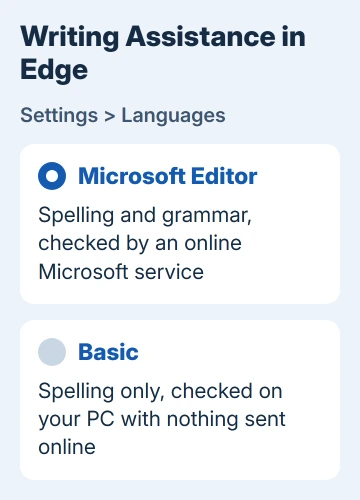
The two settings check your spelling in different places. Basic runs on your PC and sends nothing anywhere, while Microsoft Editor sends what you type to a Microsoft cloud service and shows the suggestions that come back.
That's why Basic keeps working for you when Editor fails. Anything that breaks the trip to that service, from a bug in Edge to a blocked connection, leaves Editor with nothing to offer.
Editor also stays out of text boxes where the website already supplies its own spell check, as Microsoft's Editor overview points out. So silence on one site can be normal.
You'll find both choices on the same page, edge://settings/languages, under Writing assistance. That page also holds Edge's newer writing hints, including the small blue dot that can sit by the cursor, but those are a separate feature.
1. Update Edge and restart it
Open edge://settings/help, or go to Settings and more (the three dots) > Help and feedback > About Microsoft Edge. Edge checks for an update as soon as the page opens and downloads it.
Select Restart when it asks, then type a misspelled word again. One owner reported on May 8, 2025 that their Edge "just now auto updated and Editor functionality returned".
I'd start here every time. It takes a minute, and it's the fix that ended the May 2025 reports.
The version number on that page tells you whether the old bug could still be behind it. Anything older than 136.0.3240.64 could, since that's the version the Edge known issues page gives as the fix.
Current versions are well past it. If yours is up to date and Editor still shows nothing, the cause is somewhere else, so carry on.
2. Try the same word on another site
Type the same misspelled word into a plain text box on a different site, such as a forum's comment box or the message box of your web email. Then click the underlined word to see whether Editor offers anything.
If you get suggestions there, Edge and Editor are fine and the first site is running its own checker. Online document editors often do this, and Edge leaves those boxes to them.
Word for the web is one of them. Its spelling marks come from Word itself, and our guide to Microsoft Word spell check covers that checker.
No suggestions anywhere, on any site, points back at Edge, an extension or the connection. That's what the next three steps cover.
3. Remove the separate Editor extension
Edge's built-in Editor doesn't need the Microsoft Editor extension, and having both can make things worse. One owner reinstalled the extension during the May 2025 bug and lost Basic as well; removing it brought Basic back.
Open edge://extensions, find Microsoft Editor under Installed extensions and select Remove. Refresh the page and test the built-in setting again.
Other spelling or grammar extensions can clash with Editor as well. Turn them off for a quick test, then turn back on the ones you want once you know which one is the problem.
4. Check for a policy on work or school PCs
IT can switch Editor off with a policy (a setting pushed to the browser) called MicrosoftEditorProofingEnabled. When it's set to disabled, Edge only uses the spell checkers on your PC, which is the Basic-only behavior you're seeing.
Open edge://policy and look for MicrosoftEditorProofingEnabled in the list. On a managed PC, ask IT whether Editor is meant to be off before you change anything.
A home PC shouldn't have Edge policies at all, but tweaking tools sometimes leave them behind. Our page on Edge settings turned off for managed browsers shows how to find and clear them.
5. Let Editor reach its online service
Editor needs a working connection to that cloud service, and Basic doesn't. A VPN, a strict firewall or a DNS filter that blocks certain addresses can get in its way while ordinary pages still load.
Pause the VPN or filter for a minute and test the same word. If Editor springs back, turn the protection on again and add Edge or Microsoft's services to its allow list. Don't leave it off.
A school or office network can do the same thing. Testing on a phone hotspot or your home Wi-Fi tells you quickly whether the network is the problem or the PC.
If Basic is the only one that works
Basic is a good place to stay. It catches spelling mistakes on your PC and keeps what you type there, though it won't flag grammar the way Editor does.
To report the Editor problem, go to Settings and more > Help and feedback > Send feedback, and mention the Edge version number and a site where Editor fails. A screenshot of an underlined word with no suggestions shows the bug at a glance.
The Short Version
Basic checks spelling on your PC; Microsoft Editor relies on an online service. Update Edge first, since the May 2025 bug was fixed in 136.0.3240.64. Then test another site, remove the extension and check edge://policy and your VPN.
Checked November 19, 2026.
 If you have any business, I can build it online