
Gigabyte motherboard drivers must match the hardware revision and model. A support page can list AMD and Intel wireless packages because different revisions use different chips. Check the printed REV number before choosing one.
That distinction matters even on a PC with an AMD processor. The processor brand alone does not identify the motherboard's Wi-Fi or Bluetooth hardware.
Read the model and REV marking together
Record the complete motherboard model, including suffixes such as AX, V2 or DDR4, then its REV marking. Do not assume a similarly named board's support page covers it.
Gigabyte's instruction to match the revision when selecting drivers is documented by the vendor. Its example marking is REV: 1.0; record the number printed on the actual board.
Status: Gigabyte's revision guidance and B650 GAMING X AX specifications checked October 25, 2026. No driver, firmware or motherboard was changed.
Use existing paperwork or a readable marking when possible. If the case must be opened to see it, shut the PC down and disconnect power first. Ask the system builder when access is difficult or the marking cannot be read safely.
For a prebuilt desktop, check the system maker's support information too. An OEM board may have its own support route rather than the retail motherboard's download page.
Why one download page offers two wireless brands
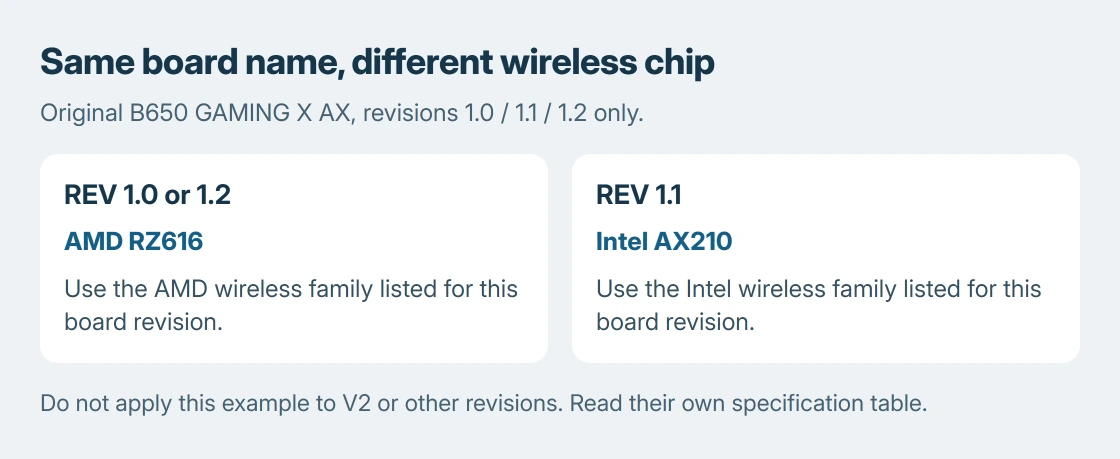
The original B650 GAMING X AX, revisions 1.0/1.1/1.2, provides a concrete example. Gigabyte's specification table maps the wireless hardware this way:
| Printed revision | Wireless module | Matching wireless family |
|---|---|---|
| 1.0 or 1.2 | AMD RZ616, also identified as MT7922A22M | AMD Wi-Fi and Bluetooth |
| 1.1 | Intel AX210 | Intel Wi-Fi and Bluetooth |
This table applies to that original board and those revisions. It does not describe B650 GAMING X AX V2, revision 1.3, or every Gigabyte motherboard.
Installing the Intel package on the AMD-module revision is not a useful test of whether the chip is faulty. Select the family named for the revision, even when another package is newer.
Download the package for the device and Windows version
Open the exact board's Support page and confirm the revision selection. Choose Downloads, then the driver section and the Windows version offered for the computer.
Gigabyte's original B650 support page lists wireless packages separately from chipset, audio and LAN. A chipset driver does not replace a missing Wi-Fi package.
Download the needed component's archive and extract it before following its setup instructions. Restart if the installer requests it, then check the device that prompted the repair, rather than changing every component together.
Microsoft documents installing a manually obtained device driver. Use that route when the supplied package calls for it; otherwise follow the manufacturer's installer.
Our driver selection guide explains why a working component does not need replacement simply because a utility flags its date. The revision match matters more than downloading the longest list.
The correct package still leaves the device missing
Find the affected hardware in Device Manager, then open its properties. Record the device name and status code. The device error-code explanation separates a missing driver from hardware that cannot start.
If the package reports no supported hardware, return to the model, revision and component mapping before trying a different brand's installer. Include that message when asking Gigabyte or the PC builder for help.
The stopping point is ours: hardware identity verified, matching package still failing. Send support the board revision, Windows version, downloaded filename and device code. Avoid repeatedly installing both wireless families.
Do not select a BIOS download merely because a Windows driver failed. Firmware installation is a separate procedure with its own compatibility requirements, not the next item in this driver sequence.
The Short Version
Match the Gigabyte board name and printed revision, then the component and Windows version. Shared support pages can cover different wireless chips. Check the specification table for that revision before choosing AMD or Intel drivers.

Isaac Smith is the founder and editor of PC Glance, a website that covers computers, laptops, and technology. He is a tech enthusiast and a computer geek who loves to share his insights and help his readers make smart choices when buying tech gadgets or laptops. He is always curious and updated about the latest tech trends.