

Rotate your iPad and the volume buttons seem to swap, and the setting that kept them fixed is nowhere to be found. Your old iPad gave you a choice.
I checked Apple's model list and available controls. Some iPads let you fix the buttons' roles; others always change them with orientation. You can still use the onscreen volume slider if those changing roles keep catching you out.
Find out whether your iPad offers the switch
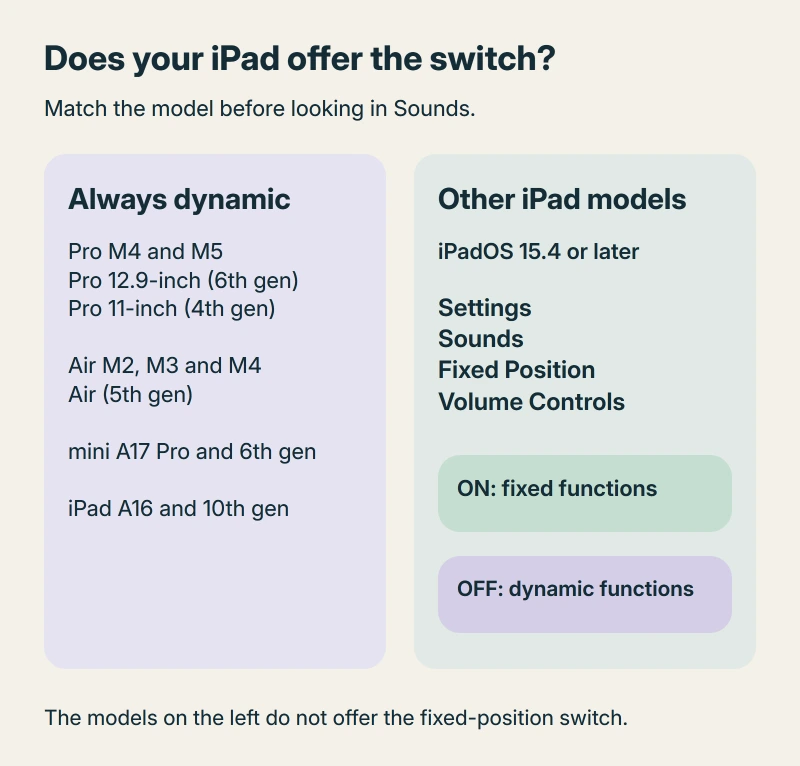
Apple documents two groups of iPads. The models in this table always use dynamic volume buttons, so they don't offer the choice to keep each physical button's role fixed.
| iPad family | Always uses dynamic volume buttons |
|---|---|
| iPad Pro | M4 and M5; 12.9-inch 6th generation; 11-inch 4th generation |
| iPad Air | M2, M3 and M4; 5th generation |
| iPad mini | A17 Pro; 6th generation |
| iPad | A16; 10th generation |
For other iPad models, Apple offers the switch with iPadOS 15.4 or later. That model difference explains why a setting you remember from another iPad may be absent on yours.
Status: Apple model and volume instructions checked 17 October 2026. The switch depends on your iPad model; no iPad settings or buttons were tested here.
Unsure which generation you have? Open Settings > General > About. Tap the part number beside Model Number to reveal the model number, then match it on Apple's identification page.
If Settings is inaccessible, locate the iPad's physical model marking to establish which volume-button rules apply.
I would check that before following a setting path from someone with an older iPad. A similar model limit explains missing iPad Battery Health, although that feature has its own supported list.
On eligible models, choose fixed or dynamic
In Settings > Sounds, find Fixed Position Volume Controls. This path is for the other models described in the previous section, with iPadOS 15.4 or later installed.
Switch it on for fixed button functions. Switch it off for orientation-dependent functions.
With fixed behavior, the button nearer the top button raises volume. The one farther away lowers it. Apple describes that arrangement as staying the same however you hold the iPad.
Pick the behavior that feels easier to remember. You can change that choice again on a model offering the switch.
With dynamic buttons, follow the screen's direction
For an iPad using a left-to-right language such as English, the button at the right or top raises volume. The button at the left or bottom lowers it as you rotate the device.
Apple says right-to-left languages change the horizontal rule: left or top raises, while right or bottom lowers. The vertical rule stays the same.
Rotation Lock also matters. When it's on, Apple states that the volume buttons follow the orientation the screen is locked to, rather than simply following every turn of the iPad.
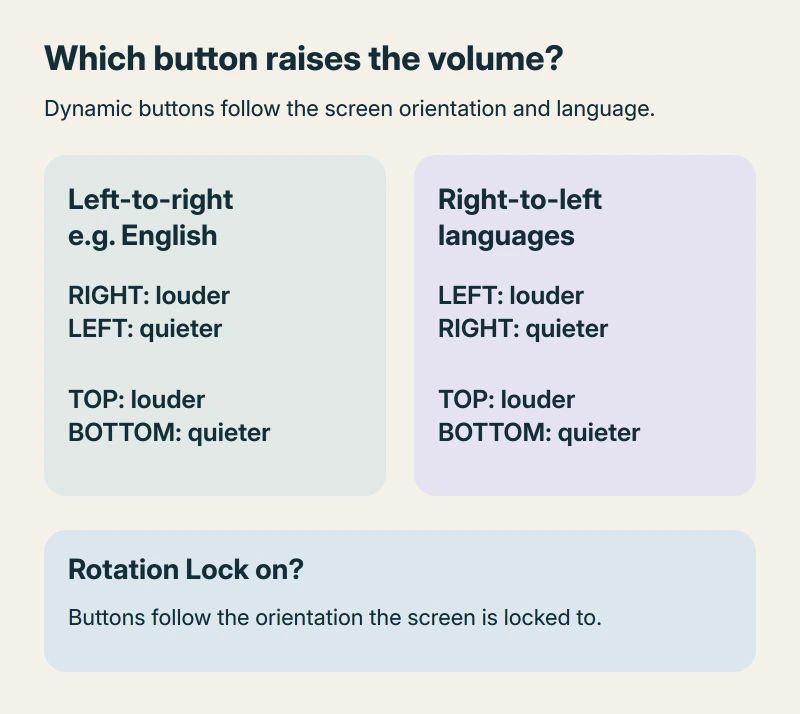
That helps explain a confusing moment when you turn the iPad but the button behavior doesn't follow. Check the screen's orientation and its rotation lock before treating the buttons as faulty.
These everyday volume roles aren't the way to choose a force-restart sequence. If the whole iPad is frozen, follow the physical button positions in our iPad force-restart guide.
Use the slider when you don't want to guess
To reach Control Center, start at your display's top-right corner and swipe down. Then drag the volume slider to adjust the level. Apple's volume guide supports that onscreen control while you're using an app or the iPad is locked.
If the slider rises but playback remains silent, check audio routing and the speaker before treating dynamic buttons as the cause.
I would use it when the iPad is lying at an awkward angle and I just want quieter audio. You can see the level directly, without working out which physical button will raise it.
Why restoring an old backup isn't a supported fix
The owner who opened the MacRumors discussion had moved from a 2020 iPad Pro to an M4 model. The familiar switch was missing.
One later reply claimed an old setting carried over through an iCloud backup, but there was no later confirmation from that poster. Requests for its return continued into 2026.
I wouldn't erase and restore your iPad for that report. Apple's current model list still places the M4 and M5 iPad Pro in the always-dynamic group.
The Short Version
Check your model first. Eligible older iPads offer Fixed Position Volume Controls in Sounds; the listed always-dynamic models don't. Screen orientation, language direction and Rotation Lock explain which dynamic button raises volume.
Where to Next
Which iPad did you move from, and which one are you using now? Tell me whether the buttons change when the screen rotates or stay unexpected even with Rotation Lock off. That helps separate the model change from another problem.

Isaac Smith is the founder and editor of PC Glance, a website that covers computers, laptops, and technology. He is a tech enthusiast and a computer geek who loves to share his insights and help his readers make smart choices when buying tech gadgets or laptops. He is always curious and updated about the latest tech trends.