KB5060999 can fail with 0x80040154 when Windows component registration is broken. Check whether Windows Features also fails. In the confirmed case, repairing the registry worked after update resets and a Windows upgrade had failed.
KB5060999 belongs to June 2025 and Windows 11 22H2/23H2. Today, work toward a supported Windows release and its current updates. Don't force this old package onto a newer version just to clear update history.
In this guide
1. Check the Windows version and the second symptom
Press Windows + R, run winver, and save the Windows version and build it shows. In Settings, choose Windows Update, open Update history, and copy the failed package title and code.
KB5060999 produced builds 22621.5472 and 22631.5472. A PC running 24H2 or a later release needs that release's updates instead. A failed historical entry doesn't mean the current installation still needs this package.
Next, press Windows + R, enter optionalfeatures.exe, and select OK. A working Windows Features window fills with component names and checkboxes. Opening it doesn't turn any feature on or off.
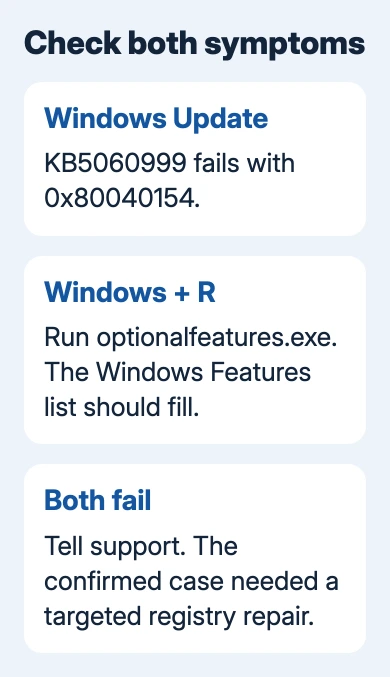
Report an empty or unresponsive Windows Features window when you request support.
If Windows Features opens normally, the same update code doesn't point to that same registry fault. Continue with the standard repair route. The Windows Features access guide covers a failure to launch that program separately.
2. Try the supported component repairs once
Search Start for Get Help and launch its Windows Update troubleshooter diagnostic. After it finishes, retry the package Windows Update currently offers this PC.
If it still fails, search Start for Command Prompt, right-click its result, and choose Run as administrator. Enter DISM first. After its result appears, run SFC:
DISM.exe /Online /Cleanup-Image /RestoreHealth
sfc /scannow
DISM fixes Windows' recovery source files. SFC then examines protected system files, replacing any damaged copies it finds. Microsoft's System File Checker procedure uses that order.
Read the result of each command. Save any error code or message saying that repairs couldn't finish. Restart afterward, then check the update again. A completed scan isn't the same as a successful update installation.
The asker reported failure after the troubleshooter, cache resets, file repairs and a manual package. I wouldn't rename update folders again after that result. Check the Windows Features failure instead.
3. Try the Recovery repair on Windows 11
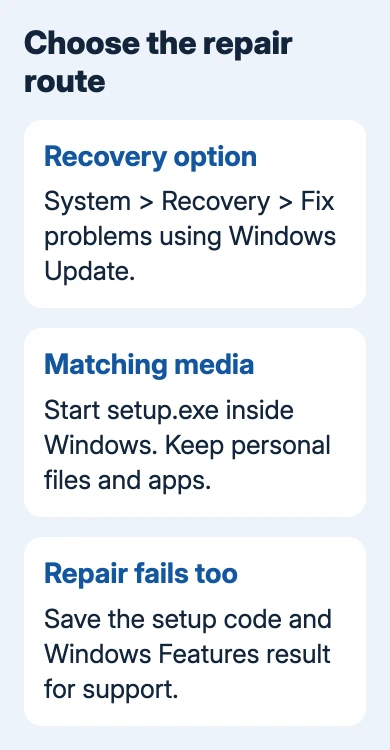
In Settings, open System, then Recovery. The Fix problems using Windows Update control repairs the installed version and retains apps, files and settings.
Save an independent backup of important files first. Select Reinstall now, review the automatic restart choice and select OK. Keep external power and internet access available throughout the repair.
Watch Windows Update for the repair download. After installation and restart, test updates and Windows Features again. Save any failure code before deciding whether another repair attempt makes sense.
Company-managed PCs can lack this repair option. It needs Windows 11 from the 2022 annual release onward, plus at least the optional February 2024 release. Ask IT for the managed repair route when it's missing.
Reinstalling this way is a general Windows repair. In this case an owner reported that the ISO upgrade failed too. If yours also fails, request the registry check in section 5 rather than counting on another download.
4. Choose installation media carefully when needed
If Recovery can't offer a repair and Windows still starts, the installation-media procedure provides another supported reinstall route. Visit the Windows 11 download page and check the release currently supplied.
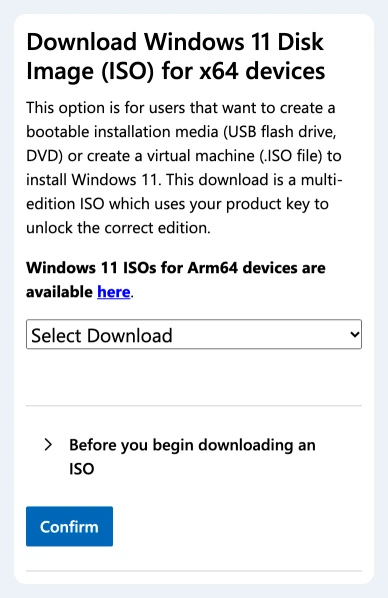
Current media may upgrade an old 23H2 PC to a newer release. For a company-managed machine, ask IT for approved media. Choose media that matches your processor type, Windows edition and installation language before proceeding.
For x64, use Download Windows 11 Disk Image (ISO) for x64 devices and choose the multi-edition ISO. Select the matching Windows language and follow the confirmation and download prompts. Arm PCs use the separate Arm64 ISO link.
Right-click the downloaded ISO in File Explorer and choose Mount. Open its mounted drive and start setup.exe from inside the running Windows installation.
Review Change what to keep and select Keep personal files and apps before installing. Don't proceed without that selection.
Booting from a USB drive starts a different installation path. For this repair, keep working inside Windows. The aim is to replace damaged operating-system components while keeping your installed programs and data.
After setup finishes, check winver again and apply the latest updates listed for the resulting release. A successful upgrade can leave KB5060999 marked as failed in history. That package was for the older release.
5. Ask for targeted registry repair when both routes fail
The successful repair corrected registry entries using TrustedInstaller, a Windows servicing identity with special access. The owner confirmed that Windows Features filled normally and updates installed afterward.
That repair used the PC's diagnostic logs. Don't import another computer's fixlist or grant broad registry permissions to imitate it. Ask support to check component registration and permissions on your PC.
Request update support through Get Help. Include the full error, Windows build, Windows Features result, and any DISM, SFC or setup failures. On a managed PC, send those details to the Windows administrator.
Ask specifically for a servicing or registry-permission check when optionalfeatures.exe also fails. The Windows Update error-code guide helps separate a changed code from a repeat of this one.
The Short Version
Check Windows Features as well as the update code. Try component repair, then a supported repair reinstall. If both fail and Windows Features is broken, request targeted registry support. The confirmed case needed that deeper repair.
Checked November 27, 2026.
 If you have any business, I can build it online