
Reset a forgotten Android voicemail password through your mobile carrier's account app or support menu. Then enter the new password when voicemail asks. Your phone's screen PIN is separate from its voicemail password.
Your carrier decides how you reset voicemail, whether the phone is a Samsung or Pixel. Check which phone number needs the reset first, especially if you use two SIMs or manage several family lines on one account.
Choose the voicemail line before changing a password
Check which number receives the voicemail. A family account can manage several numbers, and a phone with two SIMs can have separate mailboxes. Select the line you need in the carrier app before starting the reset.
Look for your mobile carrier's name on your bill or account. Your phone can have several unrelated passwords: the screen lock, Google Account password, carrier-account sign-in and voicemail password.
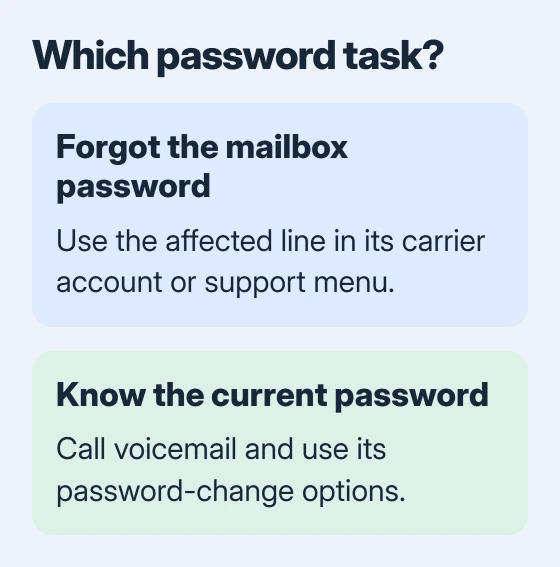
Google's voicemail instructions explain calling the mailbox: hold the 1 key on your Phone app's dial pad. This reaches the service without changing Android's screen lock.
For a new line without a working mailbox, complete Android voicemail setup. Password recovery is for a mailbox that's already configured.
Stop guessing if the service rejects your password. Repeated attempts can lock you out, leaving you with an extra wait even after you've found the right reset method.
Reset it in My Verizon for a Verizon line
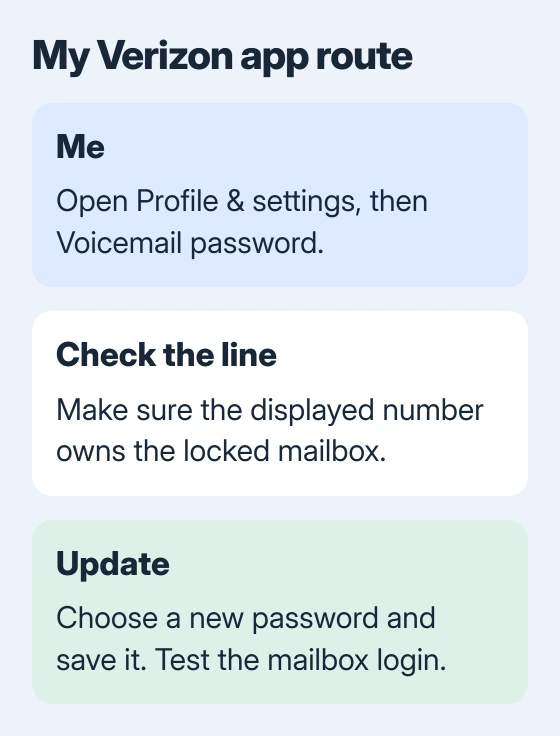
Open the My Verizon app and go to Me > Profile & settings > Voicemail password. Check that the displayed line is the number whose mailbox you want to reset.
Choose Create my own password, enter the new password in the required fields, then tap Update. The app can also offer Choose a password for me if you prefer its generated choice.
Verizon's device reset procedure requires 4 to 7 numbers, without repeating or consecutive patterns. Follow the app's current checks if it rejects the chosen number.
Pick a password that's easy for you to remember, and keep it private. Keep your carrier-account sign-in handy too. It gets you into the account app, while the new numeric password opens your mailbox.
Return to voicemail and enter your new password when asked. If you reset the wrong line, the mailbox you're trying to reach will still reject it. Recheck the selected number before making another change.
Use the carrier's phone menu when the app is unavailable
For a Verizon mobile line, dial *611 from that phone to reach its automated customer-service menu. Complete the requested security verification and state Reset voicemail password when asked why you're calling.
Follow the menu to finish the reset. If the automated service sends you a Digital Assistant message during the call, follow that message's instructions to continue the reset.
This phone menu is useful if you've forgotten the mailbox password but your mobile line still works. You don't need the old voicemail password to ask customer service for a reset.
Use these dial codes only for the named carrier. For another provider, use its official support number or app. A small provider can use a larger company's network but still have its own accounts and voicemail reset steps.
When you contact support, ask to reset the voicemail password for a specific mobile number. Calling it an Android password reset can send the conversation toward your phone's screen lock instead.
The account owner or an authorized manager may need to verify the request. For a work phone, ask whoever manages the mobile account to handle that part if your login doesn't have permission.
Change a known password through the mailbox instead
If the old password still works, changing it is simpler than recovering access. Call the mailbox, sign in and follow the provider's personal or administrative options for changing its password.
For an AT&T Wireless line, hold 1, enter the current voicemail password and press # to reach the Main menu if messages are playing. Then choose 4, 2, 1, 1 for the password-change sequence.
Follow the voice prompts to enter the replacement. The AT&T password instructions distinguish changing a known password from resetting a forgotten one and require AT&T coverage for the change.
If the password is forgotten, use AT&T's account reset route instead. On its Reset my voicemail password page, sign in, choose Switch if the displayed number is wrong, then select Reset voicemail password.
You'll need to sign in to that account page. Follow the prompts for your line and enter the new password in Visual Voicemail if asked. The keypad steps for changing a known password can't get past one you've forgotten.
Check calling access separately from the message list
After the reset, call your mailbox and check that it accepts the new password. Listen to a saved message if you have one, then follow the prompts to exit. This checks your mailbox login directly.
Open the visual voicemail app, which shows recordings as a list. Enter the new password if asked. If the mailbox accepts it by phone but the list won't load, check the app's setup or its ability to fetch messages.
For a Galaxy that can reach the mailbox but won't load its recordings, the Samsung visual voicemail checks cover that separate problem. Keep the successful call result for support.
A Verizon mailbox can lock for 30 minutes after too many incorrect attempts. Its voicemail troubleshooter explains this wait. Don't keep testing guessed passwords during the lockout.
Ask the carrier to check a reset that still fails
Give support the phone number, whether the reset finished and the exact message you hear when calling voicemail. Say whether it fails before the password prompt, after you enter the password or only inside the app.
I'd call the mailbox before clearing an app's data. That tells support whether your mailbox login works, so a missing recording doesn't send you through another password reset.
The Short Version
Reset a forgotten password through the affected line's carrier account or support menu. Mailbox settings need the old password. Verify the new login by calling voicemail, then check the visual message list separately.
Checked November 5, 2026.

Isaac Smith is the founder and editor of PC Glance, a website that covers computers, laptops, and technology. He is a tech enthusiast and a computer geek who loves to share his insights and help his readers make smart choices when buying tech gadgets or laptops. He is always curious and updated about the latest tech trends.