
You click the taskbar icon of the window in front of you, and it should drop out of sight. It stays put. Or it flashes up and falls straight back.
I would count the windows behind that icon first. Several windows means previews, by design. One window that will not budge points to a stuck Windows Explorer.
On Super User, the August 2016 question has 75,238 views, and its asker confirmed the fix while a 2023 comment says it "Still helps".
One window behind the icon, or several?
Windows combines your app's windows into one button out of the box. Microsoft says on its taskbar page that the Windows 10 default shows each app as one unlabeled button, even with several windows open.
Click that button with two or more windows behind it, and you get thumbnails to pick from. Nothing gets minimized, and that part is by design.
Ours: this Windows 11 laptop holds TaskbarGlomLevel 0, the Always setting, so Windows 11 starts out combined too.
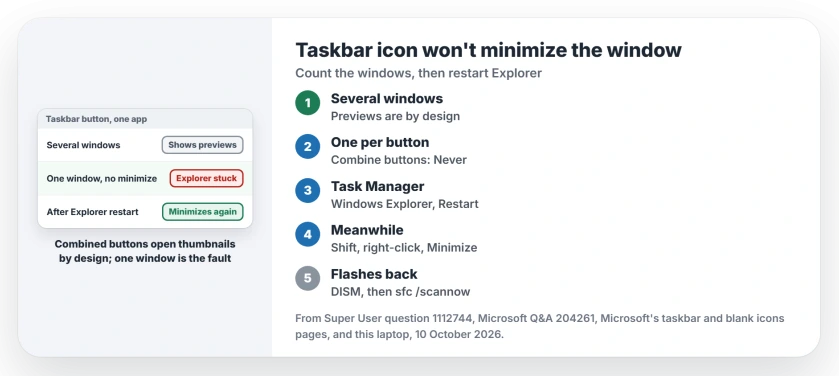
Status: I checked Microsoft's taskbar and Explorer restart pages against Super User and Q&A owners on 10 October 2026. Restarting Windows Explorer fixed the one-window case.
Want one button per window? Open Settings, Personalization, Taskbar, then Taskbar behaviors. Set Combine taskbar buttons and hide labels to Never, and a click on a window's own button then minimizes it.
The single-window fault: restart Windows Explorer
The asker's case was the plain one. They clicked a window that had focus. "Nothing happens", they wrote, where it used to minimize before an update.
The accepted answer called it a temporary bug and restarted Explorer, and the asker came back to say "simply restarting explorer.exe worked wonders". Your taskbar is part of Windows Explorer, so a restart rebuilds its buttons from scratch.
Press Ctrl+Shift+Esc to open Task Manager. On the Processes tab, find Windows Explorer, right-click it and pick Restart.
The taskbar blinks out for a moment and returns, and your apps stay open, though File Explorer windows close. Note any folder you had open.
Ours: Task Manager's message file on this laptop lists Restart next to End task in the process menu. Microsoft documents the long way on its blank icons page: End task, then File, Run new task, and explorer.exe.
Several owners said the Task Manager route was easier and worked. One said restarting Explorer did nothing for them. A full reboot did.
Minimize it while you wait
Can't restart Explorer right now? Hold Shift and right-click the taskbar icon. One owner chose Minimize there, and plain clicks worked again afterwards.
Windows key and D shows your desktop and minimizes everything. Press it again and it all comes back.
When the window flashes and falls back
A different case sits on Microsoft Q&A. An IT admin described windows that "flash on the screen and collapse back to taskbar", but only when an app had two or more windows open.
They fixed it with DISM and then sfc /scannow, run while signed in as each affected user. Another owner later said the pair fixed one user on their own domain, so if you have this case, run both lines from an admin Command Prompt.
DISM /Online /Cleanup-Image /RestoreHealth
sfc /scannow
Let each one finish. The owner's own post used CheckHealth, which only reports damage, so I would use RestoreHealth and let DISM repair what it finds.
One more owner got the window back by holding Ctrl while clicking, and another found it came back after every sleep, even though a restart cleared it.
If your taskbar itself misbehaves
Blank icons are a cache fault, and the blank taskbar icons page clears both caches. For what Windows 11 lets you change on the bar, see the Windows 11 taskbar guide.
The Short Version
- Several windows behind one combined button: a click shows previews, by design.
- Set Combine taskbar buttons and hide labels to Never for one button per window.
- One window that will not minimize: restart Explorer from Task Manager.
- Shift and right-click, then Minimize, works while you wait.
- Flashing windows that fall back: run DISM and sfc /scannow.
Where to Next
Did restarting Explorer do it, or did you need DISM? I read every comment, so tell me which app it happened with and on which Windows version.

Isaac Smith is the founder and editor of PC Glance, a website that covers computers, laptops, and technology. He is a tech enthusiast and a computer geek who loves to share his insights and help his readers make smart choices when buying tech gadgets or laptops. He is always curious and updated about the latest tech trends.