
Windows 11 KB5089549 can fail during restart with 0x800f0922 when its startup partition has too little room. KB5089573 fixed that issue. Try the latest cumulative release for your PC before changing partitions.
The May 12, 2026 update affected versions 24H2 and 25H2. Check whether you're seeing an old failure in Update history or an update that still won't install.
1. Check the failed update and the Windows version
Open Settings > Windows Update > Update history. Find KB5089549 and check its result and date. Keep looking for a newer cumulative update that installed successfully, even if the old failure is still listed.
Open Settings > System > About and find Windows specifications. Keep the version, OS build and failed KB number together. Those details tell you which Windows release you're checking.
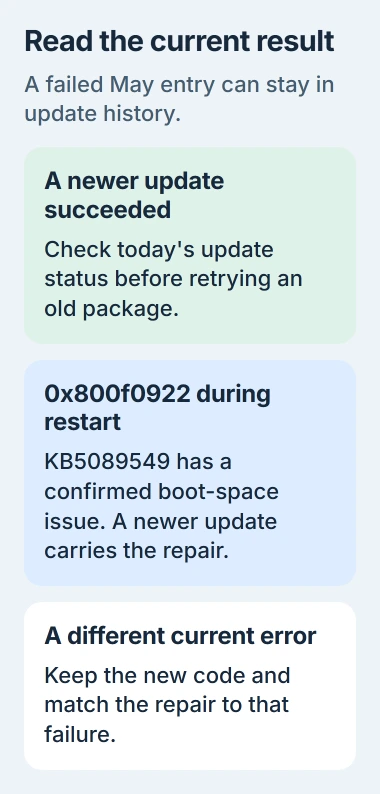
The original update's builds were 26100.8457 for 24H2 and 26200.8457 for 25H2. Those numbers identify the May update. Keep your newer build if you've updated since then.
If a newer cumulative update has already installed successfully and Windows no longer offers the failed May package, don't keep downloading that old installer to clear its history entry. Check the current update result instead.
If Windows Update still reports a failure, write down the code beside the currently failing update. A newer KB with another code may need a different repair even when KB5089549 also failed months ago.
2. Match the specific boot-partition failure
Microsoft's KB5089549 issue record describes installation progressing normally, then failing during restart at about 35 to 36 percent, undoing changes and returning 0x800f0922.
The space that matters is the EFI System Partition, or ESP. This small partition holds startup files. It's separate from the C: drive where your ordinary documents and apps live.
This problem especially affects PCs with 10 MB or less free on that partition. Clearing Downloads can help a full Windows drive, but it won't directly free space in the separate startup partition.
If you or support check C:\Windows\Logs\CBS\CBS.log, look for insufficient free space, ServicingBootFiles and 0x70. Check that the entry's time matches the failed attempt, rather than an older failure.
That error code can have other causes too. Our Windows Update error guide covers them. Check the failed KB, what happens during restart and the log together before choosing a fix.
3. Get the latest release through Windows Update
Return to Settings > Windows Update, select Check for updates, and install the newest cumulative package listed for your version. Restart when asked, then return to the same screen to check the result.
The KB5089573 release notes list the fix for this startup-partition failure. That was a May preview update. Keep a newer working Windows installation rather than going back to it.
Windows quality updates are cumulative, meaning later updates include earlier changes. Let Windows Update choose the current package for your PC instead of installing old KBs one at a time.
Keep your laptop plugged in while the update installs. Afterward, check Windows Update's message and newest history entry. Reaching the desktop after Windows undoes the update doesn't mean it installed successfully.
If your organization manages the PC, give IT the failed KB and error code. They may need to approve or install the newer cumulative update. Leave its update controls to them.
4. Use Get Help when the current update still fails
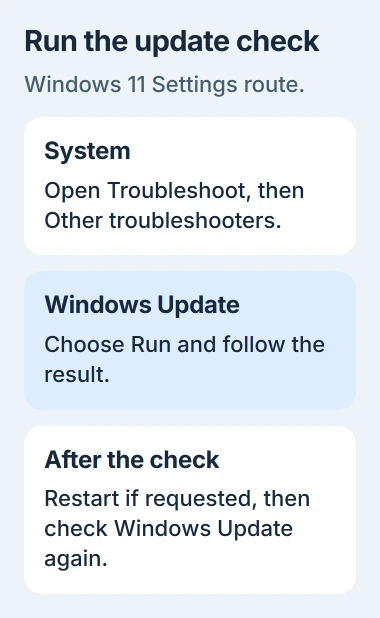
Open Get Help and run its Windows Update troubleshooter. It checks the update process and can repair common problems that are separate from the May boot-partition issue.
The update troubleshooter instructions also give Settings > System > Troubleshoot > Other troubleshooters > Windows Update > Run as a route. Follow its result, restart if requested and check updates again.
If the code changes, use the new code to choose your next step. An ESP fix may no longer fit. For example, 0x800f0991 has its own repair sequence; it's a different error from 0x800f0922.
I'd try the newer update and this built-in check before changing the disk. They follow the update's known fix without having you remove files Windows needs to start.
5. Have persistent ESP failures checked before disk changes
If the current cumulative update still fails and the log points to startup-partition space, contact Microsoft Support or your computer maker. Give them your Windows version, failing KB, error code and the time of the matching CBS log entry.
Back up important files before anyone changes partitions. Ask the technician to check your disk's layout and startup files. Resizing instructions written for another PC could change the wrong part of your disk.
If Windows crashes after the update installs successfully, write down the stop code shown on the crash screen and when it happens. That's a different problem from an installer that undoes its changes with 0x800f0922.
The Short Version
Check the failed KB and Windows version. KB5089573 fixed KB5089549's known 0x800f0922 startup-space failure. Try the cumulative update Windows offers now, then Get Help if needed. Ask support before changing boot partitions.
Checked November 5, 2026.

Isaac Smith is the founder and editor of PC Glance, a website that covers computers, laptops, and technology. He is a tech enthusiast and a computer geek who loves to share his insights and help his readers make smart choices when buying tech gadgets or laptops. He is always curious and updated about the latest tech trends.