A Windows policy can hide the Windows Update page even while updates still run. Open ms-settings:windowsupdate directly: if it sends you to Settings home, check whether a policy is hiding the page before repairing update services.
A visible Windows Update page with no usable Check for updates button is a different case. Paused updates or an organization's update policy can affect the controls without hiding the entire page.
In this guide
1. Open Windows Update directly
Press Windows + R, type ms-settings:windowsupdate, and press Enter. This opens the update page without using search or the sidebar.
If the page opens, check which update controls are available. Select Resume updates when checking is paused. Save open files before completing a requested restart, then check whether the controls return.
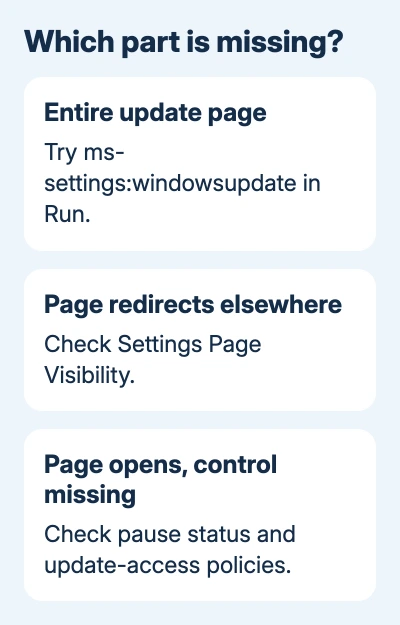
If the command takes you to another Settings page, note that result. Microsoft's page visibility instructions explain that a policy can hide selected pages and block their direct addresses too.
The asker said searches and the update-attention control opened System settings, although manually downloaded updates installed. That suggests a restriction on opening the page, rather than an update service that can't install anything.
If the page opens but downloads fail, use our Windows Update troubleshooting guide instead. An update that fails inside a working page needs different repairs.
2. Check whether work or school controls the PC
Open Settings > Accounts > Access work or school. Check for an organization connection and consider who supplied the computer and manages it. Being signed in as an administrator doesn't override your organization's policies.
For a managed device, show IT what Settings displays when the page or control should appear. Include the result of the direct command and ask them to check Settings Page Visibility and policies controlling access to Windows Update.
Keep organizational accounts connected while IT reviews the restriction. Disconnecting one can remove access to work resources without clearing the policy that controls updates.
On your own PC, review any privacy utility, debloating script or setup tool used before the page vanished. Look for a hide-pages setting and reverse that change through the tool's undo option.
Undo just the setting you changed. Reapplying a large optimization preset can make several unrelated changes and leave you less certain which one restored access.
If there is no organization and no known tool to undo, continue to the local policy check. Keep a note of what the direct command opened; it helps separate a hidden page from a control restricted inside an otherwise visible page.
3. Restore Settings Page Visibility on Pro
On Windows 11 Pro, Enterprise or Education, press Windows + R, type gpedit.msc, and press Enter. Home editions lack Group Policy Editor; follow the read-only Home checks instead.
Open Computer Configuration > Administrative Templates > Control Panel. Double-click Settings Page Visibility. Before changing it, copy its current state and any text in its options so you can restore your own configuration.
An enabled value beginning hide: hides the listed pages. A value beginning showonly: allows only the pages it lists. The identifier for the Windows Update page is windowsupdate, without the ms-settings: prefix.
On your personal, unmanaged PC, set the policy to Not Configured, then select Apply > OK if you want to remove that local page restriction. Close Settings and open the direct update command again.
Also check User Configuration > Administrative Templates > Control Panel > Settings Page Visibility. The policy can be applied to the user as well as the computer. Restoring only one location can leave the other restriction active.
Once the page returns, check for updates and make sure it still opens after restarting. If it disappears again, a utility or management policy may be reapplying the restriction. Address that source before changing the setting again.
I'd check this policy before another service-reset script. In the original thread, an update-reset script produced errors and didn't restore the missing interface. An update service can be running even when a policy hides its Settings page.
4. On Home, inspect the setting without deleting keys
Open Start, type Command Prompt, and open it. Run these two read-only queries, one at a time:
reg query HKLM\SOFTWARE\Microsoft\Windows\CurrentVersion\Policies\Explorer /v SettingsPageVisibility
reg query HKCU\SOFTWARE\Microsoft\Windows\CurrentVersion\Policies\Explorer /v SettingsPageVisibility
These commands check for a SettingsPageVisibility value in the computer and user policies. If it exists, copy the complete output, including its data. A message saying the value wasn't found means that location didn't contain it.
A returned hide:windowsupdate entry would explain a hidden page. A showonly: list can also explain it if Windows Update isn't allowed in that list. Read the complete value because other Settings pages can share the same entry.
Give this output to Get Help or the person who configured the PC. Ask them to remove the unwanted page-visibility restriction while preserving settings you still need. Don't delete the whole Explorer policy key to remove one value.
If neither command finds the value, this registry entry doesn't explain the missing page. Keep the output and continue to the button check or ask support for help instead of creating new keys from a generic repair script.
5. Separate a restricted button from a hidden page
If Windows Update opens but the manual check control is missing or disabled, check whether the page mentions management by your organization. Have IT review Remove access to use all Windows Update features.
In current templates, open Computer Configuration > Administrative Templates > Windows Components > Windows Update > Manage end user experience. This policy limits which update controls you can use, rather than hiding whole Settings pages.
On a personal Pro PC where you enabled that policy yourself, return it to Not Configured, close Settings and check again. If someone else manages updates, have that administrator review the restriction.
For a broader blank or crashing Settings window, our Windows Settings repair guide covers the application itself. Record whether other Settings pages work before choosing that route.
When the page still won't appear
Open Get Help from Start. Describe the absent Windows Update page and request checks of both visibility and update-access policies. Include your Windows edition, direct-command result and the two registry-query results.
If those policies aren't configured, ask support to check the Settings components. Tell them whether the whole app closes or just redirects when Windows Update should open.
The Short Version
Try the direct update command, then distinguish a hidden page from a restricted button. Check management and page-visibility policies first. Use read-only checks on Home and keep service resets for an actual update-service fault.
Checked November 26, 2026.
 If you have any business, I can build it online