
You boot from your USB stick and watch setup copy files, install features and reach Finishing up. Then it stops: "Windows could not prepare the computer to boot into the next phase of installation".
I would look at your USB stick first, then at every other drive that carries a boot partition. Restarting, as the message suggests, brings the same screen back. A Microsoft Q&A thread about it shows 600+ under Same question.
Why it fails at the very end
By Finishing up, Windows already sits on your drive. What remains is writing the files that start it into a small boot partition.
Microsoft documents that "The device must contain a system partition". It adds: "On GPT drives, this is known as the EFI System Partition, or the ESP. This partition is usually stored on the primary hard drive".
Setup can pick the wrong one. A 2021 Super User answer sums up what owners keep finding: "The Windows installation gets confused if it can see any other EFI bootable drives than the installation media and the target drive".
That other one can be a second drive or an old Linux disk. It can also be the USB stick itself.
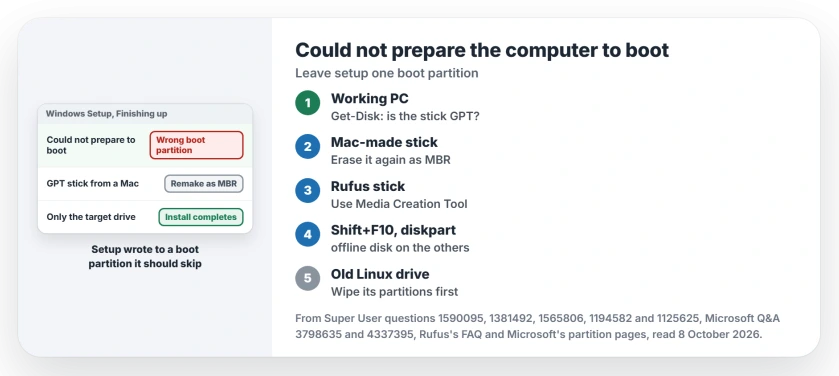
Status: checked 8 October 2026. Owners got past it by remaking a GPT USB stick as MBR, or the reverse, and by unplugging or taking offline every other drive that can boot.
Ours: this laptop has one GPT disk with one System partition of 260 MB. PowerShell shows both without administrator rights. The same two commands read any USB stick you plug in.
1. Read the stick on a working PC
Plug the stick into any Windows PC that starts. Then run this in PowerShell:
Get-Disk
Get-Partition
Get-Disk shows each disk's PartitionStyle, GPT or MBR. Get-Partition gives each partition a type, and the boot partition on this laptop reads System.
Ours: if your stick lists a System partition too, it carries a boot partition of its own. That is the kind setup can grab.
2. Made on a Mac? Remake it as MBR
The fix with the most confirmations sits under a 2020 Super User question, and its answer blames setup.
It "attempts to reconfigure the USB's EFI/System partition as the target even though it just formatted and otherwise prepared the internal drive that you selected".
Owners confirmed it on very different machines. "Can confirm this was the fix for me too on a Lenovo P1 Gen 3," one wrote.
Another got Windows 11 Pro onto an Asus B450M-A II board by "using MBR instead of GPT when installing Windows 11 Pro on a new SSD". A third fixed an ASUS TUF Gaming A15 from 2023 the same way. Different brands, same fix.
Several of those sticks were made on a Mac, following a guide that formats them as GPT. The owners erased the stick again with the MBR option:
diskutil list
diskutil eraseDisk MS-DOS "WIN11" MBR /dev/disk2
Run the first line and find your stick's number before the second. Erasing the wrong number wipes that disk. Then copy the Windows files back as your guide describes.
Already MBR? One owner went the other way: "when I converted my USB from MBR to GPT instead, the installation actually got past that error and went through successfully".
3. Made with Rufus? Read its FAQ first
Switching Rufus to MBR is not the same fix. Rufus's own FAQ says a Windows stick made with MBR "will be bootable in BIOS-mode only (even on UEFI systems)".
A GPT drive needs setup started in UEFI mode, so that trades one error for another.
On Windows, make the stick with Microsoft's Media Creation Tool instead. Advisers on the 600+ thread pointed owners there. Our page on the partition error explains why a stick made on Windows behaves better.
If your stick never appears in the tool's list, there are two ways round that drive list, one of them Microsoft's own copy steps.
4. Take the other drives out of setup's view
Can you reach the other drives? Unplug them. "I had to remove the SSDs before the install would work," wrote an owner with two NVMe drives and four SSDs.
In a laptop, take the drive offline instead. Press Shift+F10 at the first setup screen:
diskpart
list disk
select disk 1
offline disk
exit
Microsoft's diskpart reference says the command "Takes the online disk with focus to the offline state". Use the number of a drive you are leaving alone, never your target.
"Setting the HDD to offline made the install go through," an owner replied under the accepted answer. It does not always hold, though.
A Microsoft Q&A asker took their second disk offline and still wrote: "Back on the installation, the same error occurs to happen".
For drives you cannot unplug, a 2021 Super User answer hides them from setup with pnputil, a longer route.
5. Coming from Linux or SteamOS?
Then the old boot partition may sit on the very drive you are installing to. One Super User asker kept their Linux partitions and hit the message every time.
The reply they got: "As long as that Linux partition is visible from the installer you're going to continue receiving that error".
So wipe that drive's partitions at the drive picker, until it shows one block of unallocated space. Let setup build its own. A Q&A adviser gave a SteamOS owner that advice in August 2026. Copy off anything you need first.
The pull-the-stick trick
One owner got past it by removing the USB stick at the right moment. They pulled it "after 'copying files' and 'getting files ready' were complete but before getting to 'Finishing up'".
Another tried it on a ThinkPad and wrote: "Doesn't work for me, P14s". Ours: it points at the same cause, since a removed stick takes its boot partition with it. Try it after steps 1 to 4, not before.
What did not help
Switching between AHCI and IDE, toggling legacy USB support, and remaking the stick with the same tool. The asker of a 100+ thread tried all of it, over 20 attempts on one laptop. Nothing changed.
Marking a partition active does not apply either. One asker found that out on a GPT target: "You can't mark the partition as active, that's for MBR only".
Will taking a disk offline erase it?
No. Offline only hides it from setup. Nothing on it changes. Bring it back online from Disk Management once Windows starts.
Does the PC then start the old system instead of Windows? Our boot device page shows how to put the right drive first.
Why did the same stick work on another PC?
Firmware differs from board to board. The owner behind the MBR fix blamed "certain systems' BIOS/UEFI implementations" for the whole problem.
The Short Version
- The error comes at Finishing up, when setup writes the boot files.
- Read the stick on a working PC with Get-Disk: GPT or MBR.
- Mac-made GPT stick: remake it as MBR. Already MBR? One owner went the other way.
- Rufus: use Media Creation Tool instead of switching to MBR.
- Unplug the other drives, or take them offline in diskpart.
- From Linux or SteamOS: wipe the old partitions on the target.
Where to Next
Which step got you through? Tell me the PC model and how you made the stick in a comment. I keep a list of which fix works on which boards.

Isaac Smith is the founder and editor of PC Glance, a website that covers computers, laptops, and technology. He is a tech enthusiast and a computer geek who loves to share his insights and help his readers make smart choices when buying tech gadgets or laptops. He is always curious and updated about the latest tech trends.