
You pressed the Windows key and the period key to add a GIF, and the panel says the GIF service is not available. That is annoying when the emoji side still works fine. I would run Windows Update before anything else.
The cause is documented by Microsoft on its release health pages. The company that supplied the GIFs shut its service down in June, and newer Windows updates bring a replacement.
Why the GIFs went away
Microsoft says that from 30 June 2026 "you might not see GIF options in the Windows Emoji Panel on some devices". Your keyboard and the panel itself are fine.
Microsoft states the reason in one line: "This issue occurs because the previous GIF provider (Tenor) retired its service on that date."
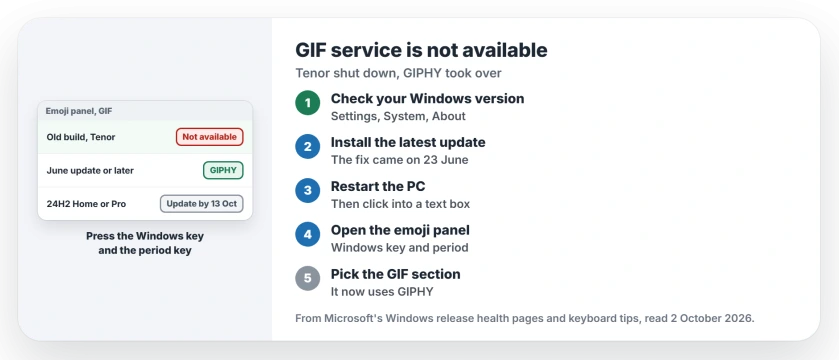
Status: checked 2 October 2026. Microsoft says Windows updates from 23 June 2026 onward switch the emoji panel's GIFs to a new provider, GIPHY. Installing the latest update brings them back.
1. Check which Windows you run
Microsoft lists Windows 11 versions 24H2, 25H2 and 26H1 as affected. Settings, System, About shows which one you have.
2. Install the latest updates
This is Microsoft's own fix. In its words: "To restore GIF functionality in the Windows Emoji Panel, install the latest available Windows updates".
The repair first shipped in KB5095093 on 23 June, and every update since then carries it. Open Settings, then Windows Update, and let it install everything waiting.
3. Restart and open the panel again
Restart once the update is in, then click into any text box, hold the Windows key and press the period key.
I would test it in a chat window first. Microsoft's keyboard tips describe the same panel: "For more ways to express yourself, choose from GIFs and Kaomoji too!"
4. Expect GIPHY, not Tenor
Microsoft says the updates bring a new GIF provider. It is GIPHY. So the GIFs come from a different library now, and a search may not turn up the same results as before.
5. On 24H2 Home or Pro? Update before 13 October
Timing matters for one group. Microsoft's September notes give 13 October 2026 as the last update date for 24H2 Home and Pro.
So if your PC is on that version, install the latest update now, while you can still get it.
If the Windows key itself does nothing at all, the Windows key page covers the locks that switch it off. And if your PC is still on 24H2, the 24H2 end of updates page covers the move to a newer version.
Why does my Windows emoji panel say GIF service is not available?
Microsoft says the old GIF provider, Tenor, retired its service on 30 June 2026. Windows updates from 23 June onward switch the panel to GIPHY.
How do I get GIFs back in the Windows emoji panel?
Install the latest Windows update, restart, then press the Windows key and the period key in a text box and open the GIF section.
Does Windows still have GIFs in the emoji panel?
Yes. Microsoft moved the panel to a new provider, GIPHY, so the GIFs return once your PC has a current update.
The Short Version
- Tenor shut its GIF service down on 30 June 2026.
- The panel then says the GIF service is not available.
- Microsoft's fix is a newer Windows update.
- It switches the GIFs to GIPHY.
- Install the latest update and restart.
- Press the Windows key and the period key again.
- On 24H2 Home or Pro, update before 13 October.
Where to Next
Head to Settings and Windows Update now, install everything listed and restart when it asks. Then try the panel in a chat or email box.
If the GIF section still shows the error on a fully updated PC, post your Windows version and build in a comment. Those reports help me find what else blocks the fix.

Isaac Smith is the founder and editor of PC Glance, a website that covers computers, laptops, and technology. He is a tech enthusiast and a computer geek who loves to share his insights and help his readers make smart choices when buying tech gadgets or laptops. He is always curious and updated about the latest tech trends.