Building Blocks.dotx errors interrupt Word's page-number gallery when a template is damaged or a leftover ~$ file loads. Close Word and read the exact filename first; files starting with ~$ need different handling from the real template.
The fault affects ready-made page numbers, headers and footers; your document may be fine. Office repair is a confirmed fallback when clearing the affected template files doesn't help.
In this guide
1. Match the template named in the message
Save the document and write down the full path shown by the warning. Read the filename at the end of the path, along with each folder name before it. A message naming Building Blocks.dotx is different from one naming Normal.dotm.
The older Word 2007 gallery template is called Building Blocks.dotx. Word 2010 through 2016 use Built-In Building Blocks.dotx for built-in entries, while a separate Building Blocks.dotx can hold your custom entries.
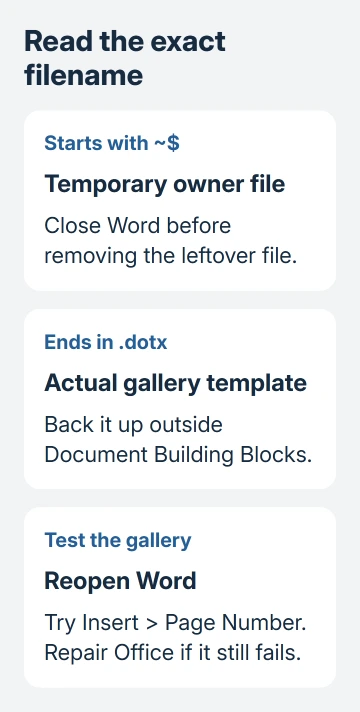
A filename beginning with ~$ identifies a temporary owner file, also called a lock file. It normally helps Word track an open file. Follow the temporary-file step if those two characters appear at the start of the reported name.
The template-error discussion includes both cases. It also contains owners for whom deleting temporary files didn't work, so clearing a lock file isn't a complete answer to every gallery failure.
If the warning names a different template, keep that exact name for support. Don't replace Normal.dotm as a substitute for checking the file Word actually identifies.
2. Open the user folder without typing a username
Close every Word window. Press Windows + R, enter %appdata%\Microsoft\Document Building Blocks, and press Enter. Keep both percent signs: %appdata% expands to your own profile location.
This opens your Document Building Blocks folder. It avoids hidden AppData folders and doesn't require you to copy a username from a forum example.
Open the numbered language folder that matches the warning. 1033 is English (United States), but another Office language can use a different number. Follow the path from your error instead of guessing the language number.
Word 2007 can have its template directly inside that language folder. Later releases can add a version folder: 14 for Word 2010, 15 for Word 2013, or 16 for Word 2016 and later installations using that layout.
To see filename endings in Windows 11, open File Explorer's View > Show > File name extensions control. In Windows 10, the option is on the View tab. Older Explorer uses Folder Options to control hidden extensions.
Use the AppData user copy for this check, leaving Program Files unchanged. Searching the whole PC may turn up another template with the same name. If that copy is in Program Files, use Office repair to address it.
3. Remove a leftover lock file or move the real template
With Word still closed, check for the exact ~$ file named by the warning. Move that temporary file to the Recycle Bin, then reopen Word and try Insert > Page Number in a blank document.
If the gallery opens and inserts a number, save the test file and reopen it. If the same warning remains, close Word again. Don't keep deleting newly created lock files while the app is running.
For an error naming the ordinary gallery template, make a backup folder on the desktop and move the affected template there. Keep the backup, because a custom Building Blocks.dotx may contain entries you created yourself.
Move it outside Document Building Blocks, rather than simply changing its name while leaving a .dotx ending in the same folder. Word can still load template files stored there under another name.
Restart Word and open the page-number gallery again. Word should rebuild the built-in user copy when needed. It's normal for a replacement to appear in the folder. What matters is whether the gallery now works without the warning.
The thread includes a failed template reset and a later report of success after a leftover temporary file was removed. If the warning remains on your PC, keep the backup and continue to repair.
4. Repair Office when the gallery still fails
Close the Office apps and open Run using Windows + R. Run appwiz.cpl, select your Office product in Programs and Features, then click Change. For an older MSI installation, choose Repair and follow the prompts.
For Click-to-Run installations that offer two choices, start with Quick Repair. If the warning continues, Online Repair is the more extensive option and requires an internet connection. Have your Office sign-in details available.
Microsoft's Office repair instructions distinguish these installer types. The repair covers the suite, so other Office applications need to be closed too.
An owner in the original template thread reported that repairing Word solved the problem. Use repair when checking the user template hasn't restored the gallery.
After repair, try Insert > Page Number and a header gallery in a new blank document, then in a duplicate of your original. If both work, you can get back to adding page numbers and headers in your document.
If the blank document works but one existing file doesn't, tell IT that distinction. Keep the original document and its backup instead of repeatedly replacing templates that now work in new files.
5. Insert a page field if the deadline comes first
For a document that still opens, double-click its header or footer where you want the number. Press Alt + Shift + P in Windows Word to insert a PAGE field, the automatic current-page number.
Putting the field in a header or footer lets it repeat on the pages that use that header or footer. Typing a number directly into each page's body creates manual numbering and won't follow later page changes reliably.
For a disabled button without a template warning, restore Word's Page Number control by checking Print Layout first.
The shortcut bypasses choosing a decorative gallery item. It doesn't repair that gallery, and sections may still need their own numbering settings. For starting at page 2 or restarting a section, use the Word page-number steps.
If an unwanted final sheet changes the page count, the blank-page removal guide addresses paragraph marks and section breaks. A blank page is a separate layout problem from a template that won't load.
IT can check the full template path and your account's folder access if repair hasn't cleared the warning. Provide the Word version, full filename, blank-document result and whether a new built-in template appeared.
The Short Version
Match the ~$ lock file or real gallery template, then close Word before handling that user copy. Repair Office if the warning remains. Alt + Shift + P inserts an automatic page field without the gallery.
Checked November 16, 2026.