Word's could not fire event message in Office 2011 for Mac can come from missing VBA or an EndNote add-in. Restore VBA if a custom installation left it out. If the error started with citation tools, check the EndNote startup bundle.
These reports concern an older Mac installation, even though the archived discussion is now listed under Windows. The steps concern Office 2011 on older Intel Macs, not the installation folders used by current Microsoft 365.
In this guide
1. Restore VBA when the custom installation omitted it
Visual Basic for Applications, or VBA, is the part of Word that runs macros, small programs that automate actions. A macro can run when a document opens or closes, so an event error can appear even when typing and saving still work.
Several owners in the original Word event-error thread fixed the problem by installing VBA from their Office 2011 media. Later owners confirmed they could add that component without first uninstalling Office.
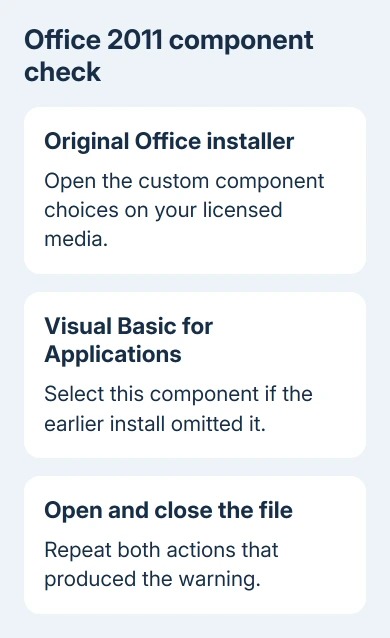
If you remember excluding VBA during a custom installation, save your work and quit the Office applications. Open the original Office 2011 installer from your licensed disc or installation media and open its custom installation options.
Select Visual Basic for Applications and complete the component installation. The installer screens depend on your media. Use its component list; the Office Change option is a Windows control.
Reopen Word with a document that previously triggered the message. Close it as well, because some owners saw the dialog on closing rather than opening. The warning should stay away when you open and close the document.
If the error remains, check the startup add-in next. Installing VBA doesn't remove an incompatible citation tool, and an installation that already includes VBA needs a different repair.
Don't fetch an Office 2011 installer from an unofficial download site. If the original licensed media is missing, use a supported Word installation to edit a duplicate document while arranging the old Mac's repair.
2. Temporarily remove the EndNote startup bundle
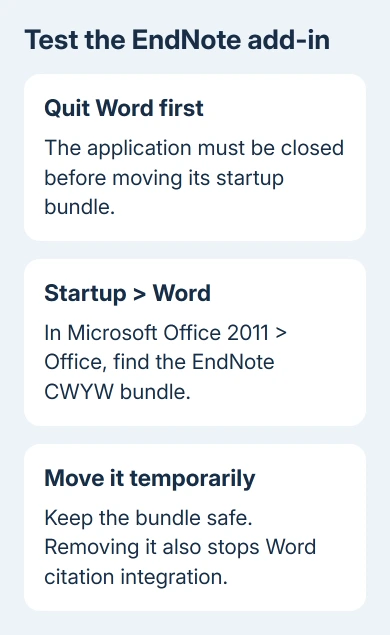
Choose Word > Quit Word before changing its startup folder. Closing the document window alone isn't enough if Word is still running. Keep the document closed until the bundle has been moved.
In Finder, open Applications > Microsoft Office 2011 > Office > Startup > Word. On a typical installation, the complete path starts with /Applications/Microsoft Office 2011/.
Look for EndNote CWYW Word 2011 or EndNoteCWYWWord2011.bundle. CWYW means Cite While You Write, EndNote's integration with Word. Owners described the component using these slightly different names.
Move that specific item into a temporary folder on the Desktop. Keep the bundle intact in that folder so it's ready to restore. Leave unrelated application folders and your documents in place.
Reopen Word and repeat the same opening and closing test. Several owners stopped the message this way. If the folder was empty to begin with, this particular fix doesn't apply, so continue to the document check.
Removing the bundle also disables its Word citation integration. An owner later confirmed that restoring it brought the integration and the warning back. It's a temporary check, not a permanent repair if you need EndNote.
If the error disappears, ask EndNote support which CWYW component matches your exact EndNote, Word 2011 and OS X versions. Reinstalling an unchanged bundle would bring back the same component.
If nothing changes, quit Word and return the bundle to its original folder. Moving it didn't help, and leaving it out would remove a feature you may need.
3. Rebuild a single affected document in a new file
Open and close an empty document, then repeat with the troublesome file. If the blank document behaves normally and the warning follows only one file, make a copy and run the next checks on it. Leave the Office installation alone for now.
One owner fixed a single-file case by copying its text into a new document and saving the new file. Keep the original file and build a separate replacement so you can compare them afterward.
Choose File > New, copy the needed text from the affected document, and paste into your blank file. Save under another name. Open and close that new copy to see whether it still produces the warning.
Check its formatting, headings, tables and references before you use it as your replacement. Copying text isn't a full transfer of every template setting, macro or embedded object that may have belonged to the original file.
For a document built from one of Office's templates, compare a plain blank document too. The original discussion included warnings on some supplied templates even when the user couldn't see any document macros listed.
I wouldn't spend time deleting every template just because the macro list is empty. Restoring VBA or checking the EndNote bundle addresses the reported causes more directly. An empty macro list didn't explain the original asker's warning.
If the replacement opens correctly, keep both versions until you've checked all the content. A warning-free file with missing references or figures still needs repair before submission or printing.
4. Escalate with the exact legacy software versions
Open Word > About Word and record its version. Note the OS X version from Apple menu > About This Mac, along with the EndNote version if that integration is installed.
The original asker already had Word 14.1.2. Advice in the thread to install that particular update didn't resolve their case. Don't assume matching that old number completes the repair or makes the installation current.
Send the technician or citation-tool support team the exact dialog text and whether it appears on opening, closing or both. Explain whether installing VBA helped and whether moving the CWYW bundle changed the result.
Ask them to check that these software components work together and look at the affected document. Those details make your repair request more useful than asking for a general Mac cleanup.
Office 2011 is out of support, so moving the work to a supported Office version may be the practical solution.
For a different Mac Word message, the Acrobat error 53 checks cover that add-in's separate failure. An inability to save needs the Word and Excel save-error checks instead.
The Short Version
For Office 2011 on Mac, restore VBA if it was omitted, then test the EndNote startup bundle with Word closed. Try a replacement copy for a single-file failure. Check citations and contents before replacing your working file.
Checked November 17, 2026.