"WslRegisterDistribution failed with error: 0x80040324" means WSL couldn't find the virtual network switch it was told to plug Linux into. Setup stops after "Installing, this may take a few minutes…" and Ubuntu never registers.
Check your .wslconfig file first, because a bridged networking line that names a missing switch causes exactly this.
No such file? Update WSL, then remove and re-add its Windows features if the error stays. That rebuild, followed by a round of WSL updates, got one owner's Ubuntu installed back in 2022.
In this guide
What 0x80040324 actually means
Under WSL 2, Linux lives in a lightweight virtual machine, and that machine gets online through a Hyper-V virtual switch, which is a software network port. Normally WSL builds its own switch and you never see it.
In WSL's source code, 0x80040324 is named WSL_E_VMSWITCH_NOT_FOUND. So the setup didn't fail on Ubuntu's files. It failed the moment WSL went looking for a switch by name and came back empty.
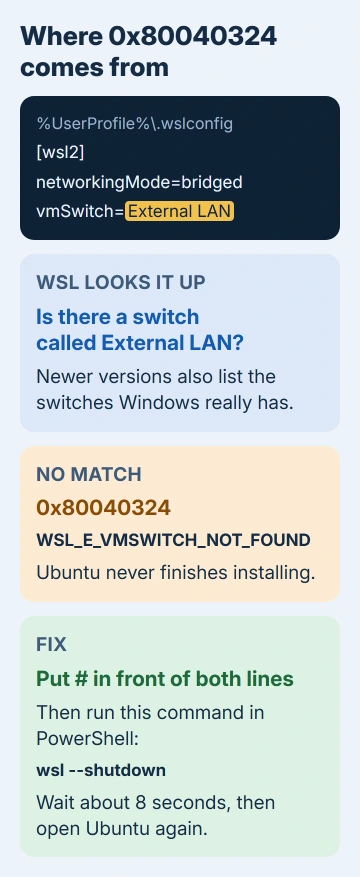
WSL reads that name from the vmSwitch= line in your .wslconfig file, a bridged networking setting. Leave the name out and you get 0x80040325, which newer versions spell out as "Bridged networking requires wsl2.vmSwitch to be set."
Docker Desktop hits the same wall and shows Wsl/Service/CreateVm/ConfigureNetworking/WSL_E_VMSWITCH_NOT_FOUND. The owner from 2022 saw both messages on one PC, and both come from the same missing switch.
1. Remove the bridged switch from .wslconfig
Type %UserProfile% into File Explorer's address bar, then hit Enter to reach your user folder. Look for a file named .wslconfig. It doesn't exist unless you or a tool created it, so if it's missing, go straight to fix 2.
I'd check this file before touching any Windows feature, since it's the only place a switch name comes from.
Open it in Notepad and find the [wsl2] section. If you see networkingMode=bridged and a vmSwitch= line, put a # at the start of both lines and save the file.
[wsl2]
#networkingMode=bridged
#vmSwitch=External LAN
Now run wsl --shutdown in PowerShell and wait about 8 seconds. WSL only reads the file when its virtual machine starts fresh, and that pause lets it fully stop. Then open Ubuntu from Start again.
If it carries on with the install and asks you to create a UNIX username, the switch name was the whole problem. If you'd rather click than edit text, the WSL Settings app in the Start menu has the same networking mode setting.
Did you add bridged mode so other devices could reach Linux? It's been deprecated, meaning on its way out, since WSL 2.4.5. From Windows 11 22H2 onward, networkingMode=mirrored copies Windows' own network adapters into Linux instead.
If you really need bridged mode, newer WSL versions list the switches Windows has right after the not-found message. Copy one of those names exactly into vmSwitch=, spaces and capitals included.
2. Update WSL
A round of WSL updates was that owner's last step before Ubuntu installed, so bring yours up to date before you rebuild anything. In an administrator PowerShell window, run:
wsl --update
wsl --version
The second command shows the WSL, kernel and Windows versions. If wsl --version isn't recognized at all, you're still on the old built-in WSL, and the update is the fix that matters most.
When the update stalls in the Microsoft Store, wsl --update --web-download pulls the same update from GitHub instead. Run wsl --shutdown afterward and try your distro (your Linux install, such as Ubuntu) again.
3. Remove and re-add WSL's Windows features
This is how the original asker got Ubuntu working: they took out everything WSL depends on, restarted, and put it all back. Back up any other distro you care about first with wsl --export <Distribution Name> <FileName>.
Type optionalfeatures into Start and press Enter to open Windows Features. Untick Windows Subsystem for Linux, Virtual Machine Platform, Windows Hypervisor Platform and Hyper-V (if listed), then select OK and restart.
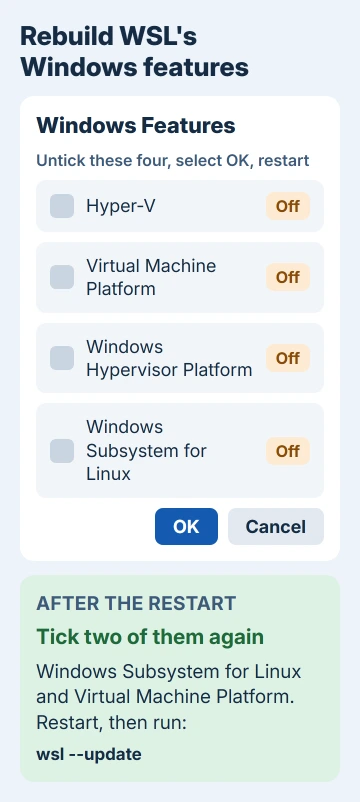
Also check Settings > Apps > Installed apps for Windows Subsystem for Linux, and uninstall it if it's there. The wsl command may still answer afterward; that's the built-in launcher, and you can carry on.
Open Windows Features again, tick Windows Subsystem for Linux and Virtual Machine Platform, and add Hyper-V back only if you use it. Restart once more, then run wsl --update and wsl --install -d Ubuntu.
If the dialog won't apply the change, you can turn the same two features on from an administrator Command Prompt. Restart when both finish:
dism.exe /online /enable-feature /featurename:Microsoft-Windows-Subsystem-Linux /all /norestart
dism.exe /online /enable-feature /featurename:VirtualMachinePlatform /all /norestart
The asker's error changed after the rebuild. A couple of WSL updates from Windows Update finished the job: "after uninstalling everything and reinstalling everything, I did a couple of WSL updates from Windows Update and now it's working!"
4. Ubuntu says it's already installed
This combination confused the original asker too. wsl --list --all says no distributions are installed, yet wsl --install -d Ubuntu replies that Ubuntu is already installed and then fails again.
Both messages are true. The Ubuntu app is on your PC, but WSL never finished registering it, so the list stays empty. Once the switch problem is gone, opening Ubuntu from Start runs the registration again and asks for a username.
If a broken copy does show in the list, wsl --unregister Ubuntu removes it so you can install fresh. Do that only for a distro you haven't used yet, because unregistering wipes every file, setting and program inside it.
If 0x80040324 keeps coming back
Follow the Collect WSL logs steps in WSL's GitHub repository, then open an issue there with the logs attached. A GitHub report of this exact code was closed after a week because its author never sent logs.
For other WSL codes, error 0x80370114 covers the missing-feature version, and a broken install that won't start belongs with the ERROR_FILE_NOT_FOUND repair.
Microsoft's .wslconfig reference lists every networking setting if you want to rebuild the file from scratch.
The Short Version
Error 0x80040324 means WSL can't find its virtual switch. Comment out networkingMode=bridged and vmSwitch= in %UserProfile%\.wslconfig, run wsl --shutdown and retry. Otherwise update WSL, or remove and re-add its Windows features.
Checked November 20, 2026.
 If you have any business, I can build it online