
The 10661 error on a Mac, usually displayed as -10661, points to an application executable in the wrong format. Check whether the download is a Windows installer before changing permissions or reinstalling macOS.
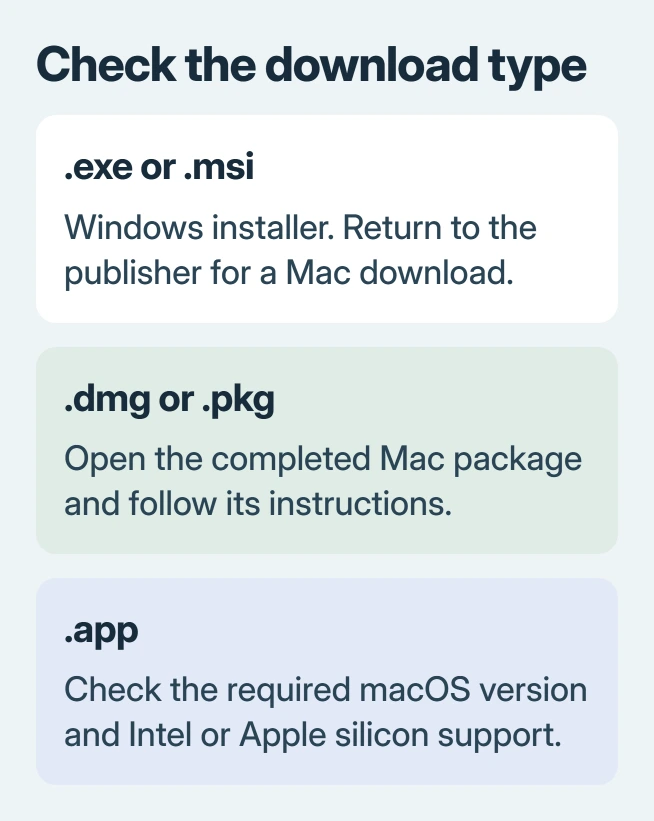
A file ending in .exe or .msi is not a native Mac installer. Get the Mac download from the software maker instead. If the file is already a Mac app, check its processor support and obtain a fresh compatible copy.
Read the filename before trying another repair
Select the downloaded file in Finder and press Command + I. Expand Name & Extension to inspect its full filename. Apple's filename-extension guidance documents this view.
Apple documents -10661 as kLSExecutableIncorrectFormat in its Core Services reference. The minus sign matters when looking up an error code.
Status: Apple's -10661 definition and current Mac installation guidance checked November 2, 2026. One Office installation outcome was verified; no Mac repair was performed.
Return to the publisher's download page and select Mac or macOS explicitly. A Windows-only product may have a browser alternative or a separate edition for Macs; check the maker's product list.
Renaming setup.exe to setup.app does not convert its contents. The file must contain code that macOS can run; a different ending only changes the name.
For Office, download from the account holding the license
The asker in a community thread received a Windows executable while installing Office on a client's Mac. They recalled error 10661, then later encountered a redeemed-product-key message.
They completed installation after signing into the Microsoft account that already held the purchase and downloading Office from Services & subscriptions. Their follow-up confirmed that the Mac installer finally worked.
For a purchased Office license, open account.microsoft.com, sign into the account used for redemption and check Services & subscriptions. Locate the owned product and use its installation option for Mac.
Microsoft says a redeemed key is associated with that account in its Office installation instructions. Reinstalling should not require redeeming it again.
For Microsoft 365, the same guide provides the current app-download sign-in route. Its Mac installer is a .pkg file, with a name that can vary by release. Open that completed download and follow the installer.
If the product is absent from the account, resolve the account or license with Microsoft Support. Repeatedly opening the old Windows download cannot correct that mismatch.
Check a Mac app against the Mac's processor
Open Apple menu > About This Mac and note whether the machine lists an Apple chip or an Intel processor. Compare that with the publisher's requirements and its offered download types.
For an existing app, select it in Finder and open Get Info. Apple states that Kind distinguishes Application (Intel), Application (Universal) and Application (Apple silicon) in its Intel-app guidance.
A Universal build supports both processor families. An Apple silicon build is not the correct download for an Intel Mac. Prefer the publisher's compatible current build when several versions are offered.
Rosetta translates Intel Mac apps on supported Apple silicon systems. It does not turn a Windows executable into a Mac application. A Rosetta prompt is therefore different from choosing the correct operating-system download.
Reinstall the correct package if its format already matches
Apple's app-opening advice says an app can need updating or reinstalling after a macOS change. Check the developer's supported macOS versions before downloading again.
Use a new download from the publisher or App Store. Open a completed .dmg or .pkg and work through its installation prompts, as Apple documents in its Mac installation guide.
If the download is a ZIP that will not expand, resolve the Mac archive-extraction failure first. A partially extracted application is not a completed installation.
A message specifically denying permission is a different Mac launch error. Do not apply permission, quarantine or signing commands merely because another article also mentions an app failing to open.
For a compatible fresh copy that still returns -10661, send the developer the exact filename, app version, macOS version and processor type. Ask them to verify that installer or app build before making system-wide changes.
The Short Version
Get the publisher's Mac download instead of a Windows installer. For Office, use the account holding the license. A Mac package that still fails needs its processor and macOS requirements checked before reporting the build to its developer.

Isaac Smith is the founder and editor of PC Glance, a website that covers computers, laptops, and technology. He is a tech enthusiast and a computer geek who loves to share his insights and help his readers make smart choices when buying tech gadgets or laptops. He is always curious and updated about the latest tech trends.