
Apple logo, black screen, Apple logo again, every five or ten seconds, and you cannot get anywhere near a menu to stop it.
Before you write it off, one detail matters. If a picture of an iPhone appears on the screen, it is asking to be recovered rather than telling you it has died.
Your iPhone can do that recovery, and I will take you through it.
Recover it with your iPhone
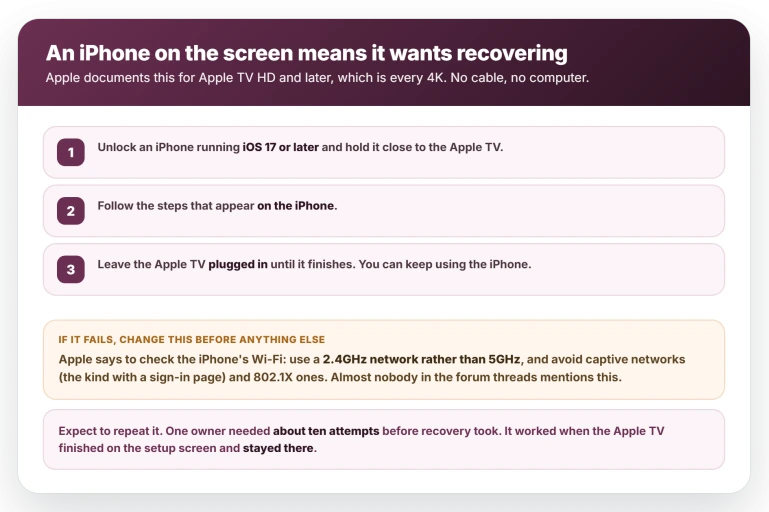
Apple's instructions apply to Apple TV HD and later, which covers every Apple TV 4K, and need iOS 17 or later:
- Unlock your iPhone and hold it close to the Apple TV.
- Follow the steps that appear on the iPhone.
- Leave the Apple TV plugged in until it finishes. You can carry on using the iPhone meanwhile.
If it fails, change your Wi-Fi before you try anything else. Apple's wording is that if the steps do not work, check the network your iPhone is on, use a 2.4GHz network rather than 5GHz, and avoid captive networks and 802.1X ones.
Captive means the sort that shows a sign-in page, so a guest or hotel network will not do.
Most home routers publish both bands under one name. If yours does, split them temporarily or join a guest network you have set to 2.4GHz, then try again.
Be prepared to repeat it. One owner who got his back described unplugging the power, holding the back button and volume up, and plugging it in again, and said it took about ten attempts before it took.
Another watched the progress bar start, flicker and reset several times before it went through.
How to tell it worked: the Apple TV finishes on the setup screen and stays there instead of restarting. If it reaches setup and then loops again, recovery has not completed.
Once it is back, a HomePod set as its speaker usually needs pairing again.
The remote test, which is free and occasionally the answer
A Siri Remote with a jammed button can hold an Apple TV in a loop. Thirty seconds and no money, so it is the right thing to try while you are waiting on anything else.
The odds are modest: in the current reports it solved the problem for about two owners and was explicitly tried and failed by about six.
The clearest account is from December 2023, when one owner described what happened after his wife sat on the remote:
> "I placed the remote out of range and the Apple TV was able to fully boot up. As soon as I brought the remote back within range, the Apple TV went into a boot loop. I reset the remote with TV button + Volume Down and everything went back to normal."
He ended that post by calling it an edge case, which is a fair weight to give it.
To run it: unplug the Apple TV, take the remote two rooms away or shut it in a biscuit tin, plug the Apple TV back in and watch for a minute. If it boots, carry the remote back in.
If the loop restarts the moment the remote is near, you have your answer, and Apple's restart for the remote is to hold TV/Control Center and Volume Down together for about five seconds, until the light on the Apple TV blinks off and back on.
If nothing changes with the remote out of the room, the remote is not your problem.
One more reason to try it: an owner with four Apple TVs in recovery at once, including one still brand new and never connected to Wi-Fi, traced the lot to a remote that had been sat on.
He put it down to stray infrared, while the 2023 owner blamed Bluetooth range, so the mechanism is not settled.
If more than one Apple TV in your house is looping, that is the cheapest thing to rule out.
What Apple will and will not do
No Apple TV 4K has a service port. The 2015 Apple TV HD is the last model Apple gave one, which is why the restore-from-a-computer instructions you will find apply only to that generation and earlier.
An Apple employee in one of these discussions put it down to the design not allowing for a diagnostic port.
That is not a detail you can work around.
One owner bought the professional service cable, reached DFU mode, watched the Apple TV appear in Finder, pressed restore, and was stopped by "Software for this Apple TV is not currently available", concluding that no firmware is openly published for these models.
Apple's page for a warning symbol is blunt about where that leaves an Apple TV 4K: it "might need service".
And the recovery page ends by telling you to check whether you are eligible for a replacement, which is the sentence to hold on to for the next section.
Ask before you pay
Know what you are invoking, because it is not a policy. The idea that Apple replaces these free traces to a single commenter in a Reddit thread who said he worked for Apple and described internal guidance he said had been posted years earlier.
Apple's own list of service programs runs to eight entries and none is for Apple TV, so there is no document to cite, and one owner who asked a rep to find it was told she could not.
Owners are being quoted between $109 and $125. Across the current reports, roughly eleven had that waived on units out of warranty and roughly twelve were charged or refused.
Every confirmed success was in the United States, and one owner with a 2017 model was told outright that Apple no longer services it.
If you will spend twenty minutes on those odds, this is what the eleven did:
- Phone Apple Support and ask to escalate to a senior advisor, describing a unit that died in normal use and cannot be restored.
- Take it into a store and have a service request lodged.
- Ask again. One owner was refused and succeeded the same day by calling instead. Another was quoted $109 in a store, showed staff the thread, waited fifteen minutes while they checked, and left with a replacement arranged.
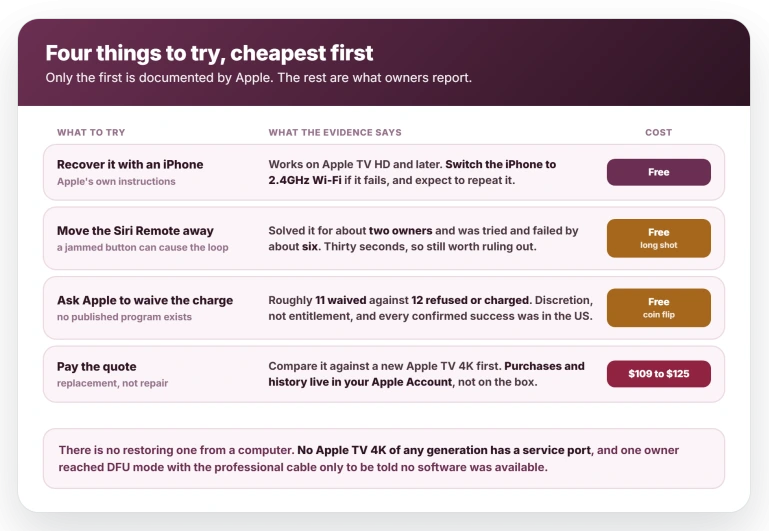
Before you agree to a paid replacement, compare the quote with the price of a current Apple TV 4K, because they are close enough that the quote is sometimes the worse deal.
Your purchases and viewing history live in your Apple Account rather than on the box, so a new one signs in and picks up where the old one stopped.
It is probably not one update
Three owners name a version and all three say 26.5, though two of them hedge.
Plenty of other people are running 26.5 with no trouble at all, and one owner reported three units failing on three different tvOS versions in the space of a few weeks.
The same fault has been posted monthly for about a year, and a thread from eleven months ago carries more replies than the busiest one from July.
Two owners who gave in and replaced the box report the new one doing the same thing.
None of that means your Apple TV is fine. It means "the update killed it" is a guess, and it is not the guess to open with when you call Apple.
Another Apple TV fault people pin on tvOS 26, the screen saver sticking on one clip, turned out to be older than tvOS 26 as well.
What does not help
- Buying a replacement before you try recovery. Two owners report the new unit behaving the same way.
- Repeating recovery on the same Wi-Fi. If it failed on a 5GHz or a sign-in network, it will keep failing until you change the network.
- Restoring from a computer. Those instructions are for Apple TV HD and earlier, and no 4K has the port they require.
- Waiting for Apple to say something. Apple has not commented, and no publication has covered this.
Status: still reported through late July 2026, and posted monthly for about a year. No tvOS version is established as the cause and Apple has published nothing. Recheck at the next tvOS release.
Why does my Apple TV keep restarting over and over?
If a picture of an iPhone appears next to the Apple TV, it is asking to be recovered. Unlock an iPhone running iOS 17 or later, hold it close, and follow the prompts.
If recovery fails, Apple says to put the iPhone on a 2.4GHz network rather than 5GHz and off any network with a sign-in page. It often takes several attempts.
Separately, a Siri Remote with a jammed button can cause a boot loop, so moving the remote out of the room is a free thing to rule out.
Can I restore an Apple TV 4K from a computer?
No. Those instructions cover Apple TV HD and earlier, which have a service port, and no Apple TV 4K of any generation has one. The iPhone recovery flow is the only home route.
One owner bought the professional service cable, reached DFU mode and still could not restore, because no firmware file is published for these models.
Will Apple replace a bricked Apple TV for free?
Sometimes, so ask before you pay a quote of $109 to $125. Across current reports it is close to an even split, roughly eleven waived against twelve charged or refused.
Apple has published no program covering this, so it is discretion rather than entitlement, and every confirmed success was in the United States.
The Short Version
- A picture of an iPhone on screen means it wants recovering, not that it is dead. Hold an unlocked iPhone on iOS 17 or later close to it and follow the prompts.
- If recovery fails, change the Wi-Fi first. Apple says use 2.4GHz rather than 5GHz, and avoid captive or 802.1X networks.
- Expect to repeat it. One owner needed about ten attempts.
- A jammed Siri Remote can cause the loop, so take it two rooms away and restart. Free, but it worked for about two owners and failed for about six.
- Restart the remote with TV/Control Center and Volume Down for five seconds, until the light blinks off and back on.
- No Apple TV 4K has a service port, so restoring from a computer is not an option on any of them.
- Ask before you pay. Roughly eleven owners had a $109 to $125 charge waived out of warranty and roughly twelve were refused. It is discretion, not policy, and every confirmed success was in the US.
- No tvOS version is established as the cause. The three owners who name one say 26.5, which plenty of people run fine.
Where to Next
A picture of an iPhone on the screen is a request, not a death notice. Your phone can do the recovery, and it costs you nothing to try.
Hold it close, unlocked, and give it time.
Once it boots properly, the next odd thing people notice is the sound label. Apple TV showing Dolby Atmos on everything explains what that badge really means.
If the loop carries on after a successful recovery, tell me how old the Apple TV is, because at that point we are looking at something else.

Isaac Smith is the founder and editor of PC Glance, a website that covers computers, laptops, and technology. He is a tech enthusiast and a computer geek who loves to share his insights and help his readers make smart choices when buying tech gadgets or laptops. He is always curious and updated about the latest tech trends.