

Fourth evening running, and your Apple TV is showing downtown Los Angeles again. Or Dubai marina, or the same stretch of coastline.
Before you restart anything, do this. While the screen saver is playing, swipe right on the remote.
Apple documents that gesture as "skip to the next visual", and on tvOS 26 the next second tells you which of three faults you have. Two of them need no download at all.
The accepted answer in the biggest threads is a factory reset. It bears on one of the three.
The one-swipe test
No need to wait for the idle timer. To start the screen saver now, press and hold the Back button, or the Menu button on an older remote, to return to the Home screen, then press that same button again.
Swipe right once, and read what the screen did.
- The same clip started over, or nothing moved. One video is all it holds. Read If the same clip keeps repeating.
- A different clip came up, and another on the next swipe. The collection is intact and only the running order is stuck. Read If swiping reveals plenty of clips.
- The screen went black while the audio kept running. Stored clips have stopped rendering. Read If the screen goes black.
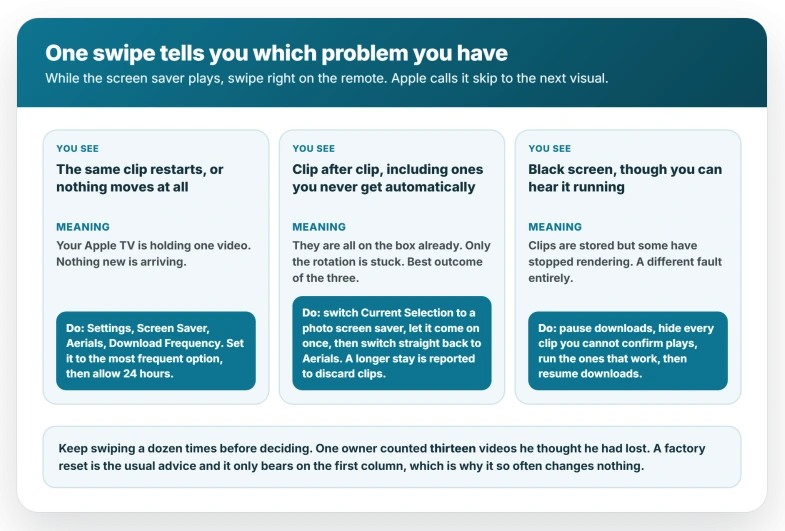
Keep swiping a dozen times before you decide. A Level 4 community member did exactly this and counted thirteen videos he had assumed were gone, so a handful on the first few swipes does not settle it.
Swipe right specifically. The tvOS 26 User Guide documents that direction, while Apple's separate support page says right or left, so if left does nothing on your remote, that is why.
If the same clip keeps repeating
You have one video and the Apple TV is not fetching more.
The setting that controls this is at Settings, Screen Saver, Aerials, Download Frequency.
Apple's guide says to "select Download Frequency, then choose an option" and never lists those options on any page. Owners describe a never setting and a weekly one.
Pick the most frequent option your screen offers.
Now wait. An Apple Community Specialist answering this complaint in 2022, under the setting's old name, asked people to "allow 24 hours after changing the frequency of downloads".
A Level 10 volunteer describes it adding roughly one clip per interval on a schedule Apple does not publish. It behaves like a scheduler, not a refresh button.
Run the swipe test again after 24 hours. A second clip means the download path is alive. The owner stuck on downtown Los Angeles reported exactly that after about three days, a new landscape arriving daily.
If swiping reveals plenty of clips
Nothing is missing and nothing needs downloading. The screen saver is not cycling through what it has.
The same member offered a guess for why: the screen saver may restart at the same point in the list every time, making a large collection feel small.
He flagged his own uncertainty, and Apple documents nothing about the order, so treat it as a possibility.
What people report shifting it is switching away and back. Go to Settings, Screen Saver, Current Selection, choose a photo screen saver, let it come on once, then switch straight back to Aerials.
Do not park on the photo screen saver for days.
The Level 10 volunteer who suggests this trick warns in two separate posts that downloaded clips may be discarded while a non-Aerial screen saver is selected, which on this branch is the one thing you cannot afford.
The two owners who reported success differ on timing, one overnight and one about a week, but both left the box awake.
The same volunteer notes an Apple TV downloads nothing in sleep mode, so leave it powered on and idle.
If the screen goes black
This is a different fault, and it is the only one with an owner-confirmed recipe behind it.
An Apple TV 4K owner on tvOS 26 and then 26.1 described the screen saver naming a clip and showing nothing. He still had plenty of videos: started by hand, some played and some came up black.
Specific stored clips had stopped working, and the timer kept landing on one.
What he did, in this order:
- Set Download Frequency to its never option, stopping new arrivals.
- Opened Settings, Screen Saver, Aerials, Choose Aerials, and hid every clip he could not confirm played.
- Ran the ten or so that did work, until the screen saver behaved normally.
- A day or two later, set downloads back to a weekly interval, leaving the hidden ones hidden.
His follow-up the next day reported new clips arriving with no black screen, and no factory reset needed.
Copy the steps, not the reasoning.
He confirmed it held for roughly a day before the thread closed, nobody else in that thread tried it, and his word for the failing clips, "corrupt", is his guess rather than anything Apple documents.
Apple renamed this setting twice
Apple renamed and moved this setting. Through tvOS 17 it was called Download New Video and lived under Settings, General, Screen Saver.
From tvOS 18 it became Download Frequency under Settings, Screen Saver, Aerials. Guides written before that describe a path that no longer exists.
The picker changed more recently still. On tvOS 18 you chose "whether to show or hide Cityscape, Earth, Underwater, and Landscape themes", and tvOS 17 sent you to a screen called Themes.
Either way, a handful of switches and nothing finer.
On tvOS 26 there is a Choose Aerials screen with categories down the left and thumbnails of individual clips, and you "select a thumbnail to hide it, or select Hide All to hide all the Aerials for that category".
Per-clip hiding is why the black-screen recipe exists at all. It was not possible before tvOS 26.
Apple moved the audio switch on this box too, which is how Apple TV reports Dolby Atmos on everything.
The Hide All claim, and how to check it
One community claim would explain why the complaints so often name the same city.
A Level 8 community member has made this claim in two threads two months apart, naming downtown Los Angeles as that default in the more recent one: use Hide All in the aerial picker and the Apple TV falls back to a single clip.
The check is to open Settings, Screen Saver, Aerials, Choose Aerials and confirm each theme reads Show All rather than an eye symbol with a line through it.
Apple documents nothing of the kind, so treat it as a reader tip. It takes one look, and Hide All is exactly the button someone hunting this menu is likely to have pressed.
What storage does, and what it does not
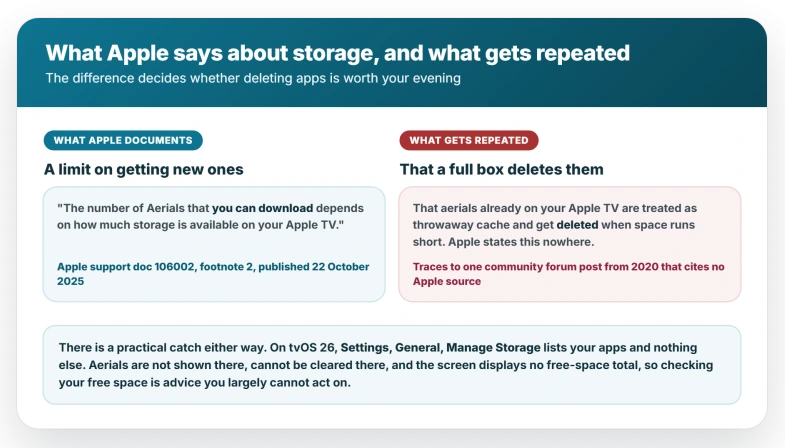
A full Apple TV deletes your aerials. That claim is repeated widely, and Apple does not make it.
What Apple says, in a footnote, is narrower: "The number of Aerials that you can download depends on how much storage is available on your Apple TV." That is a limit on acquiring new ones, not a statement that existing clips get thrown away.
The deletion claim traces to community posts going back to January 2019, none of them citing an Apple page that says it.
The evidence does not support it either. The owner stuck on Los Angeles had a four-day-old Apple TV with six streaming apps, no games, and two factory resets behind him. Nothing on it could run out of room.
There is also little there to check.
On tvOS 26, Settings, General, Manage Storage lists your apps with Delete and Offload beside each, and Apple documents nothing on that screen beyond the per-app list.
Aerials do not appear and cannot be cleared from it.
Where free space does bite is the one place Apple names it: how many Aerials you can download. That is the same failure as the first branch.
So on a box genuinely stuffed with apps and games, clearing some earns its time if the same clip keeps repeating, and earns nothing if swiping already shows you plenty.
Current models ship with 64 GB or 128 GB.
This is older than tvOS 26
The same complaint runs back through tvOS 14, 16, 17 and 18, and those older discussions drew far more me-toos than the tvOS 26 ones.
On the current release three owners describe the stuck clip by name, between September and December 2025, on tvOS 26 through 26.2, with a fourth reporting the black screen.
A genuine problem and a small sample, both at once.
Apple has said nothing publicly either way. The tvOS 26.6 release notes, published 27 July 2026, list two unrelated developer fixes and nothing about screen savers.
All three of those threads have since been closed to replies, so the quiet since December is not evidence that anything was fixed, only that people can no longer post.
This box has form for behavior that reads as a fault and is not. Up Next showing a different list on every device is mostly by design too.
What does not help
- A factory reset. The owner stuck on Los Angeles did two, on a four-day-old device, and stayed stuck. Waiting is what eventually worked for him.
- Restarting or pulling the power. Nobody in the tvOS 26 threads reports it working, and it does nothing to a download schedule.
- Hiding the clip you are sick of, on its own. If only one is stored, hiding it removes the only thing left to play.
- Router and network changes. One owner on 350 Mbps fibre Wi-Fi and another on wired Ethernet both had it regardless.
Status: still unacknowledged as of tvOS 26.6, whose release notes name only unrelated developer fixes. The tvOS 26 threads are closed to replies, so silence is not evidence of a fix.
Can I make my Apple TV rotate its screen savers again?
Swipe right on the remote while it plays. If other clips appear, the rotation is stuck, so switch Current Selection to a photo screen saver, let it come on once, and switch straight back.
If the same clip repeats, set Settings, Screen Saver, Aerials, Download Frequency to its most frequent option and allow 24 hours.
Why is my Apple TV screen saver always Los Angeles?
It is the clip people report being left with when the collection drops to one.
Check Choose Aerials and confirm each category reads Show All, since a community claim holds that using Hide All leaves that single default in place.
Then set Download Frequency to its most frequent option and wait a day.
Why does my Apple TV screen saver go black?
That is a separate fault from being stuck on one clip. Start the screen saver by hand and swipe through: if some play and some are black, specific stored clips have stopped rendering.
Hide the ones that fail, run the ones that work, and pause downloads until it is stable.
The Short Version
- Swipe right first. It splits this into three faults in about a second.
- Same clip repeating means one video on the box, so this is a download problem.
- Plenty of clips means a rotation problem. Switch to a photo screen saver, let it run once, switch straight back. A longer stay is reported to discard clips.
- A black screen with clips still present is a third fault, with an owner-confirmed recipe.
- Download Frequency is a scheduler, not a refresh button. Apple staff ask for 24 hours.
- The setting was renamed and moved after tvOS 17, and the per-clip picker is new in tvOS 26.
- Hide All may leave you with one default clip. Community claim, quick to check.
- Apple never says storage deletes your aerials. It says free space limits new downloads.
- This is not new to tvOS 26. It runs back to tvOS 14, unacknowledged throughout.
Where to Next
Swipe right first. It costs you a second and it splits this into three different faults straight away.
Once you know which of the three you have, the rest of the page is short, because each has one answer rather than a list.
If the swipe does nothing at all, say so below and tell me what is on screen at the time, because that is a fourth case and it is worth documenting.

Isaac Smith is the founder and editor of PC Glance, a website that covers computers, laptops, and technology. He is a tech enthusiast and a computer geek who loves to share his insights and help his readers make smart choices when buying tech gadgets or laptops. He is always curious and updated about the latest tech trends.