
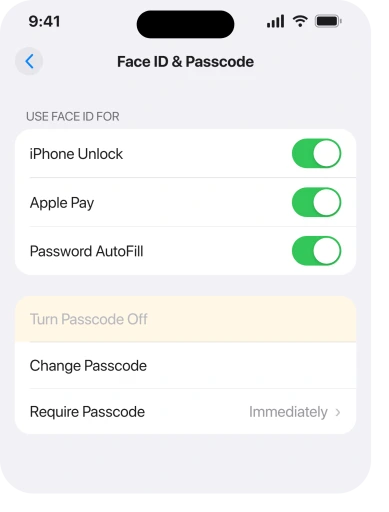
You are tired of typing four or six digits every time you glance at your phone. So you went to turn the passcode off, and Turn Passcode Off is sitting there in grey. Tapping it does nothing.
That is a frustrating place to land when you were trying to make life simpler, and I can usually tell you which of six things is holding it.
Read the warning in cause 1 before you do anything, though. It matters more than the setting does.
1. Before anything else: what you give up
I am not going to talk you out of it, but you should know what leaves with the passcode.
Apple, on setting a passcode: "Setting a passcode also turns on data protection, which encrypts your iPhone data with 256-bit AES encryption."
So the passcode is not just a lock on the screen. It is the key to the encryption on the whole phone. Remove it and that goes too.
A senior member of Apple's own community forum spelled out the practical side on a thread about this exact button. Turning the passcode off also costs you password autofill, passkeys and Apple Wallet. Use Apple Pay?
Then you are about to lose it.
If you only wanted to stop being asked so often, the answer is Face ID or Touch ID rather than no passcode at all.
Our page on Face ID that stopped recognising you covers the reasons it asks for digits more than it used to.
2. Face ID or Touch ID is switched on
This is the commonest cause by a distance, and the fix is not the obvious one.
You cannot have a biometric unlock without a passcode behind it.
A Community+ member put the mechanism plainly on the thread about iOS 26: "To turn off the Passcode you must remove Touch ID; to use Touch ID you must have a passcode because Touch ID won't be enabled after a restart, and in certain other situations, until the passcode is entered."
Go to Settings, then Face ID & Passcode or Touch ID & Passcode. Enter your code.
3. Turning the switches off is not enough, you have to delete the prints
This is the part that sends people round in circles, and it came from the person who was stuck rather than from any support page.
On that same thread the owner reported doing the obvious thing and getting nowhere: "I turned off all the toggle switches for Touch ID and restarted, and Turn Passcode off is still grey out." What finally moved it was going further.
They came back with: "I deleted my finger prints, and then had to sign in using my Apple password…But I guess at least I don't have to punch in that code every 2 seconds."
Switching iPhone Unlock, iTunes & App Store and the rest off leaves the enrolment in place. On the same screen, tap each saved fingerprint or face and delete it, then look at Turn Passcode Off again.
Expect to be asked for your Apple Account password afterwards, exactly as that owner was, and have it to hand before you start.
4. A work, school or university profile is enforcing it
Different symptom in one respect: nothing you delete on the phone will free this one.
Whoever manages your iPhone can require a passcode through a configuration profile, and Apple documents the payload that does it.
Apple, in its device management guide: "When installing the configuration profile, users receive a prompt to enter a password or passcode that meets the policies you specify. Otherwise, the profile doesn't install."
Read that as a requirement rather than a suggestion. The profile will not sit on the phone without a passcode, so iOS will not let you remove one.
Check at Settings, General, VPN & Device Management. Anything under Configuration Profile is doing this.
Do not delete an employer's profile to win the setting back, though. It usually carries your work mail, your Wi-Fi and your certificates, and removing it can lock you out of all three.
Our page on Auto-Lock being greyed out covers the same trap from the other direction.
5. A work email account brought a policy with it
Narrower, and it catches people who have never heard the word profile.
You do not need a managed phone to inherit a passcode rule. An Exchange or corporate mail account brings its own security policy. That policy can require a device passcode exactly as a profile does.
The tell is timing. Did it grey out when you added a work account rather than after an update? Then look there first.
Go to Settings, Apps, Mail, then Mail Accounts, and see what is signed in. Removing the account releases the requirement. It also removes your work mail, so decide which you would rather have.
6. None of those five, and it is still grey
The small remainder, in the order I would try them.
Restart the phone. Off and on, not a force restart. It clears a Settings pane that has stopped answering taps.
Then update at Settings, General, Software Update, since a stuck pane is the kind of thing a point release quietly fixes.
Then check Screen Time. It does not restrict the passcode directly, but Settings, Screen Time, Content & Privacy Restrictions, Passcode Changes can be set to Don't Allow, and that does exactly what it says.
I would stop there rather than reaching for Reset All Settings. On the community thread about this, nobody reported a working fix beyond deleting the biometric enrolment.
A reset that clears your Wi-Fi passwords, wallpaper and every app permission is a large price for a low chance.
What does not help
- Toggling the Face ID or Touch ID switches. Reported and confirmed as not enough. Delete the enrolment instead.
- Changing the passcode to something shorter. It stays a passcode, so the button stays grey.
- Signing out of your Apple Account. It does not remove a profile or a mail policy, and it will disrupt a great deal else.
- Reset Network Settings. It wipes your saved Wi-Fi passwords and has nothing to do with the lock screen.
- Erasing the phone. It removes the profile too, which works, but it is an enormous answer to a small question and you may not be allowed to reinstall the profile afterwards.
Status: iOS 26.6, checked 17 August 2026. Apple documents the passcode as the basis of device encryption and documents a profile requiring one. Deleting the fingerprints is user-reported.
Why is Turn Passcode Off greyed out on my iPhone?
Almost always because Face ID or Touch ID is set up. A biometric unlock needs a passcode behind it, so iOS will not let you remove the passcode while an enrolment exists.
Switching the toggles off is not enough. Delete the saved face or fingerprints.
Can my work stop me removing my iPhone passcode?
Yes. Apple's device management documentation says a Passcode payload prompts users to set a passcode meeting the specified policy and that the profile will not install otherwise.
A corporate mail account can carry the same requirement without any profile appearing.
Is it safe to turn off my iPhone passcode?
Apple states the passcode turns on data protection, which encrypts your data with 256-bit AES encryption, so removing it removes that.
You also lose password autofill, passkeys and Apple Wallet. Face ID or Touch ID is the better answer to being asked too often.
The Short Version
- The passcode is what encrypts the phone, so read cause 1 before you remove it.
- Face ID or Touch ID being set up is the usual reason the button is grey.
- Switching the biometric toggles off does not free it. Delete the enrolled face or fingerprints.
- Expect to be asked for your Apple Account password once you do.
- A work or school configuration profile can require a passcode, and Apple documents that.
- A corporate mail account can carry the same rule with no profile in sight.
- Screen Time can block passcode changes under Content & Privacy Restrictions.
- Nobody on the community thread got past this with a reset, so do not start there.
Where to Next
The thing to take away is that this button is rarely broken. It is doing its job, because something else on the phone genuinely needs a passcode to exist.
Work out which of the six it is before you change anything, and if it turns out to be Face ID, ask yourself whether you actually want the passcode gone or just want to stop typing it.
If you have deleted every fingerprint, there is no profile listed and the button is still grey, tell me whether you have a work email account on the phone, because that is the cause nobody expects.

Isaac Smith is the founder and editor of PC Glance, a website that covers computers, laptops, and technology. He is a tech enthusiast and a computer geek who loves to share his insights and help his readers make smart choices when buying tech gadgets or laptops. He is always curious and updated about the latest tech trends.