
You check Find My for your keys, and the AirTag is a kilometre away. The keys are in your pocket. Or the dot keeps jumping around while the bag sits still at home.
That is worrying when the whole point of an AirTag is trust. I will explain why the dot can be off, which checks take a minute, and the two fixes that owners say brought their AirTags back.
Why the dot can be wrong
An AirTag has no GPS of its own. When it is close to your iPhone, a Level 10 volunteer explained, "your iPhone can communicate directly with it". Out of Bluetooth range, other people's Apple devices pass on its approximate location.
So some drift is normal when you are far away, but a kilometre off while the AirTag is right beside you is not.
That is what owners report since iOS 27. In the forum thread, the first poster wrote that "my AirTag has started showing completely incorrect locations".
The gap is not small, either. "The AirTag is usually around 1 km away from the location shown in the Find My app".
Another owner found Precision Finding struggling too, and a ping that "says unreachable".
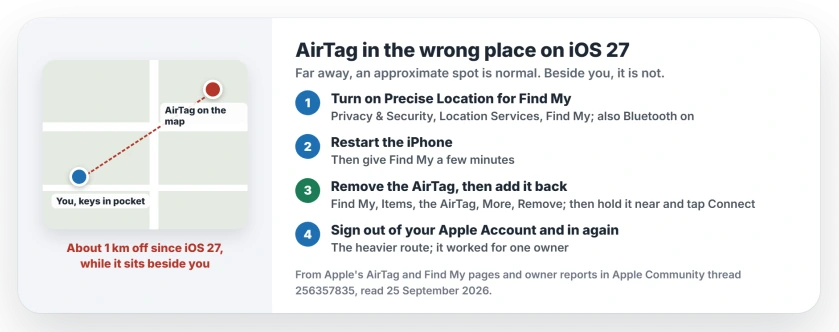
Status: iOS 27, checked 25 September 2026. No word from Apple. Re-pairing the AirTag fixed it for a Level 9 volunteer, and logging out and in again fixed it for another owner.
1. Check Location Services for Find My
Start with the quick one. Open Settings, then Privacy & Security, then Location Services. Check that it is switched on.
Then scroll down to Find My. On its AirTag setup page, Apple says: "For the most accurate location, turn on Precise Location".
The same page asks you to check that Bluetooth is on, and that your iPhone takes part in the Find My network. An update can leave any of these off.
2. Restart your iPhone
Apple lists a restart among its AirTag checks, and it costs you a minute. Turn the iPhone off and on again. Then give Find My a few minutes.
3. Remove the AirTag and add it back
This is the fix a Level 9 volunteer used on several of them: "I had to forget several of my AirTags and re-pair them using FindMy".
Apple's steps to remove it: open Find My, tap Items, tap the AirTag, then tap the More button. Bring the AirTag near your iPhone, tap Remove, and follow the prompts.
Then add it back. Apple's words: "Hold your AirTag near your iPhone or iPad, then tap Connect". Pick a name, link it to your Apple Account, and you are done.
You will need to choose its name and emoji again. This advice is ours: do one AirTag at a time, since Apple warns that setup gets confused when more than one is nearby.
4. Start your Apple Account session over
This one is heavier, so try it only if re-pairing did not help. One owner fixed it this way: "I turned find my off and signed out of my iCloud Apple ID".
They then force restarted the iPhone, signed back in and turned Find My on again. Their verdict: "Working as supposed to!"
Before you sign out, let iCloud finish syncing, and have your Apple Account password ready, since you need it to turn Find My off and to sign back in.
5. When a stale dot is normal
Some gaps are how Find My works. If nobody with an Apple device passes near your AirTag, its location simply stops updating.
Apple's Find My page says the last known spot stays visible for up to a week. An old dot in a quiet place is usually just an old dot.
If the location is wrong even when the AirTag is right next to you, and none of the steps helped, report it through the iPhone feedback page. One owner in the thread said there is "a wave of posts" about this since iOS 27.
Other Find My problems
If a device says No location found in Find My instead, that page explains what each message means. And if a friend's location stopped updating after the update, location sharing has its own fix.
Why is my AirTag showing the wrong location?
Close to your iPhone, the AirTag talks to it directly. Far away, strangers' Apple devices report an approximate spot. A big error while it is beside you points to a fault, which owners have seen since iOS 27.
How do I fix my AirTag location on iOS 27?
Turn on Precise Location for Find My and restart your iPhone. If that fails, remove the AirTag in Find My and add it again, which fixed it for a Level 9 volunteer.
Does re-pairing an AirTag reset its location?
It gave one volunteer correct locations again on several AirTags. You lose nothing but its name and emoji, which you set again during setup.
Can other people's iPhones make my AirTag location wrong?
They can make it approximate, since they relay it from wherever they are. That is normal at a distance, but not a kilometre off when it is in your hand.
The Short Version
- Near your iPhone, the AirTag location should be close. Far away, it is approximate.
- Turn on Precise Location for Find My.
- Restart the iPhone.
- Remove the AirTag in Find My and add it back, one at a time.
- A fresh Apple Account sign-in fixed it for one owner.
- Still wrong beside you? Report it to Apple.
Where to Next
Re-pair one AirTag first and check it tomorrow before touching the rest.
If yours still shows the wrong place after that, say in the comments how far off it is and which iPhone you have. I will add what works to this page.

Isaac Smith is the founder and editor of PC Glance, a website that covers computers, laptops, and technology. He is a tech enthusiast and a computer geek who loves to share his insights and help his readers make smart choices when buying tech gadgets or laptops. He is always curious and updated about the latest tech trends.