
Your hearing aids stream sound from your iPhone, and now and then you want the whole room to hear. Since iOS 27, the switch you used in Settings may be grayed out. That leaves the sound stuck in your ears.
One owner found a quicker way in Control Center, and I checked it against Apple's own iOS 27 guide. It also works inside the playing app.
What changed for one owner
Lucas1948 streams calls and music to hearing aids. In their words: "From time to time, I choose to switch from my earbuds (hearing aids) to my phone speakers to allow others to hear what's playing on my phone".
Then came the update. "I've just upgraded to iOS 27, and it appears I can no longer reroute my audio at will".
Their old route was Settings, Accessibility, Hearing Devices, Audio Routing and Handoff, where Media offers Always, Automatic and Never. The problem: "Now I can see the word Never, but it's grayed out".
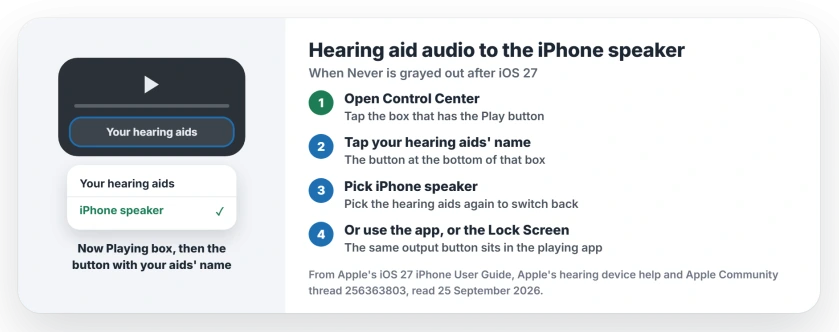
Status: iPhone with MFi hearing aids, iOS 27, checked 25 September 2026. Media routing can show Never grayed out. Switching the output in Control Center worked for one owner.
1. Switch the output from Control Center
The fix came from the hearing aid maker's own help pages, as the owner explained: "The support page for my hearing aids had the answer".
Their steps start simply. "I go to Control Center and tap the box that has the Play button". At the bottom of that box sits a button with your hearing aids' name. Tap it, and a smaller box opens where you can pick iPhone speaker.
Their verdict: "That's all there is to it". To send the sound back to your ears, open the same box and pick the hearing aids again.
2. Or switch inside the app that is playing
Apple's iOS 27 guide puts the same output button in three places: "in Control Center, on the Lock Screen, or in the Now Playing controls for the app you're listening to".
So in Music or Podcasts, tap the output button on the playing screen, and Apple's wording for the next step is "then choose a playback destination". Pick your iPhone.
Apple's hearing aid help agrees. To hear your hearing aids, "Choose your hearing device as the sound output device". The iPhone speaker sits in that same list.
3. Try the Lock Screen hearing control
Apple documents a second control made for hearing aids. In Settings, tap Accessibility, Hearing Devices, then MFi Hearing Devices, and turn on Control on Lock Screen.
From the Lock Screen, Apple says you can "Choose whether phone and media audio are routed to the hearing device". I have not seen an owner confirm this route on iOS 27, so treat it as the second thing to try, and that advice is ours.
4. Update the hearing aids' firmware
A Level 10 volunteer asked the right first question: "have you checked with your hearing provider for a software update to match iOS 27?"
Apple says the same. Make sure "your hearing device is updated with the latest firmware from the manufacturer", and the maker's app "can probably find and install firmware updates".
For this owner it changed nothing: "I tried just now, but no joy". Still, rule out old firmware.
5. Tell Apple about the grayed-out setting
The same volunteer pointed to Apple's feedback page and to Apple's Accessibility support team. If you use the switch daily, report it. A grayed-out option with no explanation is the kind of thing feedback exists for.
Other iPhone and hearing problems
If your hearing aids jump between your iPhone and iPad or Mac, the switching rules work much like AirPods switching between devices. Using AirPods Pro for hearing support instead? The hearing test page covers the setup.
Why is Never grayed out for hearing aids on iOS 27?
Apple has not said. One owner hit it right after updating to iOS 27 with MFi hearing aids, and a firmware check did not change it.
How do I switch audio from hearing aids to the iPhone speaker?
In Control Center, tap the Now Playing box. Tap the button with your hearing aids' name, then choose iPhone speaker.
Can I control hearing aid audio from the Lock Screen?
Yes. Turn on Control on Lock Screen in the MFi Hearing Devices settings, and Apple says you can then choose whether media audio goes to the hearing device.
Do I need to update my hearing aids for iOS 27?
Apple says to keep the firmware current from the manufacturer, often through the maker's app. It did not fix this for one owner, but it rules out one possible cause.
The Short Version
- Never can be grayed out for media audio on iOS 27.
- In Control Center, tap the Now Playing box.
- Tap your hearing aids' name, then pick iPhone speaker.
- The same button sits in the app that is playing.
- The Lock Screen hearing control is a second route.
- Keep the hearing aids' firmware up to date.
Where to Next
Practice the Control Center route once now, while music plays, so it is familiar when you need it.
If the Lock Screen control works for your hearing aids, name the make in the comments. I will add it here for the next reader.

Isaac Smith is the founder and editor of PC Glance, a website that covers computers, laptops, and technology. He is a tech enthusiast and a computer geek who loves to share his insights and help his readers make smart choices when buying tech gadgets or laptops. He is always curious and updated about the latest tech trends.