
Your iPhone offers iOS 26.7.1, and you would rather stay on iOS 26 than move to 27. That is worrying when Apple's notes for it mention an attack. I would install it this week, since it keeps you on iOS 26.
It arrived on 28 September with a single security fix, documented by Apple on its own security page. Older iPads that cannot run iPadOS 27 get the same update.
What iOS 26.7.1 fixes
The flaw sits in CoreGraphics, the part of iOS that draws images and documents. Apple says: "Processing a maliciously crafted file may lead to arbitrary code execution."
Apple says it may already have been used: "Apple is aware of a report that this issue may have been exploited in an extremely sophisticated attack against specific targeted individuals on versions of iOS before iOS 27."
The fix itself is plain, and Apple states that "An out-of-bounds write issue was addressed with improved bounds checking." The flaw is listed as CVE-2026-86950, and Apple credits Meta Product Security with reporting it.
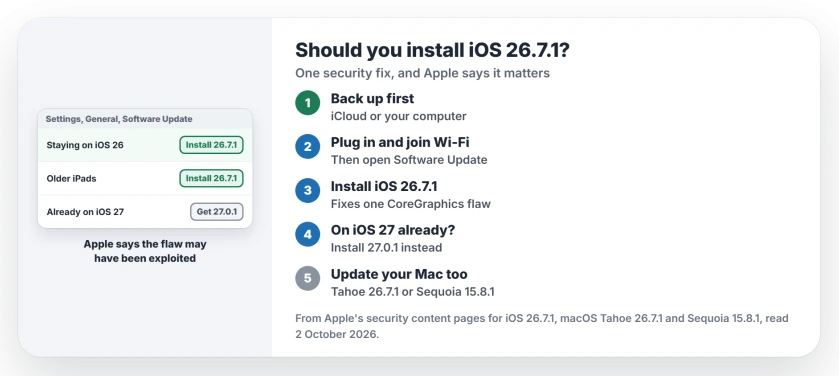
Status: checked 2 October 2026. iOS 26.7.1 and iPadOS 26.7.1 fix one CoreGraphics flaw that Apple says may have been exploited in targeted attacks. Install it if you are staying on iOS 26.
1. Install it if you are staying on iOS 26
Apple's own advice on updates is direct: "Keeping your software up to date is one of the most important things you can do to maintain your Apple product's security."
Back up first, then plug your iPhone into power and join Wi-Fi. Open Settings, tap General, then Software Update, and install iOS 26.7.1.
2. Check whether your iPad stops here
Apple offers iOS 26.7.1 to iPhone 11 and later. On iPads it reaches the iPad (8th generation), iPad Air (3rd generation), iPad mini (5th generation) and the first 11-inch and third 12.9-inch iPad Pro, plus every newer model.
That list is longer than the iPadOS 27 one. Apple's security releases page starts iPadOS 27 at the iPad (9th generation), iPad Air (4th generation) and iPad mini (6th generation).
So for the older models, 26.7.1 is the update to get.
3. Already on iOS 27? Install 27.0.1 instead
Apple released iOS 27.0.1 on the same day, and its entry reads: "This update has no published CVE entries."
The attack report also names only versions "before iOS 27". So if you already moved to iOS 27, keep it current with 27.0.1 and the updates after it.
4. Update your Mac too
The same CoreGraphics fix shipped for Macs on 28 September. Apple lists it for macOS Tahoe 26.7.1 and macOS Sequoia 15.8.1, with the same note about the attack.
5. Nothing else changes on your iPhone
Apple's notes for iOS 26.7.1 list this one fix and nothing else. You stay on iOS 26 with the same features, so the update is quick to decide.
If you are on iOS 27 and still weighing its first fix, the iOS 27.0.1 page lists what it changes. And for a Mac whose update will not appear, the Tahoe update page covers what to try first.
Is iOS 26.7.1 safe to install?
Apple lists one security fix in it, for a flaw it says may have been exploited. Back up, then install it from Settings, General, Software Update.
Do I need iOS 26.7.1 if I have iOS 27?
No. Apple's attack report names versions before iOS 27, and it lists no published CVE entries for iOS 27.0.1, so keep iOS 27 up to date instead.
What does iOS 26.7.1 fix?
One CoreGraphics flaw, CVE-2026-86950, where a crafted file could run code. Apple says it may have been used in targeted attacks.
The Short Version
- iOS 26.7.1 came out on 28 September.
- It fixes one CoreGraphics flaw.
- Apple says the flaw may have been exploited.
- Install it if you are staying on iOS 26.
- Older iPads get it instead of iPadOS 27.
- On iOS 27, install 27.0.1 instead.
- Macs get the fix in Tahoe 26.7.1 and Sequoia 15.8.1.
Where to Next
Open Settings, General, Software Update tonight, with the phone on power and Wi-Fi. If iOS 26.7.1 is waiting, install it.
If the update fails or does not appear on your iPhone, leave a comment with what Software Update shows, and I will add the cases to this page.

Isaac Smith is the founder and editor of PC Glance, a website that covers computers, laptops, and technology. He is a tech enthusiast and a computer geek who loves to share his insights and help his readers make smart choices when buying tech gadgets or laptops. He is always curious and updated about the latest tech trends.