
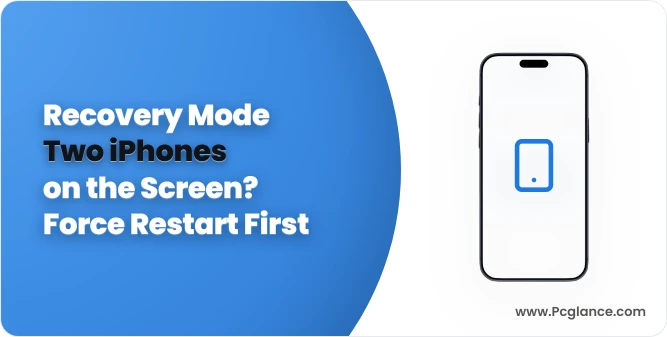
You restart your iPhone and it never reaches the Lock Screen, showing a picture of two iPhones pressed together instead. Holding the side button changes nothing, and the phone looks broken.
I would force restart it before anything else. The owner who asked about this on Ask Different did exactly that, and their new iPhone 17 started normally again.
The question has 1,326 views since June, and the owner's own answer is the accepted one.
What the two iPhones mean
Apple says on its nearby restore page that the picture belongs to a recovery mode: "If you see two devices moving together, you can use a second iPhone or iPad to restore yours". It can appear during a wireless update.
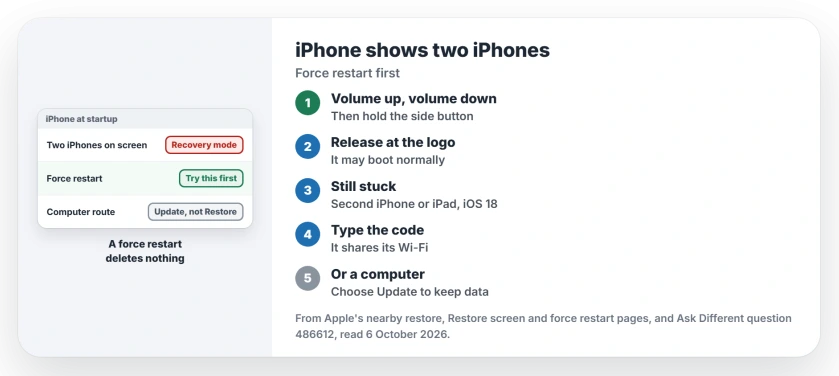
Status: checked 6 October 2026. An iPhone 17 restarted to a screen of two iPhones and stayed there. A force restart brought it back with nothing lost, as the owner confirmed.
So your iPhone thinks its software needs help. Often it does not. A force restart cleared it for this owner.
1. Force restart the iPhone
Tap volume up once and volume down once. Then push the side button in and keep it there, releasing it only once the Apple logo is on screen.
Confirmed by an owner: "The phone then booted to normal as if nothing happened". Before that, they had held the side button alone "for a long time", and it did nothing.
Ours: the three presses need to come quickly and in that order, and if the screen does not change, run the sequence once more.
2. Still stuck? Use another iPhone or iPad
Apple's nearby restore needs a second device, an iPhone on iOS 18 or an iPad on iPadOS 18, or later. It must be unlocked and on Wi-Fi. Plug your stuck iPhone into power and set it next to the other one.
Tap Continue on the stuck phone and wait for the two to connect. Apple's next step: "Note the six-digit code on the recovery-mode device". You type that code on the other device, which then shares its Wi-Fi.
Apple adds that hotel-style networks with a sign-in page do not work for this. Use your home Wi-Fi.
3. Or use a computer, and choose Update
Apple's page for a stuck restore screen gives the order: "If the Restore screen still appears after you restart, you need to reinstall iOS or iPadOS". Connect your iPhone to a Mac or PC.
When the computer offers a choice, Apple is clear: "Click Update (not Restore) to reinstall iOS or iPadOS and keep your personal data". Ours: Restore is the one that wipes the phone, so keep it for last.
Which iPhones show this screen
Apple lists the iPhone 15 Pro models and every iPhone since, including the iPhone 16e, iPhone Air and the iPhone 17 models. Several recent iPads show it too.
If your screen stays black instead, you have a different fault. An iPhone that will not turn on starts with an hour on the charger.
Will I lose my photos?
Not from a force restart, which only restarts the phone; that part is ours, and it is why the restart comes first.
Apple's nearby restore page does not say whether your data stays, so if your last backup is old, I would try the computer route and choose Update before anything else.
Why did it happen?
The owner had "no idea why/how the original problem came about". Apple ties the screen to wireless software updates, so an interrupted update is one candidate.
If an update froze partway, an iPhone stuck on Verifying Update covers that side of it.
The Short Version
- Two iPhones on the screen is Apple's nearby restore mode.
- A force restart brought one iPhone 17 straight back.
- Press volume up, then volume down, then hold the side button.
- Still stuck: use the nearby restore with a second unlocked device on iOS 18 or later.
- Or connect a computer and choose Update, not Restore.
- A force restart deletes nothing.
Where to Next
Force restart now, and count to ten with that side button pressed in. If the two iPhones come back, find a second iPhone or iPad and a charger.
Did the force restart work on your model? Say which iPhone in the comments.

Isaac Smith is the founder and editor of PC Glance, a website that covers computers, laptops, and technology. He is a tech enthusiast and a computer geek who loves to share his insights and help his readers make smart choices when buying tech gadgets or laptops. He is always curious and updated about the latest tech trends.